Rule 31: Line charts shouldn't have too many lines

In this blog series, we look at 99 common data viz rules and why it’s usually OK to break them.

by Adam Frost

It’s pretty clear that line charts with too many lines don’t help anyone. In the two charts below, you can barely make out the main story - the extraordinary drop in fertility rates almost everywhere since 1960.
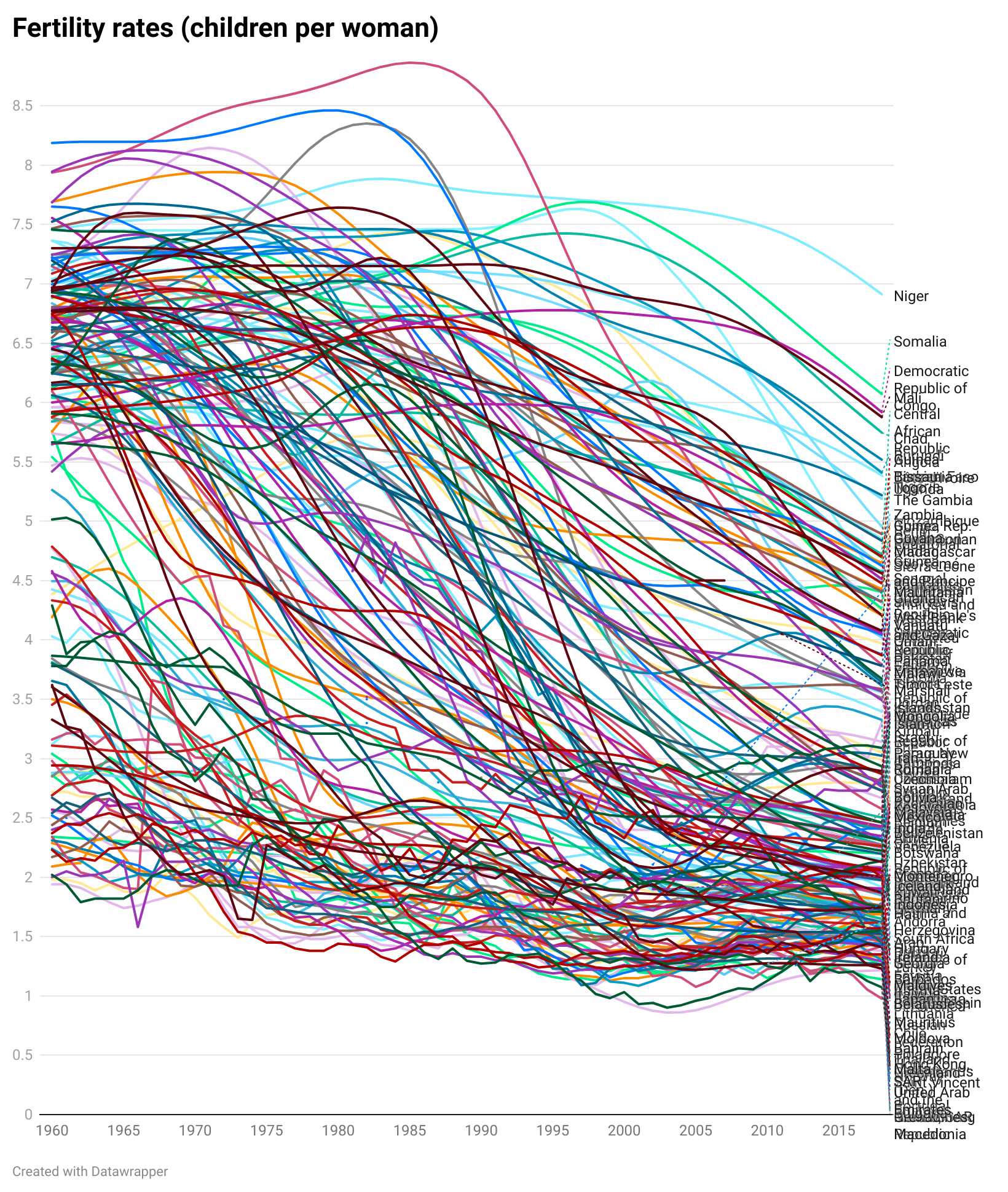
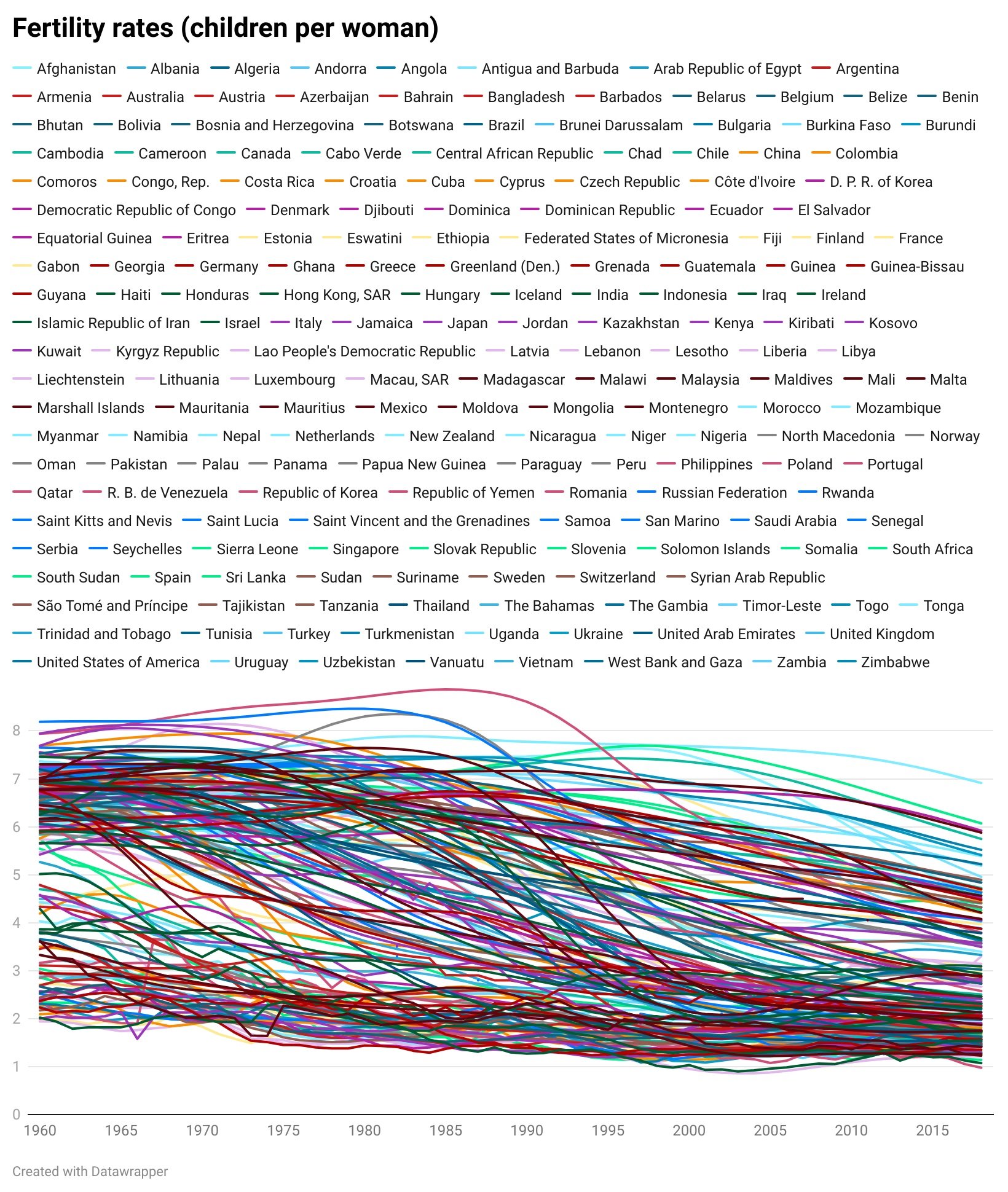
The trends have become tangled, the colours have become sludge, and the key has either become unreadable (the first chart above), an essay that fills the screen (the second) or you have to truncate it (which is pointless - so not bothering to show this).

But how many lines is a manageable number? Infogram say ‘no more than five lines’, Chartio also say ‘five or fewer’, Storytelling with Data stipulate ‘four or five’, Venngage recommend ‘two or three’ lines’. 

And that’s pretty good advice in most cases. In rule 17, we discussed cognitive load theory and saw how human beings shut down when confronted with too much information. Four or five lines are simpler for us to process, just as a four-digit PIN is fairly easy to remember, but an 11-digit phone number is a nightmare. Having five close friends is ideal for most of us, having fifteen becomes unmanageable. 

In the examples below, four lines give us a clear chart with an obvious meaning. 
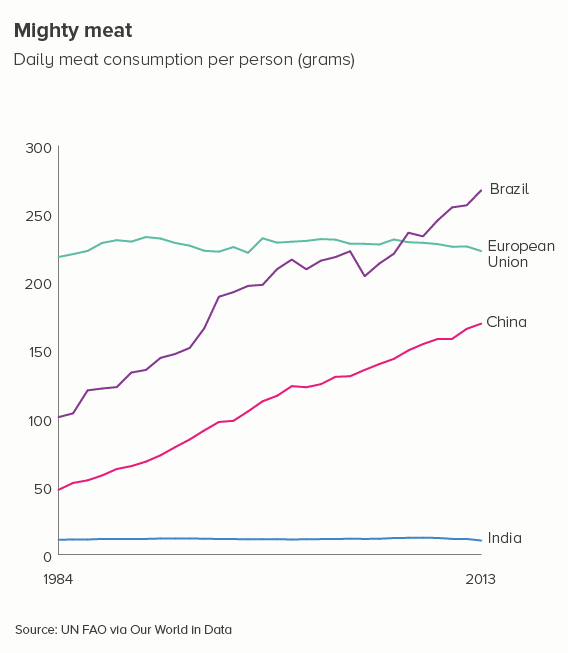
However, there are many cases when reducing our number of lines to four is dull or deceptive. Let’s return to the fertility rate chart we started with. Imagine having to reduce that to four lines - which countries do we choose?

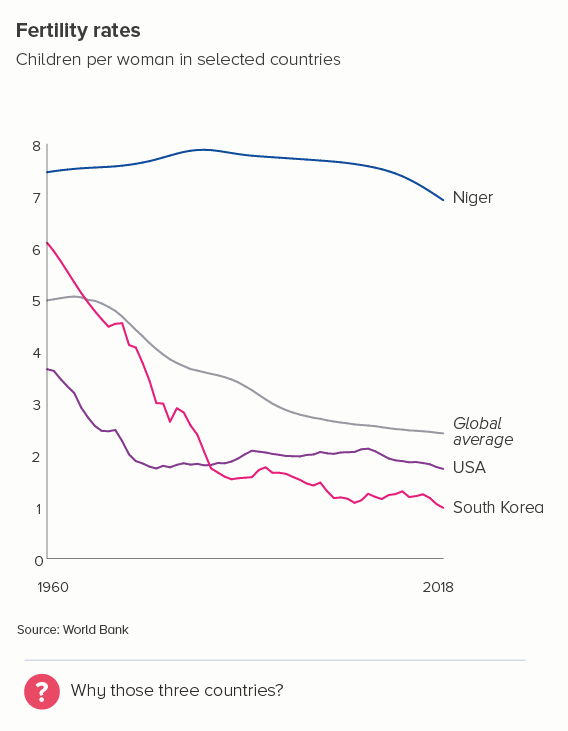
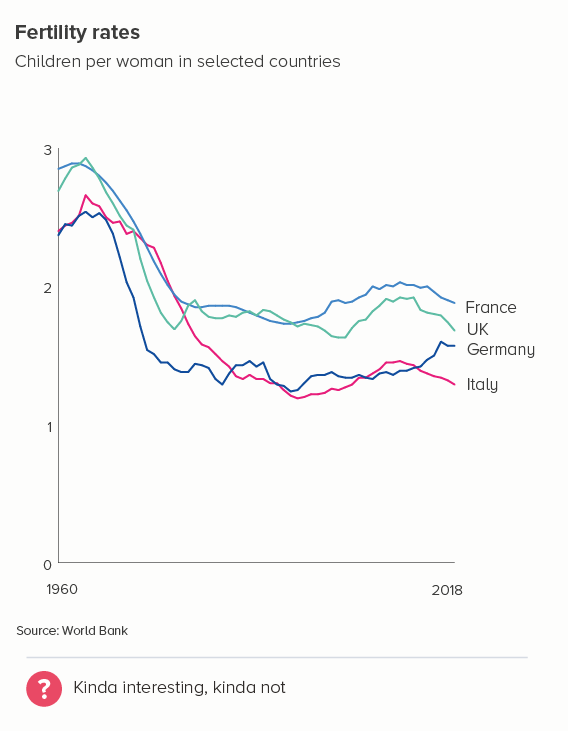
Even if we have a system of sorts - maybe we show the top, bottom, average, and US lines and omit others (the first chart below) - it still doesn’t allow us to see the global story. South Korea’s line is kind of interesting, but if we wanted to make the story about fertility rates in South Korea, would we pick these comparator countries? In the second chart, I’ve picked the UK and three of its closest neighbours - France, Germany and Italy. But, again, the result is - meh.
So what do we do in these cases?

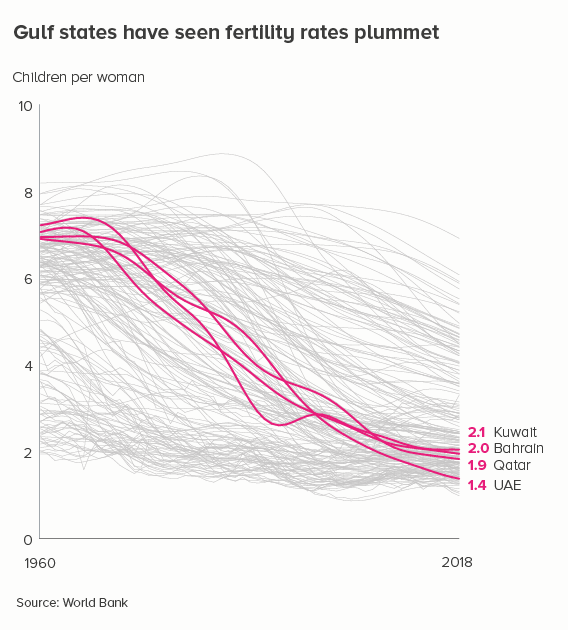
i) knock back lines

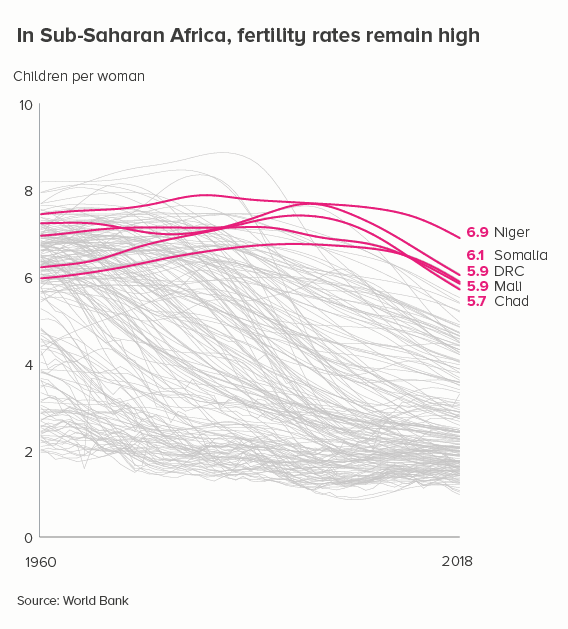
Grey out most of the lines - so we still get a sense of ‘everyone’ - and then emphasise the lines that are the most interesting or relevant for your audience.
ii) small multiples

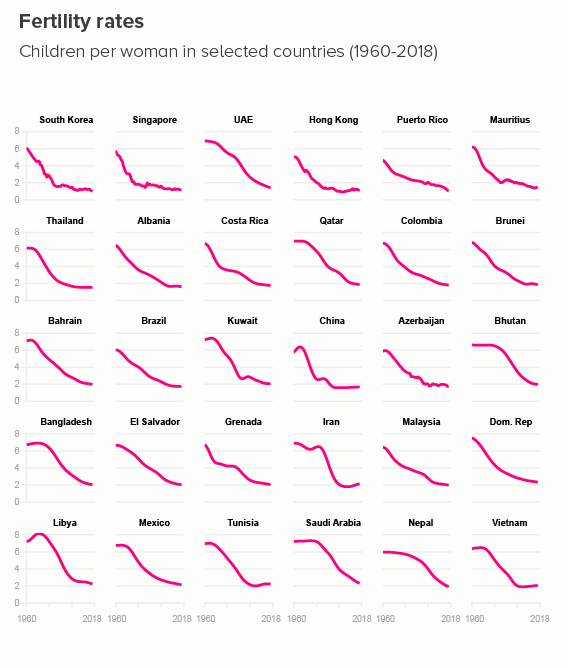
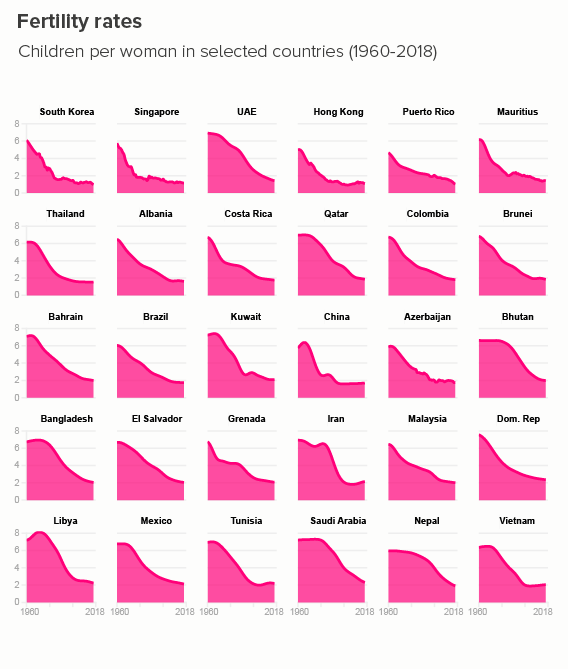
Rather than filling one chart with many lines, you can fill many charts with one line. If your y-axis starts at zero, these line charts can become area charts, which I slightly prefer, just because it gives you an excuse to use bold slabs of colour. (Small multiples are a bit fiddly to make in PowerPoint or Illustrator, but a cinch in Flourish, or - if you’re a coder - R/ggplot).
iii) group

It’s sometimes possible to group your lines into overarching categories, and then create a more manageable line chart for each. It’s still a good idea to emphasise only two or three lines on each chart, though.

iv) different charts

Because line charts are fantastic at showing trends over time, it’s easy to get tunnel vision and forget that there are a number of other chart types that also excel at showing change. When you have too many lines for a line chart, these chart types can sometimes ride to the rescue. 

Slope charts

Because they only use two time periods - a start and end point - slope charts can usually take more lines than a line chart without sacrificing legibility.
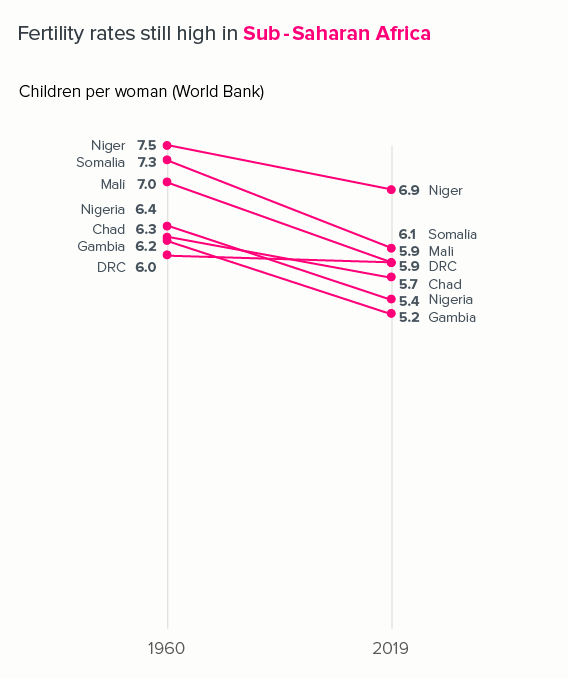
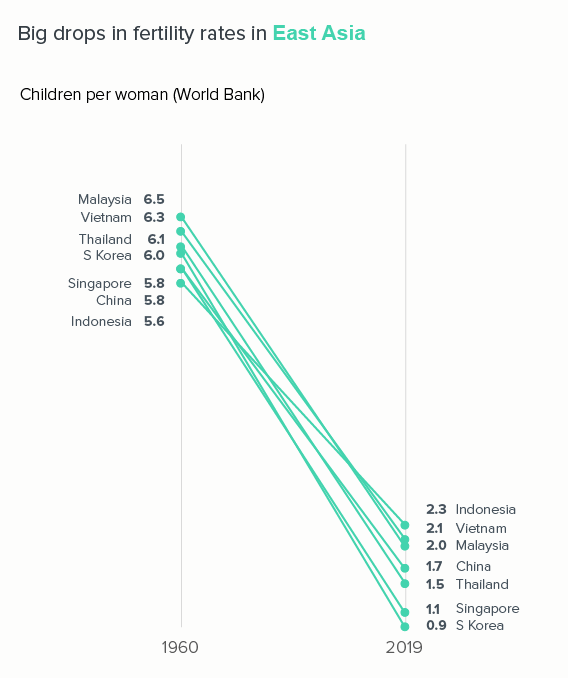
If we used a standard line chart, plotting every year between 1960 and 2019, those lines would overlap and become unintelligible.

Proportionately-sized shapes

This approach works also best if - as with slope charts - you choose just two points in time - a start and end date - and remove the rest. The shapes could be side by side, nested, or two halves of the same shape.

I also like side-by-side polar areas, as they give a top-level ‘footprint’ of the data, but they also allow you to compare specific values.

We’ll talk more about half-circle charts and polar areas - and how to make them - in a later rule.

Join the dots

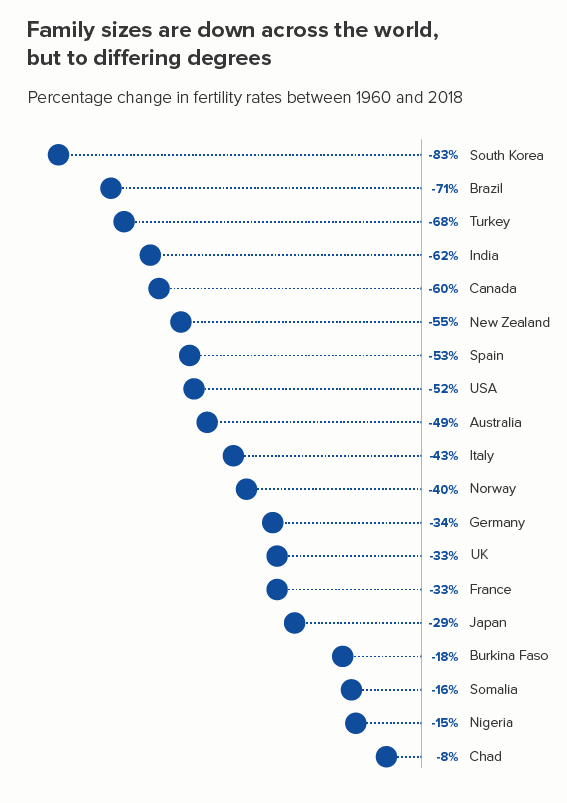
Once again, this involves just taking two points in time. You can then visualise the percentage difference between them - with arrows, or triangles, or (my favourite) a dot with a trail (the first chart below).

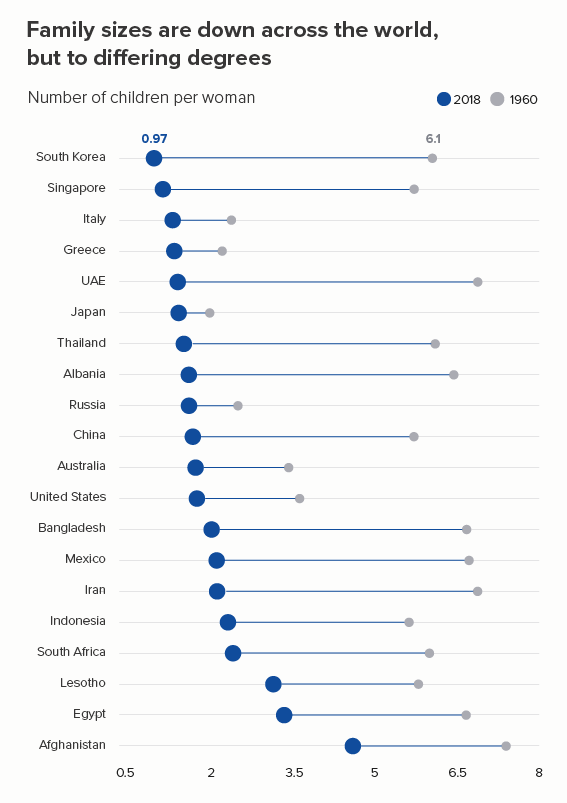
Dumbbells (or ‘connected dot plots’) work if you want to focus on the change between two points in time, without losing the fact that each category has a different starting value (the second chart below). I’m not sure they work as well with drops as with rises - because our urge to read time left to right is so strong, but they’re still a good chart to have in your tool kit.

With both these chart types, you can include more countries than in a standard line chart and still retain legibility.
Maps

If you have geographical data, then consider using a series of maps - placed side by side. I’ve used heatmaps here, but bubble maps can also be effective. This gives you all 200 countries, but of course extracting specific datapoints is impossible (unless it’s interactive).

Heat tables

Sometimes you can keep your data in a table, but use conditional formatting to create a heatmap. These work particularly well in an interactive format, as you can roll over each cell to extract the specific value, but even as a static graphic, they can make the trends more obvious than, say, a 15-line line chart.

The barcode strips for established economies like the US and Germany look radically different from those for emerging economies like India, Iran and Saudi Arabia. 

Matrix plots

Instead of colouring each table cell, you can fill each cell with a shape that is proportionate to the underlying datapoint. I’ve used squares here, but bubbles can work too. Raw has a good (free) matrix plot maker.

A table of charts

A table might not seem an obvious choice for telling a change over time story. But by using a combination of text, bars and small line charts (sometimes called sparklines - after Edward Tufte), a table can often bear as much information as a line chart, but in a clearer and more readable format. These kinds of tables are relatively easy to create in Excel, but will look smarter if you use a (free, easy) chart-making tool like Datawrapper.

Conclusion

So this is another rule with so many exceptions that it can’t really be called a rule. In rule 3, we saw that pie charts shouldn’t have more than four wedges, except when they should, and in rule 17, we discovered that bar charts shouldn’t have more than 12 bars, except when they should, and it’s the same with line charts. They should ideally have no more than five lines, except when they should - you want to show change across 27 EU countries, or 50 US states, or the 238 flavours of ice cream available at La Casa Gelato in Vancouver (Roasted Garlic! Pear Gorgonzola!).

In these situations, consider the strategies above. Knock lines back, separate lines out, group lines together, or colour outside the lines - by choosing a different chart altogether. 

VERDICT: Follow this rule some of the time.

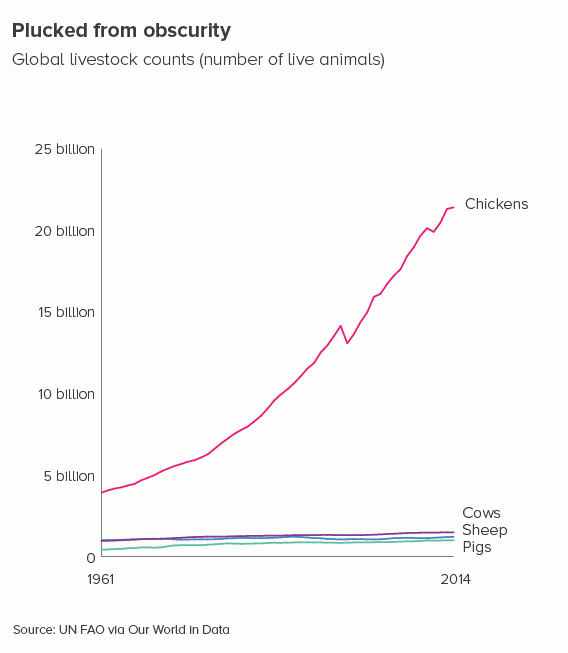
Sources: Fertility rate data from the World Bank, Meat consumption and livestock data from the FAO via Our World in Data

 More data viz advice and best practice examples in our book- Communicating with Data Visualisation: A Practical Guide
Rule 30: A line chart should only show change over time

In this blog series, we look at 99 common data viz rules and why it’s usually OK to break them. Here are all the rules so far.

by Adam Frost

If you want to show how something has changed (or stayed the same), then a line chart is usually where you start. And often it’s where you end too, because nothing conveys the passing of time more effectively than a line moving left to right across a page.

Metaphorically speaking

Why should this be? After all, aren’t lines usually used to indicate distance and direction? Think of the line representing the journey to a destination on a sat nav, or even the motion lines behind a character running away in a comic strip. Don’t we instinctively see a line on a page as representing movement through space not through time?

Certainly lines are used in this way in charting. Maps most obviously - perhaps I am showing trade routes or flight paths or the migration pattern of the Arctic tern.

Map showing the migration pattern of the Arctic tern

Image credit: Flight paths by Michael Markieta/ Arup; Arctic tern from ‘Communication with Data Visualisation’ (Sage, 2021)

Or perhaps, like Nathan Yau in this excellent piece about food deserts, I want to show how far people live from fresh food outlets. 

And those distance lines are not just placed on maps. Sometimes they are extracted from a geographical backdrop and treated as a more conventional chart, so we can more easily compare their lengths.

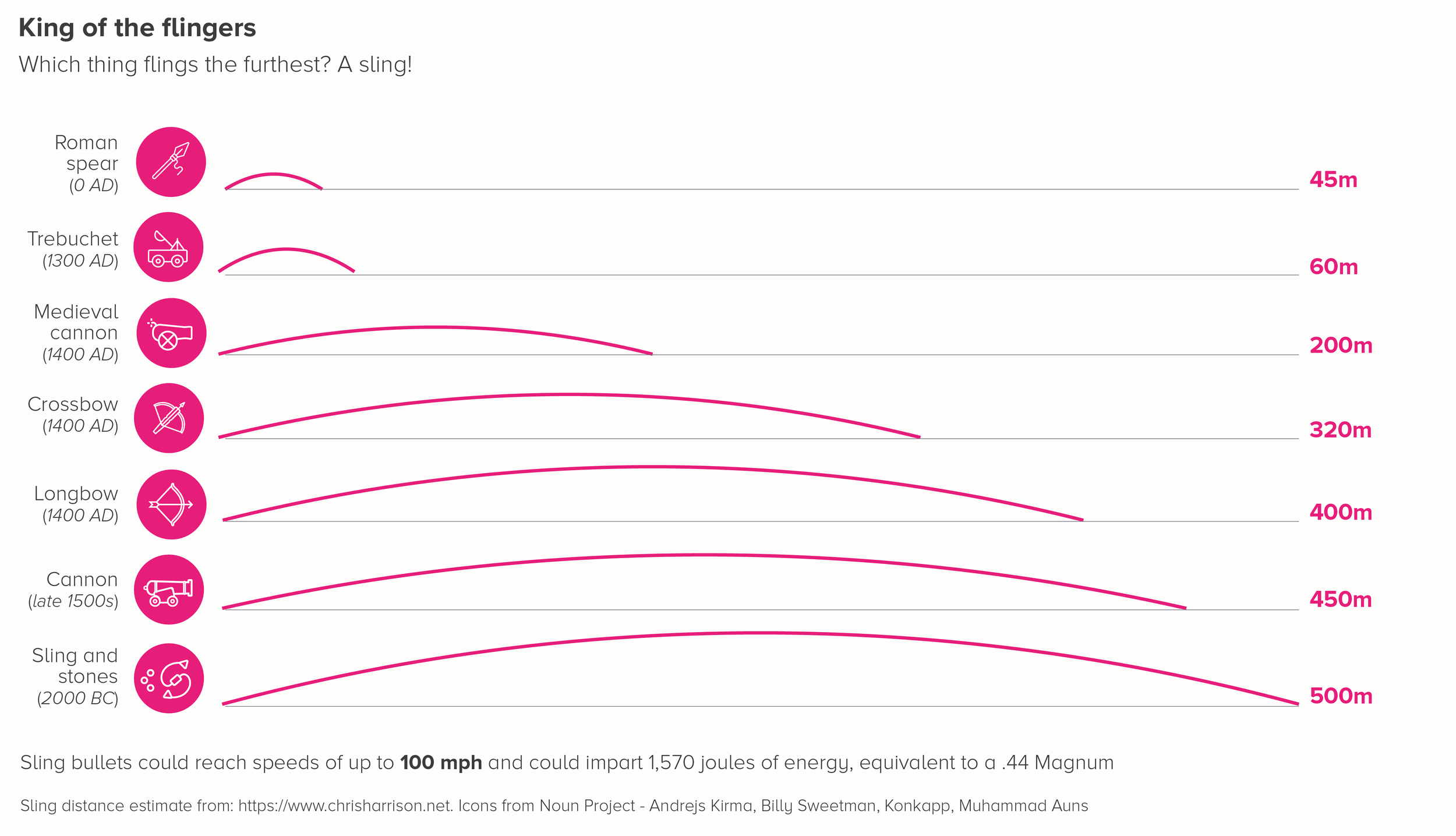
Furthermore, these distance lines don’t have to stay straight. We can get creative, and make those lines parabolas. Perhaps we are talking about things flying through the air.

Or perhaps we're not talking about things literally flying through the air, but we want to draw on that metaphor of ejection, as in this piece by Shirley Wu and Nadieh Bremer which visualises the expulsion of homeless people from US cities.

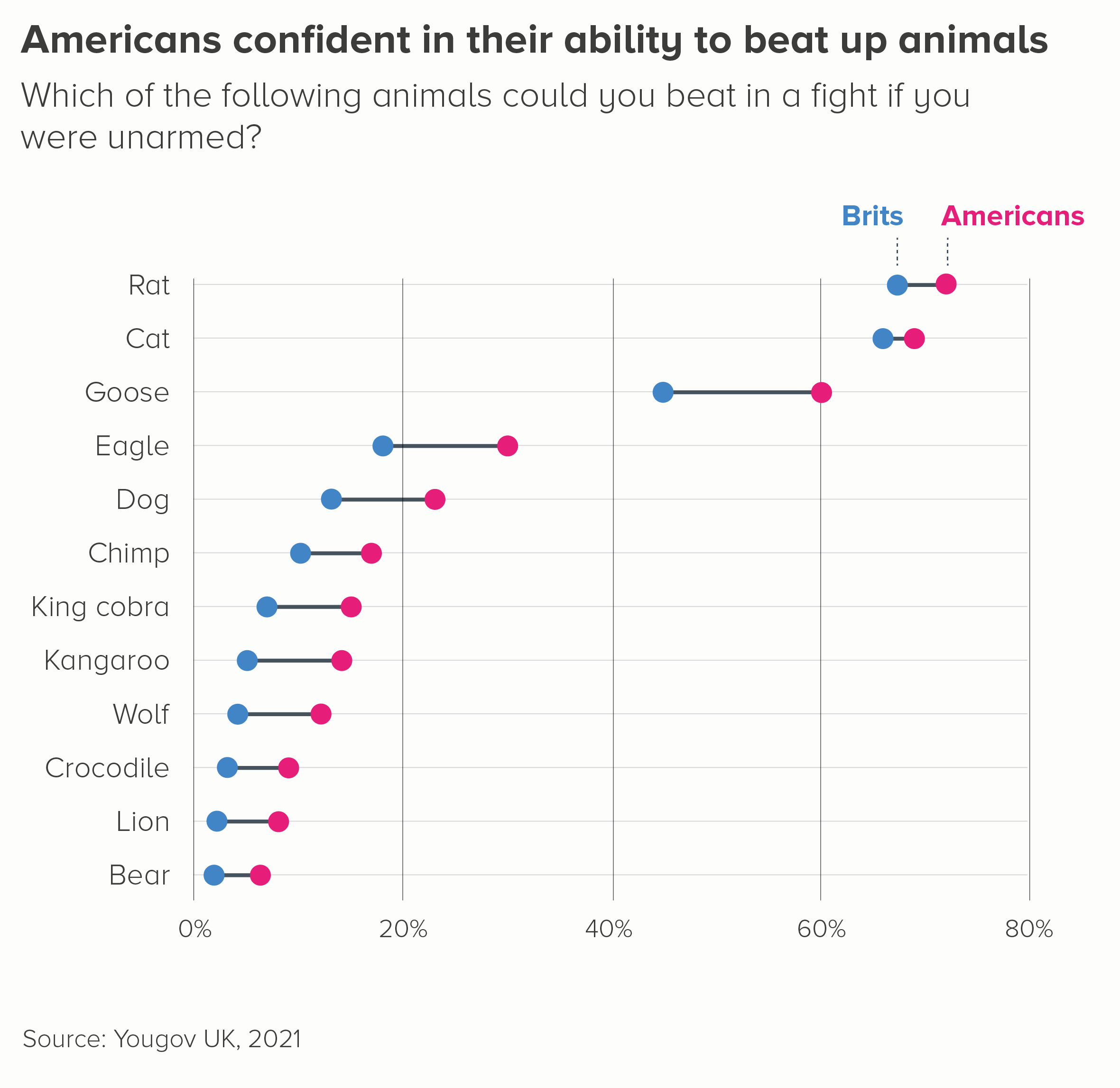
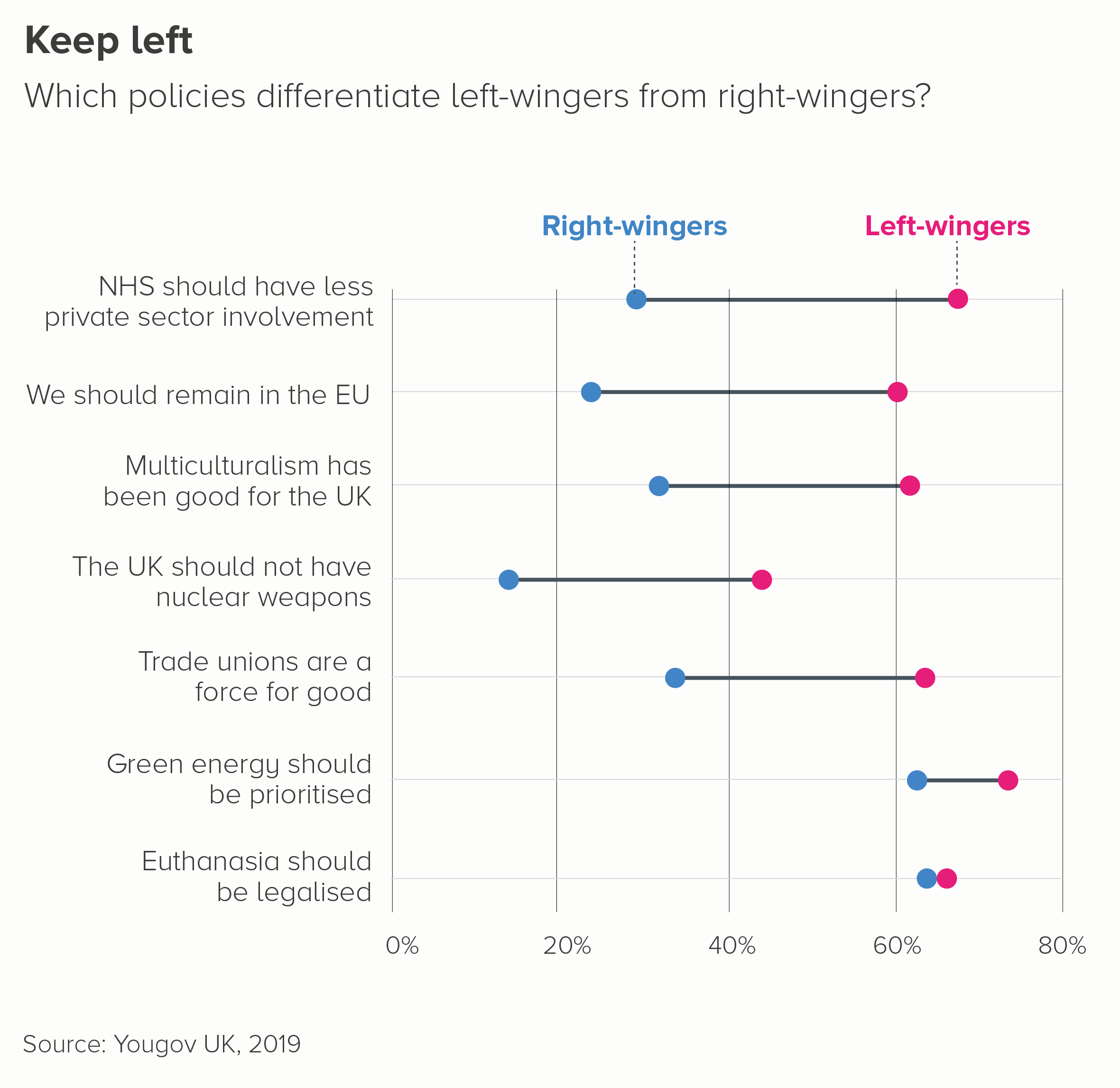
Sometimes we are not talking about physical distance, but a distance between two attitudes or viewpoints. Again, lines work to signal proximity - or a lack of it.

Occasionally this taps into a broader positional metaphor - for example the New York Times often place lines and arrows on maps to show the degree by which voting patterns have shifted left (Democrat) or right (Republican). 

The space-time continuum

So lines are clearly effective at showing the change in something's physical (or psychological) position. So why are they so good at showing change over time too?

Probably because, as Lakoff and Johnson argue in their seminal book Metaphors We Live By, we have to convert things into metaphors in order to understand them. And in the case of time, the most baffling concept of all, the only metaphor that really helps us to grasp it is the idea of time as a physical journey.

Think about the language we use to describe it. If I ask you how long your journey was, you are more likely to say five hours than fifty miles. Time seems to have length, physical extent, like a rope or a racetrack. When I tell my children that Christmas is in two weeks' time, they might say: 'That's too far away' - like it's a physical object in the middle distance. Forwards, ahead, next becomes onwards in time too, and backwards becomes the past.

It's no surprise, then, that our visual metaphors mirror these verbal metaphors. The line that tracks distance can be used to track time too.

The metaphors merge in other ways as well. The charts where I tracked distance above went left to right. If you imagine a race on the TV, the athletes will usually be filmed starting left and ending right. Why? Sometimes this is seen as a consequence of western handwriting being left-to-right but it seems to exist in right-to-left cultures too - think of Super Mario always going left to right across the screen. When we flatten 3D journeys into 2D, forwards tends to be right and backwards left.

We borrow this convention for time too - the future is always right, think of Play buttons or Fast Forward buttons. Or the Next/Forward arrow on your browser. (Those of you old enough to remember music and video cassettes will know that the tape always started on the left-hand reel before being passed across to the right). And what about the pulse on a heart monitor? How can a heart rate have a direction? But it does. Left to right. All of this means that we cannot help but see a line moving left to right across the screen as a metaphor for time as well as distance.

In fact, I'd argue that if anything we see time first. A journey after all has plenty of stops and detours; that line can wiggle and U-turn. Time, on the other hand, is always moving - and always moving in one direction. You cannot stop it. It can be spent and wasted and saved, but it is always fluid. Even when we talk about possessing it ('How much time do we have?'), it is with a sense that it is slipping through our fingers ('Ten seconds, no - nine, no - eight!'). A line moving left to right then is the perfect metaphor for time, as it evokes continual, unstoppable, irreversible motion.

Don't mess with the timeline

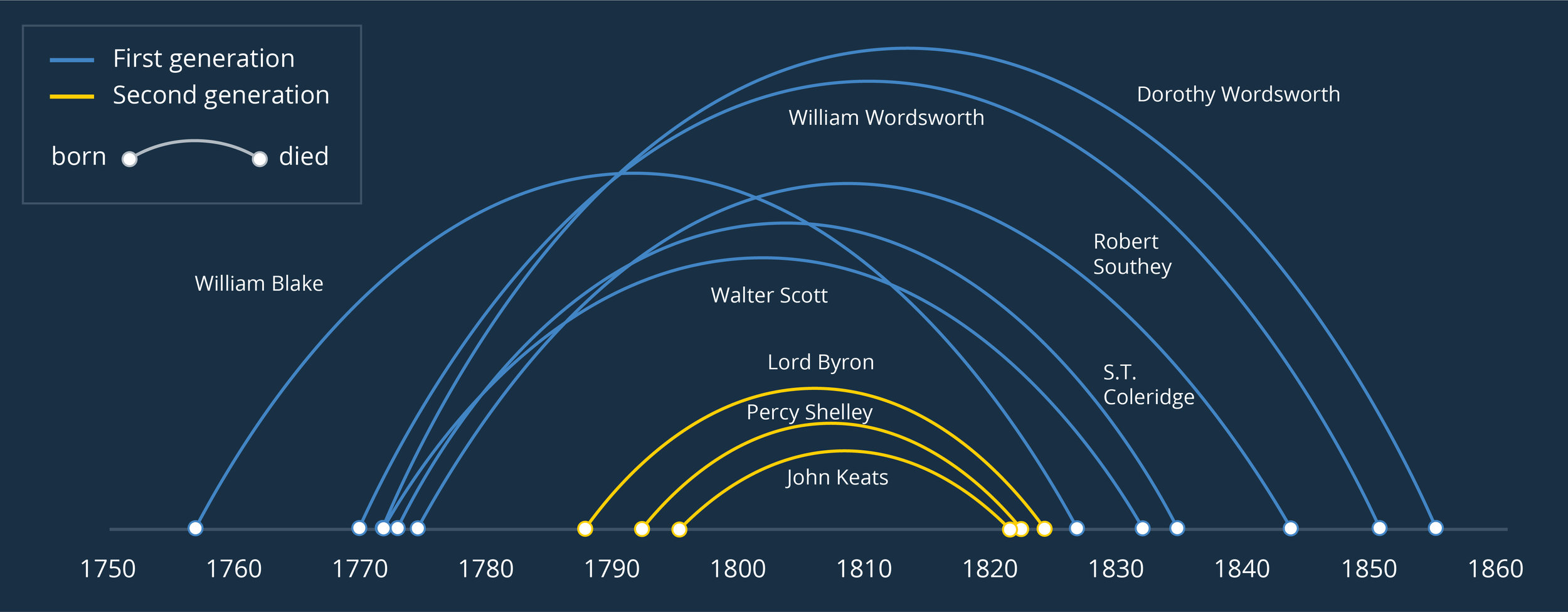
When it comes to charts, we can see the time = line metaphor most clearly in (surprise, surprise) timelines. They are such a universal feature in newspapers, museums, school textbooks and everywhere else because they are so clear, so useful, and so impossible to misunderstand. The examples below show the lives of selected Romantic poets.

Two timelines showing the lives of selected Romantic poets

These timelines lean into all the metaphors we discussed above:

  • The lines are straight and unbroken

  • Dots/markers are distinct events

  • The length between markers corresponds to the amount of time that has passed between events

  • The line moves left to right. Sometimes in mobile portrait, this is rotated and the timeline runs top to bottom. But it can never go 'backwards' - right to left or bottom to top.

Having said this, it is still possible to create more innovative timelines. As with our distance charts above, where we had arcs and arrows representing journeys, timelines can also be refracted into parabolas and spirals. However the way the line is read - left-to-right along the line, space between dots representing duration or time elapsed - remains the same. It's the only way the visual metaphor can work.

Parabola chart showing the lives of selected Romantic poets

Another dimension

When we create line charts, we add a second dimension to our timeline - this is (usually) a y-axis which (usually) represents a quantity of something.

This combines our initial metaphor - the timeline running left-to-right - with another - the orientation of a line representing something getting bigger or smaller. Up means better, greater, rising; down means worse, less, decreasing. As Lakoff and Johnson argue, this association of higher/lower with better/worse is an obvious result of our relationship with gravity - up is physically harder for us to achieve and things soaring into the sky always cause our pulses to race. 

This is why, as I said at the start of this article, often when you experiment with a change-over-time story, you will find yourself searching in vain for a better visual metaphor than a line chart. It takes all the instinctive ways we structure time and space and quantity and value and merges them all into a single lucid shape.

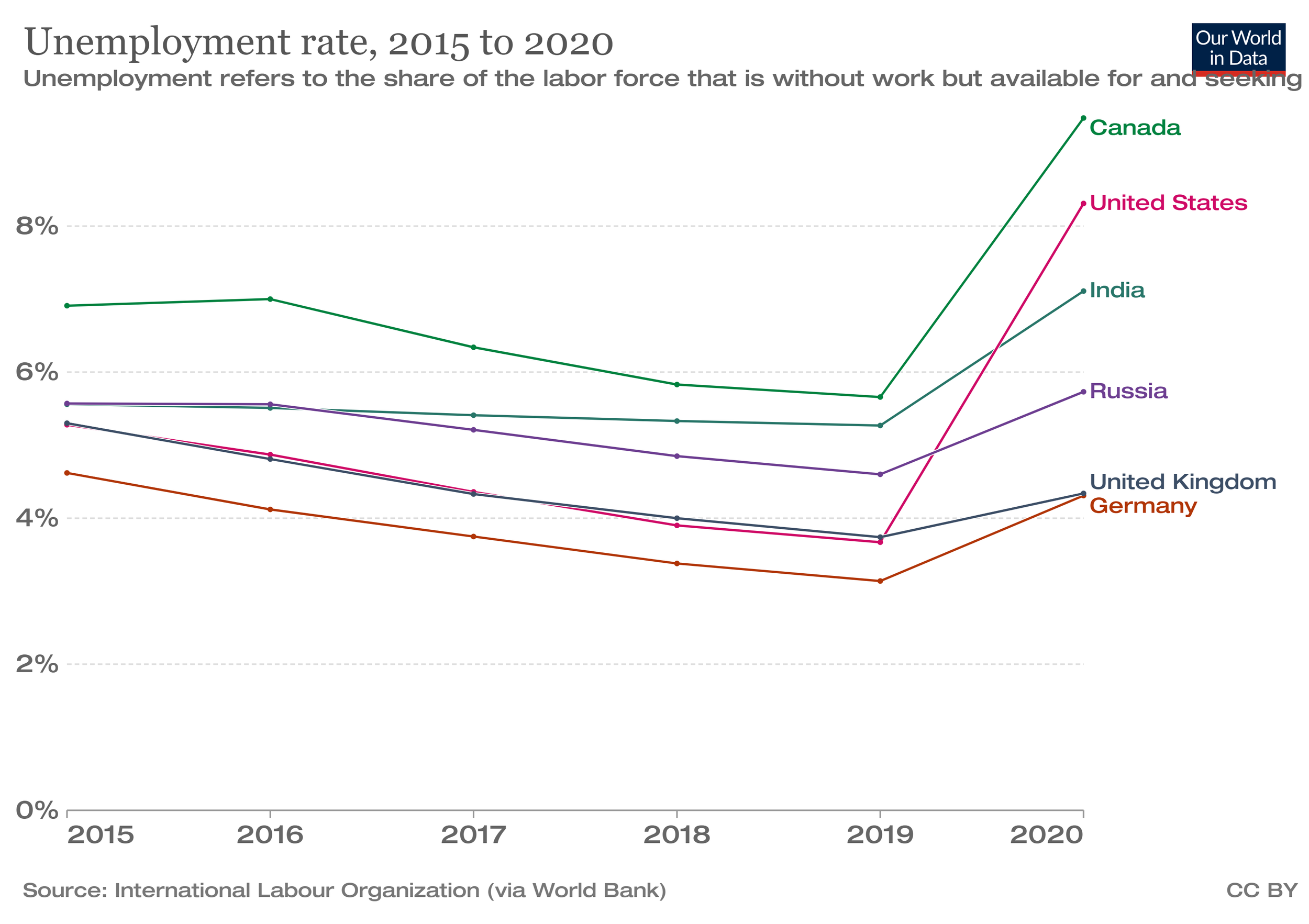
Even when the thing rising is bad - and therefore not ‘better’ at all - the up/down metaphor is still effective, because then the line chart taps into our association of ‘higher up’ with power, importance and even threat. The rising line that represents rising unemployment, inflation, Covid cases or something else bad now means ‘worse’ in the same way that a big tidal wave or explosion or monster is worse than a small one. 

A line chart showing unemployment ticking up as a result of Covid

When we need to foreground changing rank rather than value, a type of line chart called a bump chart works well for the same reason - change over time is tracked by a line moving left to right, change in importance is represented by a dot moving up or down. I’ll talk about these charts in more detail in a later blogpost. For now, I’ll just say that they are at their most effective in an interactive format, and if you are using them in a static format, I’d highlight the most relevant line(s) and knock back the rest.

In this example, made using Flourish, I’m looking at the most popular dog breeds in the US and highlighting how French bulldogs have (quite rightly) overtaken the English variety.

The perfect symbol

So line charts are one of the most popular charts in the world for good reason. They tap into our most fundamental thought processes.

However, there is an important catch. A line chart’s extraordinary strength is also its weakness. Just as a pie chart only works as a metaphor for a whole being sliced into parts, and a scatter chart only works to show the correlation between two variables, so a line chart is only effective when you are showing change-over-time - at least when you are talking to a general audience. Most people can’t not see those lines as timelines, they can’t not see each line’s rise and fall as representing a change in rank or quantity.

It means that if you want to use line charts to tell a different story, you can end up losing your audience. Yes, you can put lines on a map and tell a distance story. You can put lines on a diagram or flow chart to tell a connections story. But when it comes to drawing a line on a standard chart with an x and y axis, people will usually assume you’re talking about change over time even if you aren’t. 

So I’d like to finish this article by outlining what happens what line charts are (mis)used in this way and by suggesting some alternative approaches.    

i) Comparing categories

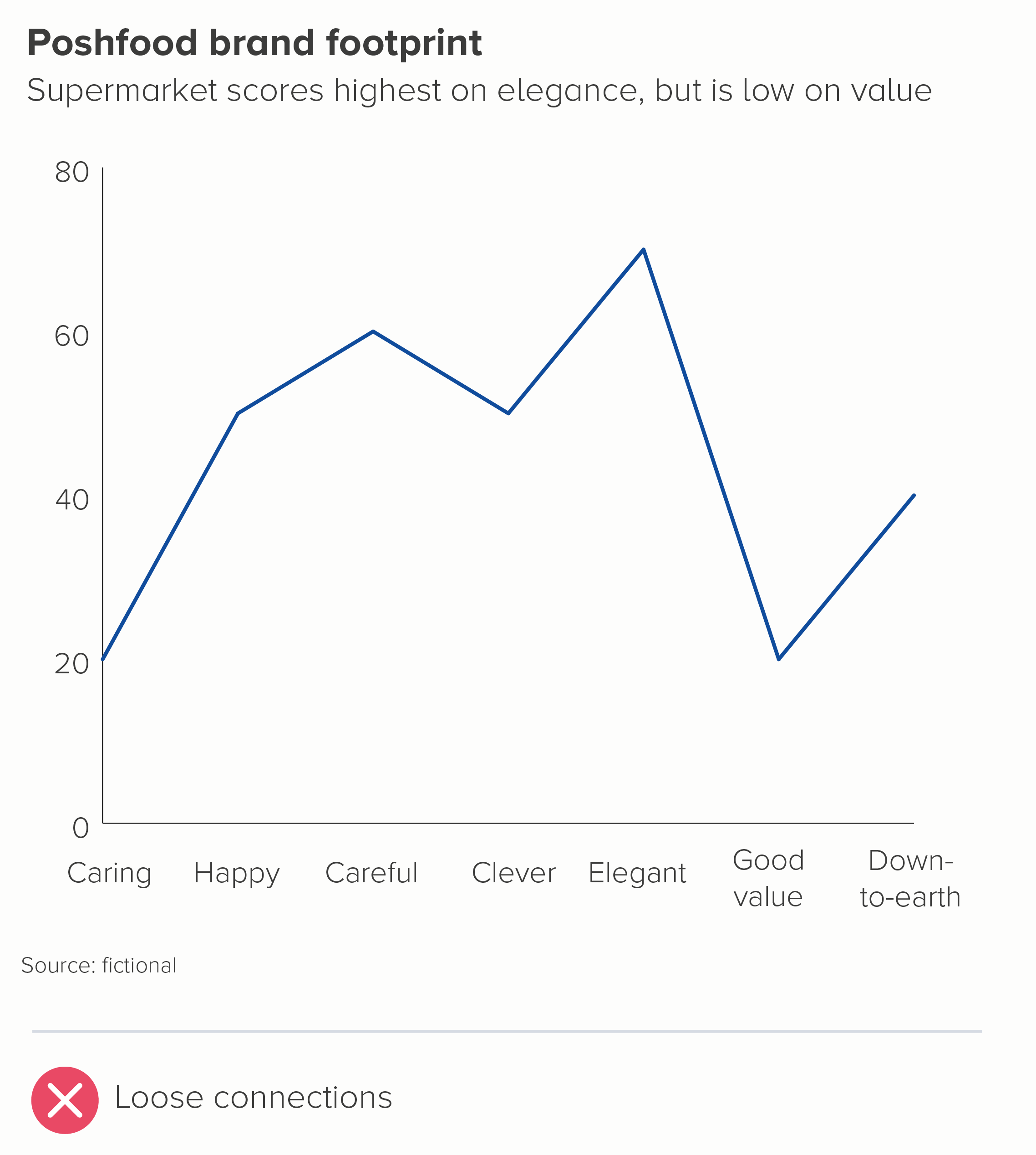
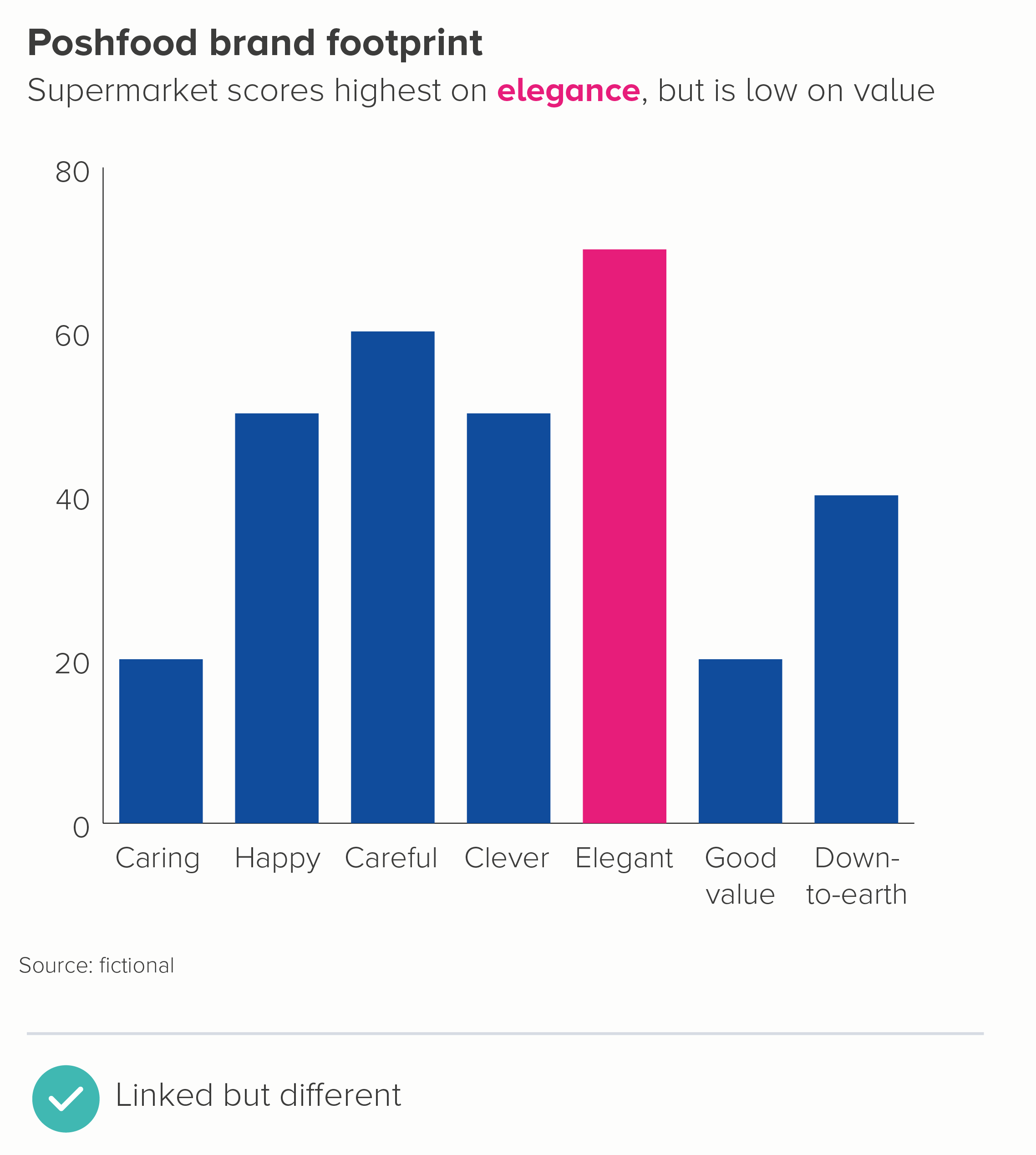
Line charts sometimes get used in corporate presentations to link categories together, often in the name of giving a ‘product footprint’ or something similar. But I’d argue that this is deceptive, suggesting that one category is somehow flowing into the next, when it isn’t. A chart type designed to compare distinct entities - like a bar chart, a bubble chart or a polar area chart - is in my view a better fit for these kinds of stories.

ii) Comparing ages

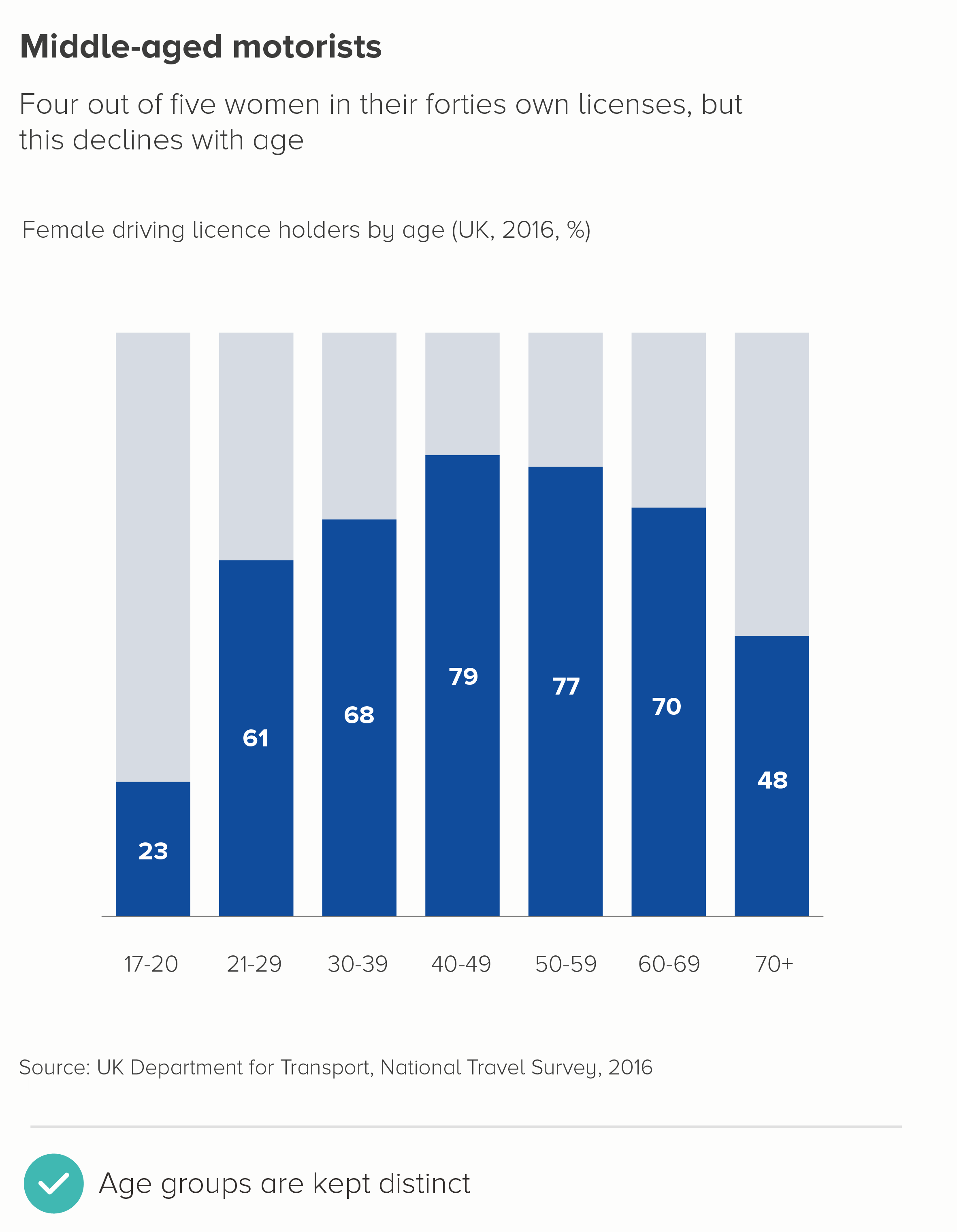
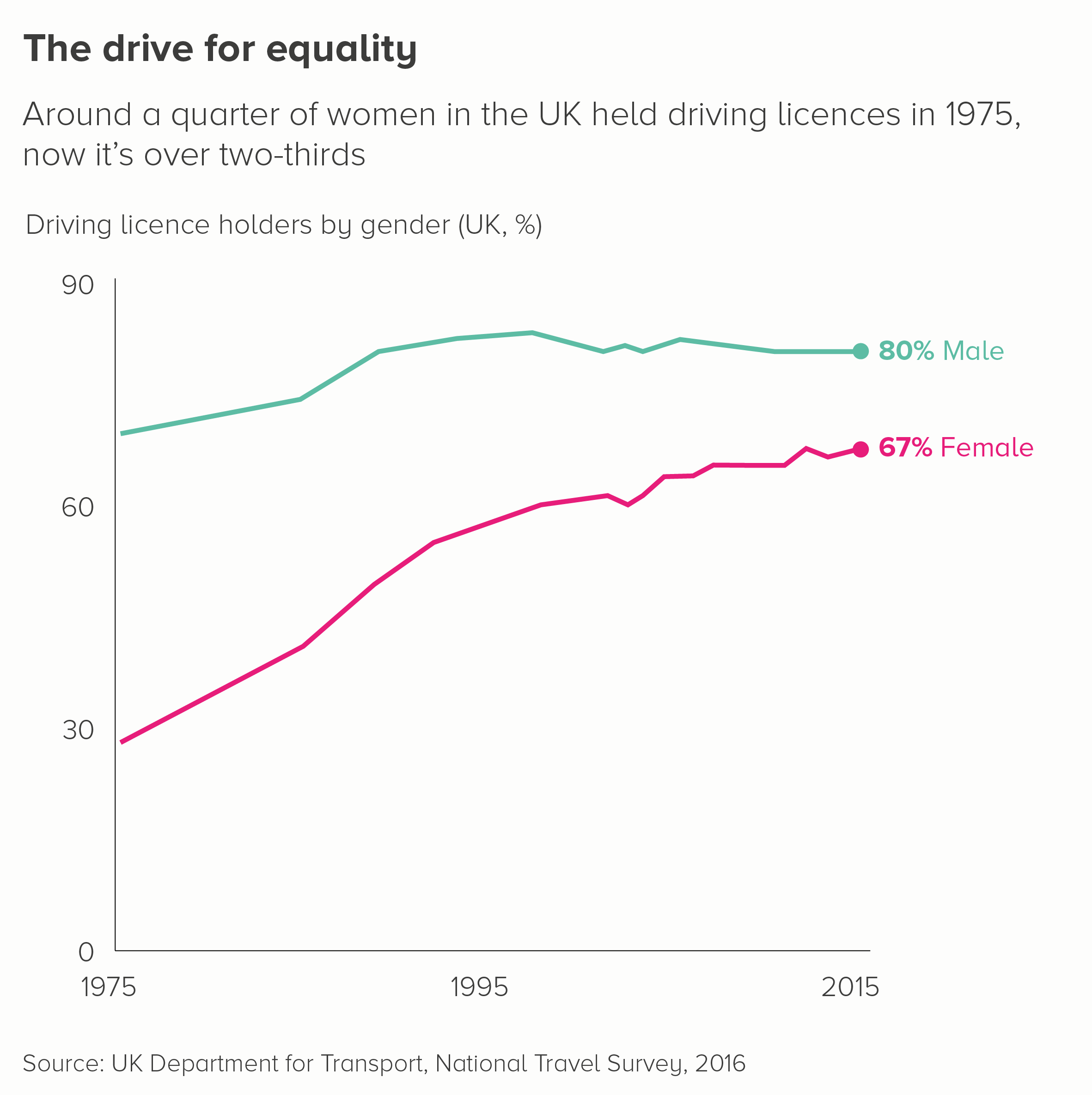
I can see why this is tempting. Age is a bit like time, right? The first chart below adapts a chart from a recent UK government travel survey on the gender of driving licence holders. I’ve also included one on pizza topping preferences - using Yougov data - and how this changes with age.

I think the line here is meant to suggest the arc of a life and how as you get older, you are less likely to a) hold a driving licence or b) like chicken on a pizza. But for me, this is confusing. We are not tracking people as they age, but different age groups right now, and it is perfectly possible (indeed likely) that the 72% of young people who like chicken on a pizza now will, in fifty years, become 72% of old people who also like it. Again, these are comparison stories - not change-over-time stories - and your chart should ideally emphasise that these are distinct age groups with distinct behaviours at a single point in time.

iii) Correlation

When creating a scatter chart to test whether two variables correlate, analysts often draw ‘a line of best fit’ through the middle of the datapoints to express the relationship between them. Often the original datapoints are removed and only the line is left, to make it easier for their audience to see the type and degree of correlation and to make predictions: if x changes by this amount, y will change by that amount.

In the examples above, adapted from a recent scientific study on the link between eating fruit and vegetables and the risk of contracting disease, the straight line represents negative correlation. The more fruit and vegetables you eat, the less chance you have of getting sick.  

Now, here’s the thing. When we’ve shown these kinds of regression analyses to general audiences, and even some corporate audiences, they can miss the message. I believe it’s because they’re wired to see a line chart as representing change over time, and they just don’t grasp (without explanation) that this is a story of interdependence. Maybe it's that, or maybe it’s because this type of line chart still isn’t widely used by the media. Either way, I’d recommend thinking of the charts above as analytical tools, not something you should use to inform or explain. Consider what your underlying message is, and use clear copy or simple cause-and-effect illustrations to help audiences understand the relationship you’ve discovered.

Here’s one alternative to the fruit and vegetable charts above. There are no lines to be seen.

iv) Distribution

Another type of line chart that is constantly used in data analysis is a frequency polygon, which is used to show how your data is distributed. They are like histograms, except the output is a curve (in a normal distribution, this is a bell curve), rather than a series of locked bars with fixed bin widths. 

As with the correlation story above, I’d think of these charts as tools for discovery, rather than communication. 

In the first chart below, we have taken a dataset about the average age of male and female actors in key romantic movies, and turned this into a frequency polygon.

Why is this so hard to understand? Again, I suspect it’s because people see that line as representing something that’s changing over time, rather than something that’s changing based on the proportion of total movie stars that are of a particular age. I also think that data distribution just isn’t that interesting for most audiences. Knowing the average is enough. So most people have no interest in even trying to decipher this chart. Distribution is something an analyst checks, just to make sure the average isn’t hiding an important skew in the data. But for a general audience, it’s of secondary or no importance. 

As a result, I think the second chart above is a better approach. Make the average the first thing the audience sees, ensure the distribution is a secondary element, and use annotation to make it clear what this unfamiliar chart means. More generally, I think a shower of dots suggests distribution, spread, dispersion more intuitively than a line.

v) Interrelationships

The Data Visualisation Catalogue states that a parallel coordinates plot is 'ideal for comparing many variables together and seeing the relationships between them.’ They use the chart above as an example of this chart type. So please. Look at the chart and tell me. What are the relationships between these datapoints?

Even more so than the other charts mentioned above, parallel coordinate plots are always always tools for analysis. Moreover, they are useless as static graphics. They can be more effective when they are interactive, because at least you have the option of rolling over a single line and isolating its path across the vertical axes. But even then, you have to be careful because overplotting can make it impossible to single out specific pathways.

I also think they get confused with bump charts- a type of (excellent) change-over-time ranking chart that I mentioned above. Once again, it’s the power of that line metaphor - moving left-right suggests time, moving up-down suggests rising-falling, and in a parallel coordinates plot, none of that applies. This chart is solely for assessing the strength of particular interrelationships.

So this chart is for your eyes only. Stephen Few has written a post about how to use these plots for effective interactive analysis. But that is all they should ever be used for; in any other situation, extract the insights and switch to an illustration or a clearer chart type.

Conclusion

In most cases, then, I think a line on a graph with an x and y axis should only be used to show change over time, particularly if you are talking to a mixed or general audience. Plenty of scientifc research backs this up, but I think studies of metaphor and narrative structure make the point even more convincingly. When it comes to that line tracking across a screen, the metaphor and its meaning are so perfectly matched that your audience is likely to see change-over-time even if you want them to see something else.

Of course, lines in themselves are used to tell other quantitative stories in data visualisation, most notably distance stories, as I mentioned at the start of this article. However, there the lines are either straight - and act more like a bar chart - or they are superimposed on a map, so it is clear we are measuring from point a to point b. As soon as we add those two visible axes and show lines zigzagging from left to right, those shapes tend to mean one thing and one thing only. A day in the life of your dataset.

So this is another rule that I would think twice before breaking. Yes, this only applies to using data visualisation for communication. Use lines however you wish when analysing, whatever helps you detect the most useful stories for your audience. And I’m also not saying you can only use line charts for telling change-over-time stories - area charts, bar charts, sankey diagrams, icon charts and many others can also work. What I am saying is if you do use a line chart, remember how little we understand about time, how invisible it is to us, and how we all seem to have alighted upon a line moving left-to-right through space as an ideal way of making it visible. 

VERDICT: Break this rule rarely.


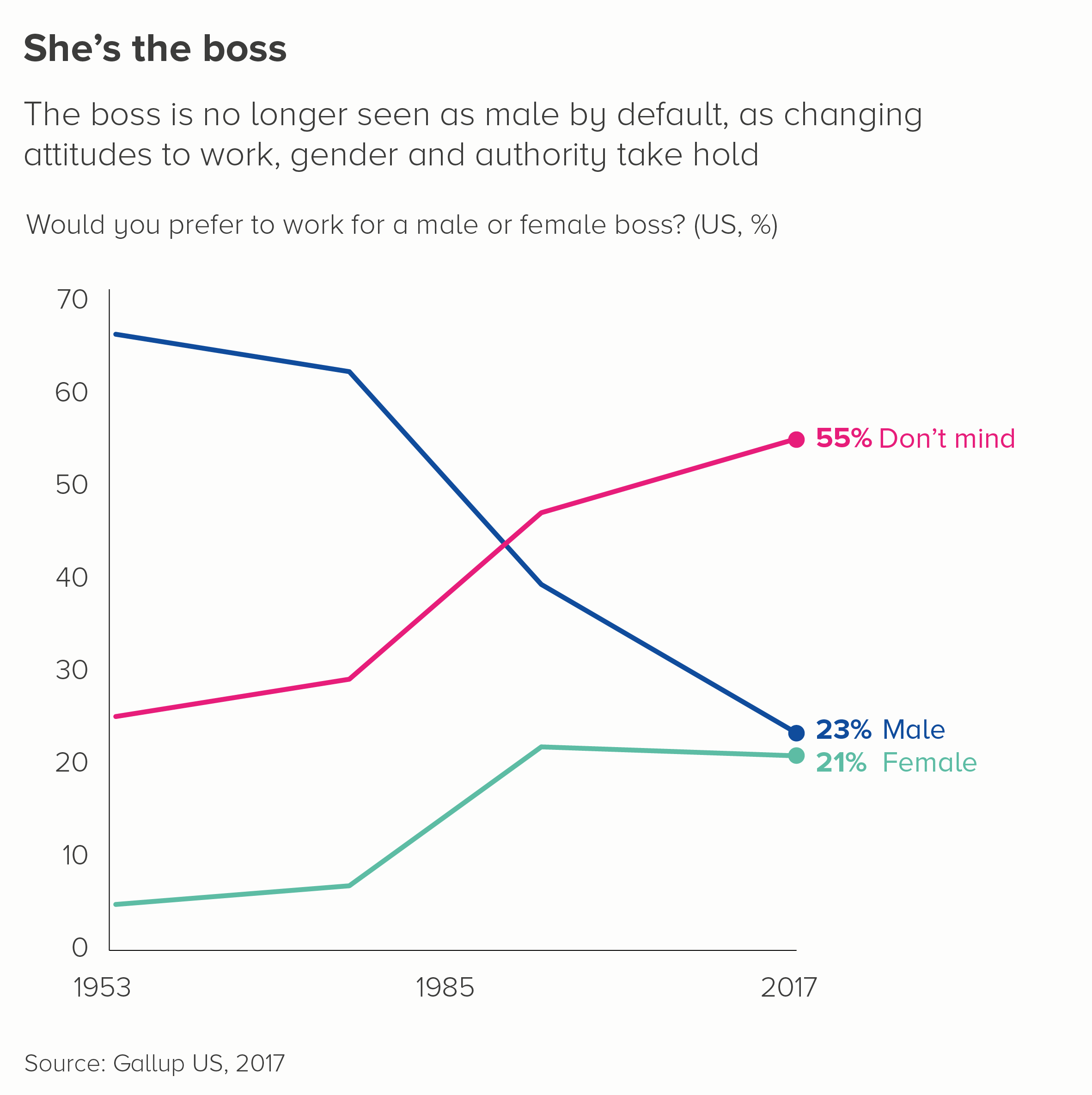
Sources: Gender of boss - Gallup US, 2017. Driving licenses - UK Department for Transport, National Travel Survey, 2016. Pizza toppings - Yougov, UK. Beating up animals - Yougov UK. Left-wing policies - Yougov, UK. Male v female actors - BFI Love graphic

More data viz advice and best practice examples in our book- Communicating with Data Visualisation: A Practical Guide


Rule 29: Use log scales for many kinds of variables?

In this blog series, we look at 99 common data viz rules and why it’s usually OK to break them. Here are all the rules so far.

by Adam Frost

In rule 26, we talked about how breaking your y-axis is usually deceptive and how you should almost always avoid doing it. A more scientifically-sanctioned form of y-axis tinkering is the use of a logarithmic scale (or just log scale - for short).

Edward Tufte, perhaps the most celebrated figure in analytical data visualisation, argues that ‘the world in general is probably lognormally rather than normally distributed’ so we should ‘use log scales for many kinds of variables’. Dona Wong, in her excellent guide to Information Graphics, provides a double-page spread on how and when to use them (Norton, 2014, p100-1).

Logarithmic gymnastics

So what is a log scale? And when should it be used?

Let’s deal with what it is, first. On an axis with a regular (or linear) scale, your numbers will go up in even intervals, so 1, 2, 3, 4, 5 or 100, 200, 300, 400, 500. On a log scale, they might go up 2, 4, 8, 16, 32 (that’s a base-2 log scale). Or 0.1, 1, 10, 100, 1,000 (that’s a base-10 log scale).

So why on earth would you do this?

The most common reasons are:

  1. when you have a huge outlier that means differences in your smaller values are invisible.

  2. when you have data where the percentage change between each bar is more important than its actual value. This is particularly the case when you are showing exponential growth - change over time data that is constantly leaping up by higher and higher amounts.

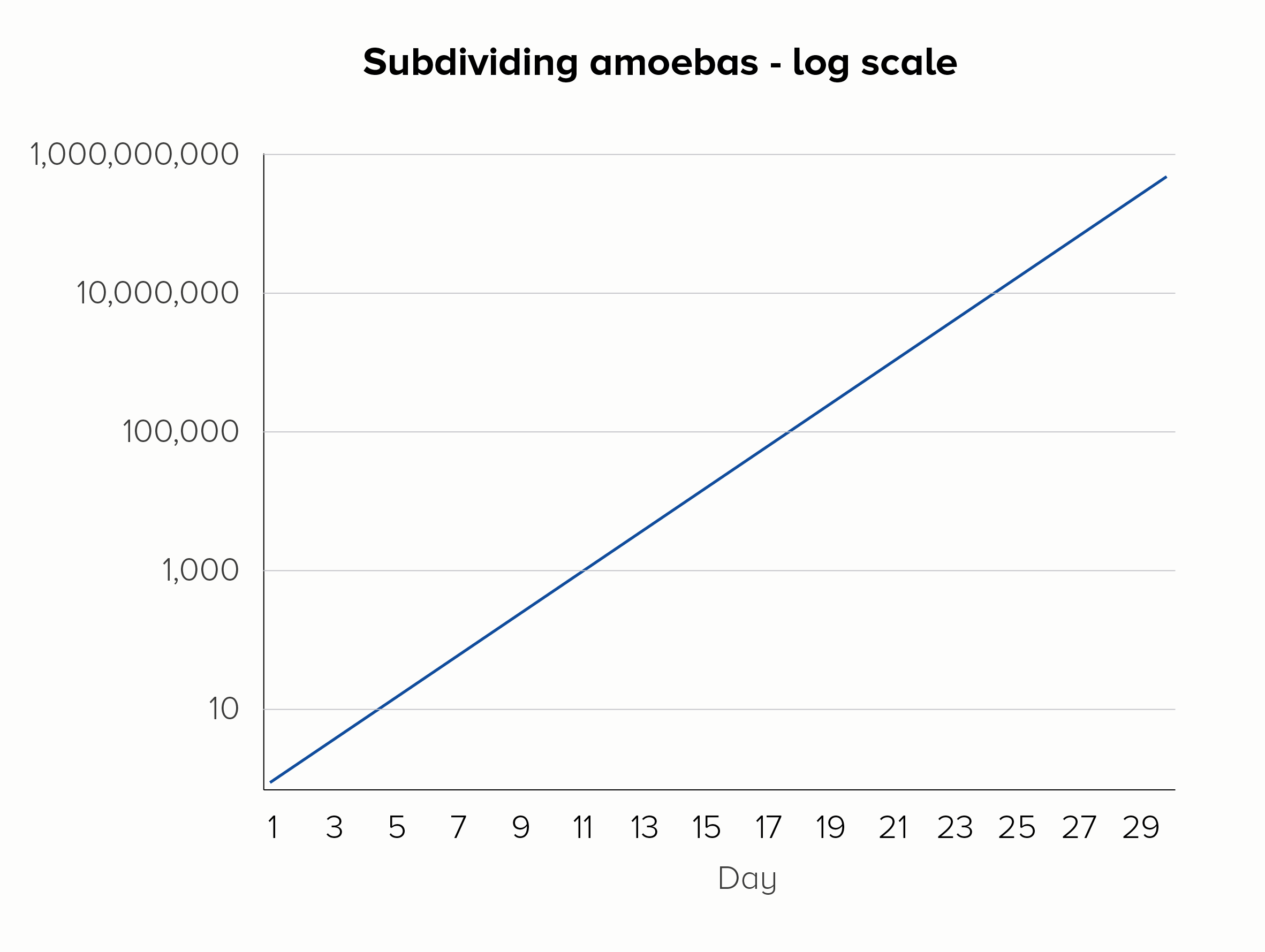
Imagine you were measuring amoebas subdividing into 2, 4, 8, 16, 32 cells - and so on. This is what we expect amoebas to do: they are reproducing at a constant rate. If we plotted this on a linear scale, we’d fail to see the important doubling in the early stages, the rate of reproduction would look alarming rather than normal, and within a few weeks our line would basically be vertical forever. For this reason, a microbiologist might choose to use a base-10 log scale (the second chart below).

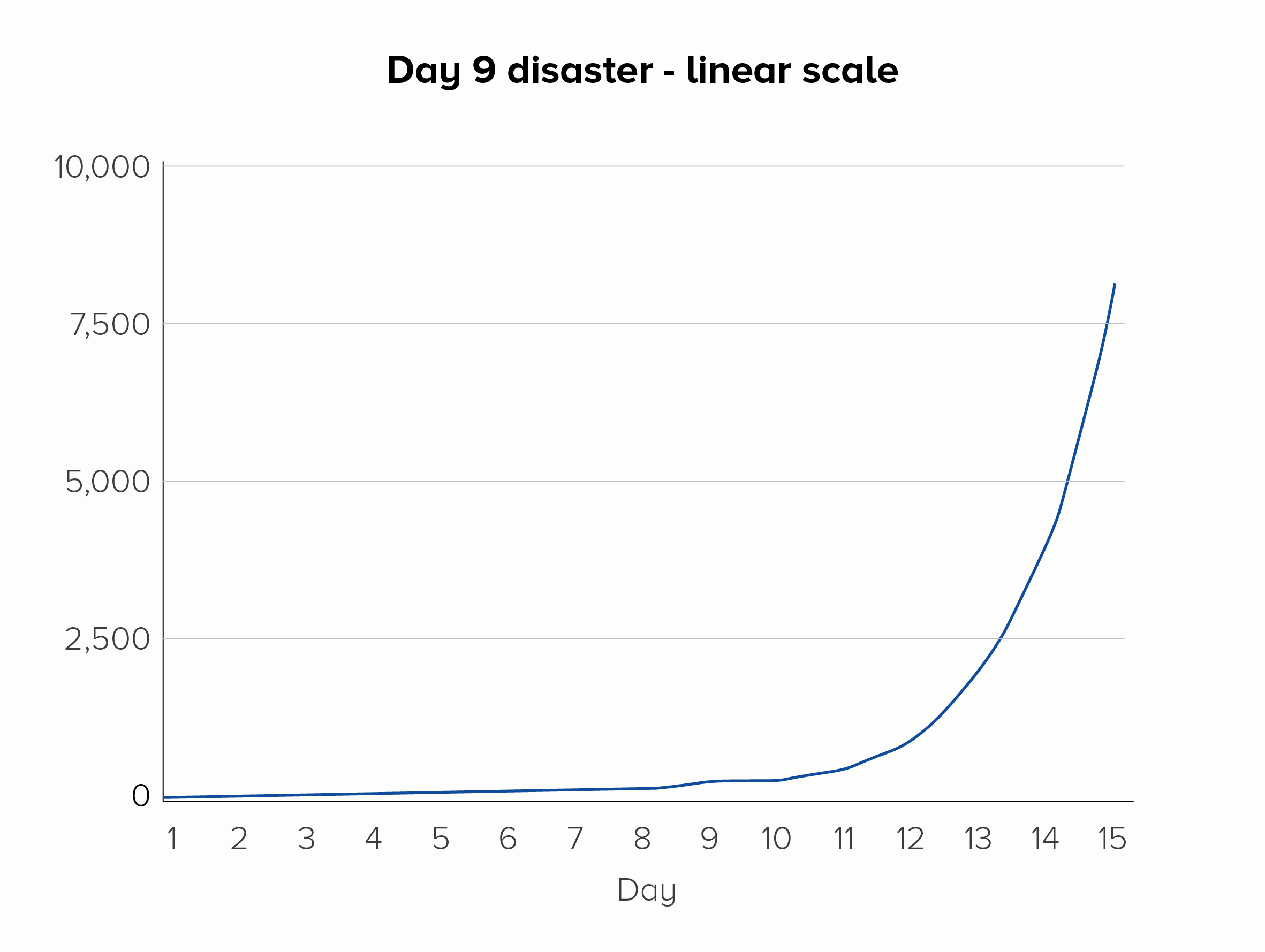
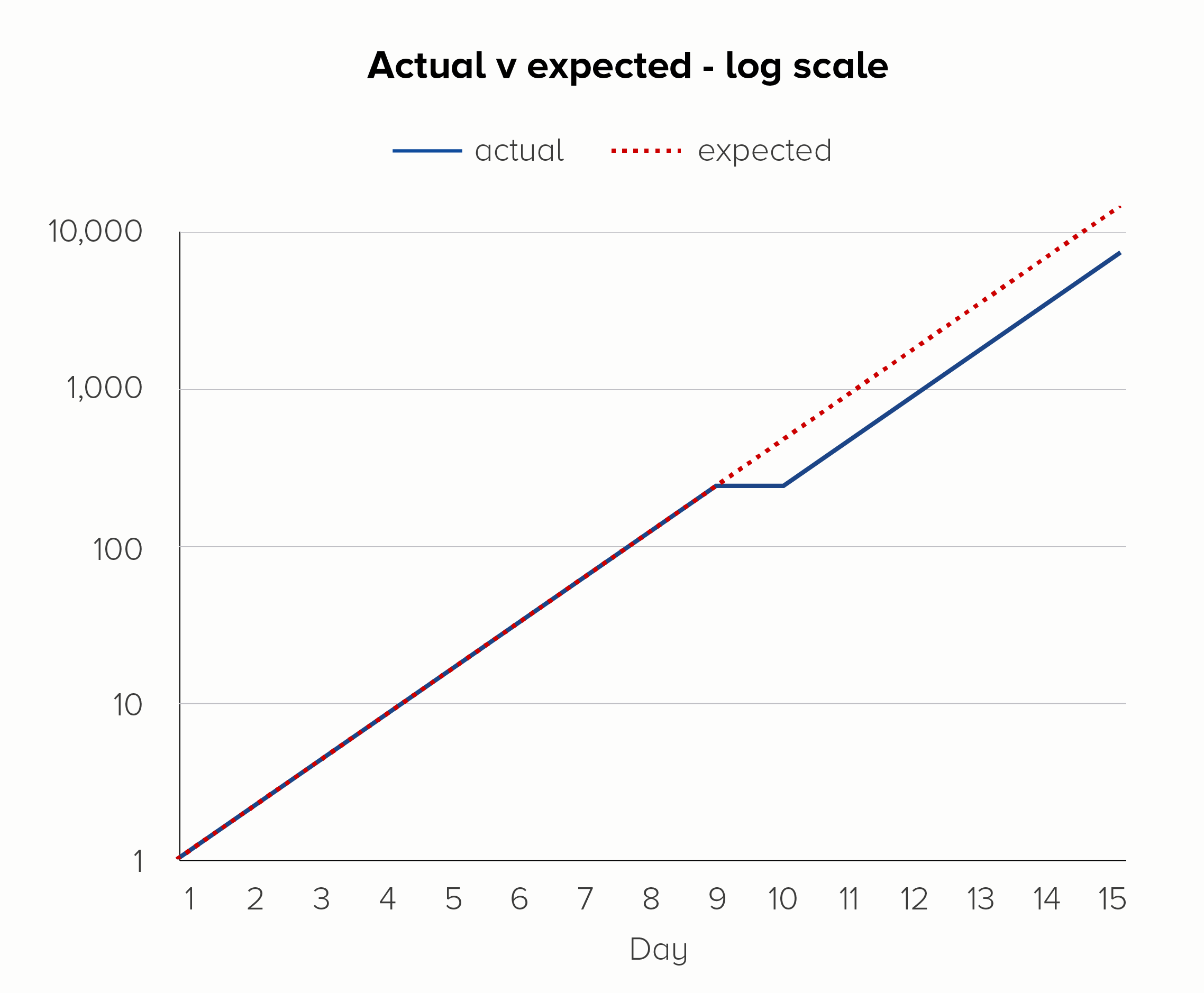
Furthermore, using a log scale means any deviation in this steady rate of increase is more visible. Picture a group of amoebas, subdividing once each day, over the course of 15 days. But on day 9 - disaster! - Dr Smith spills soup on the petri dish, the amoebas freak out, and no one’s in the mood for asexual reproduction that day. On a linear scale, the effect of this error could be missed, but on a log scale, the kink in the chart would be more obvious.

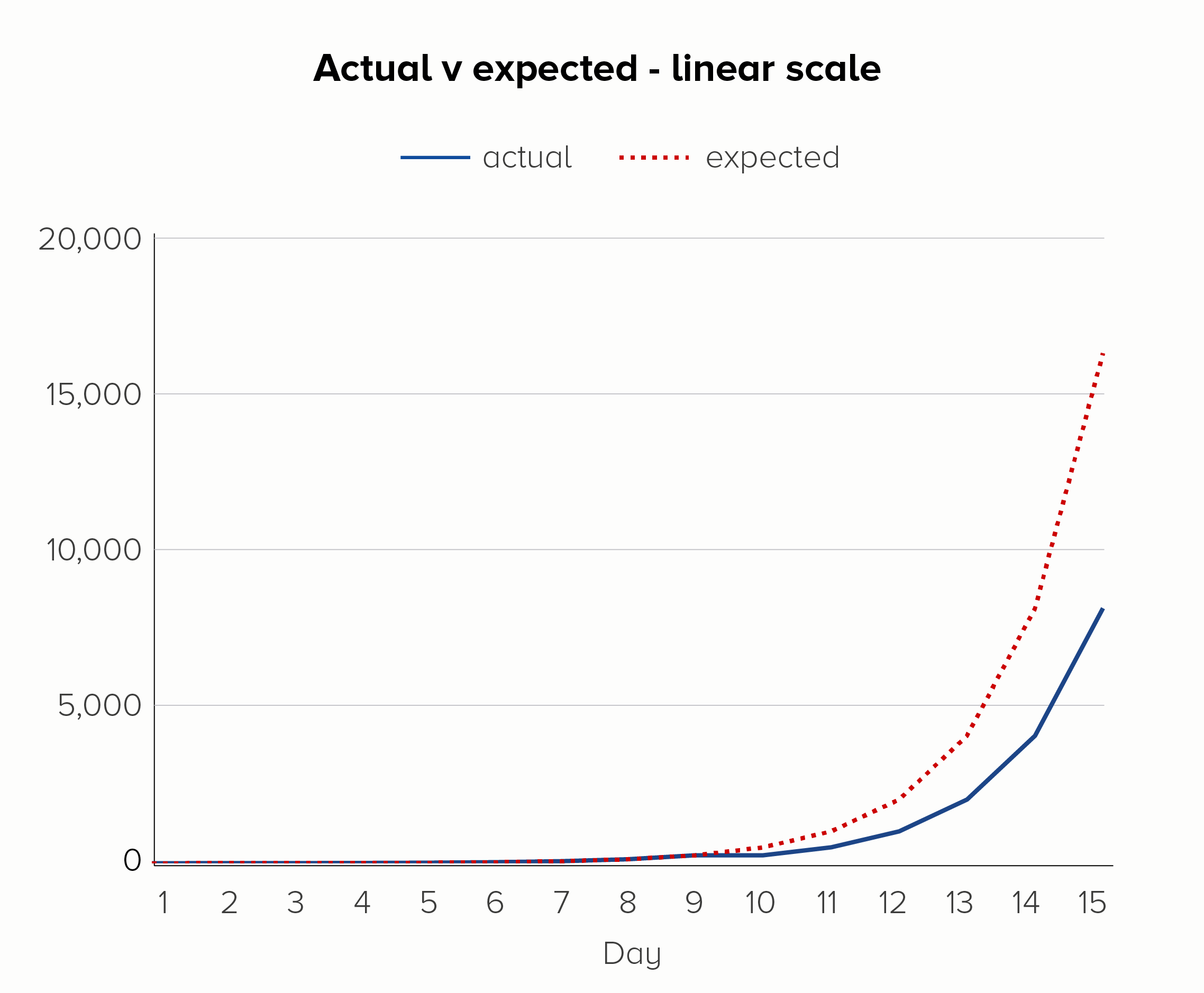
If you add a dotted line to show the expected rate of increase, you can see another strength of log scales. On the linear scale (the first chart), it looks like the day 9 glitch has thrown everything off. But on the log scale (the second chart), it’s clear that ‘normal business has resumed’ on day 10, and the steady rate of increase has kicked back in after the soup debacle.

I’ve used an example of a bad thing happening here, but log scales can be used to show positive outcomes too. Imagine if the soup-nado on day 9 was a public health initiative to slow the exponential growth of a disease. Again, a log scale would show the impact of this more clearly - it worked! we should do it again! - before the resumption of the disease’s spread on day 10.

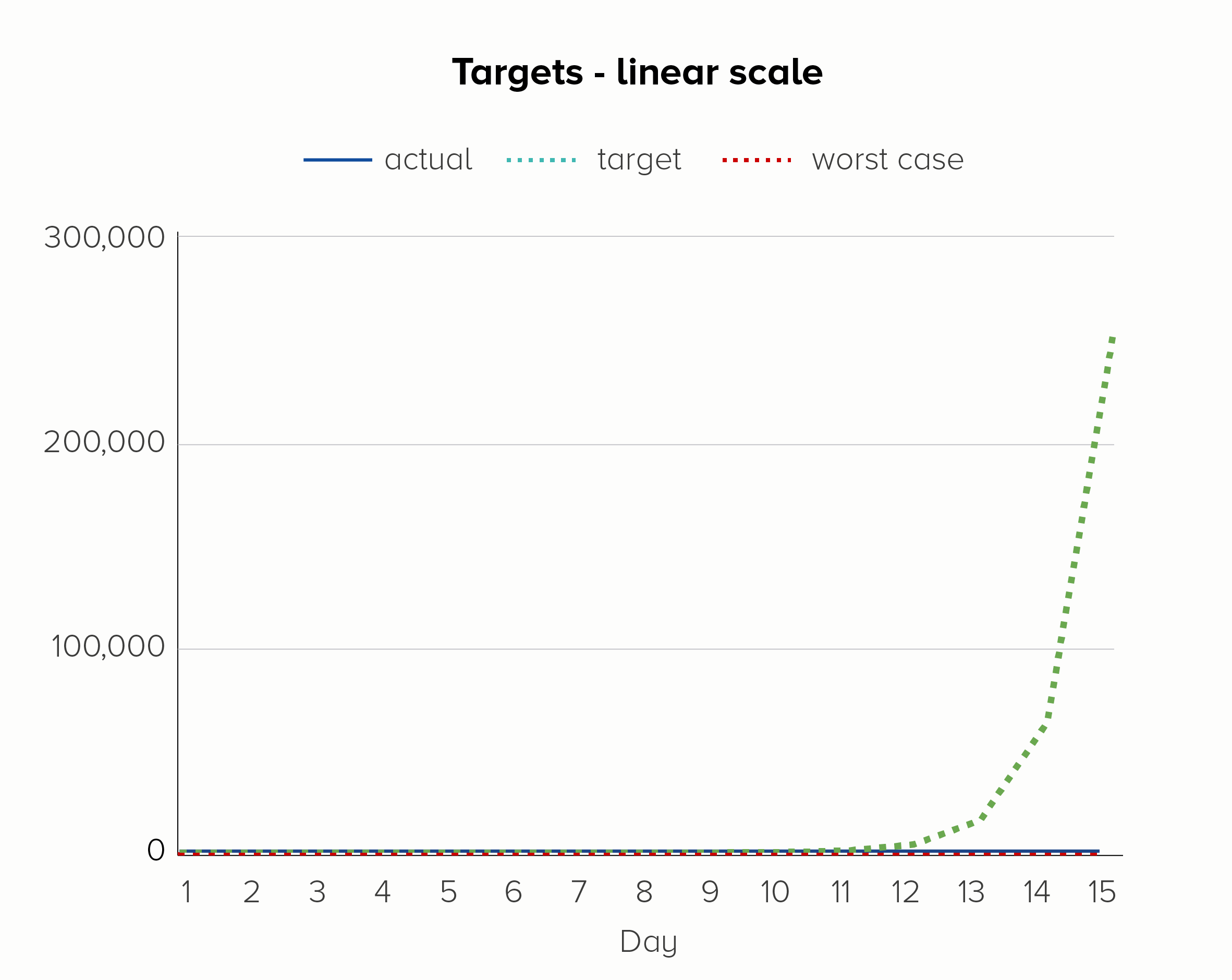
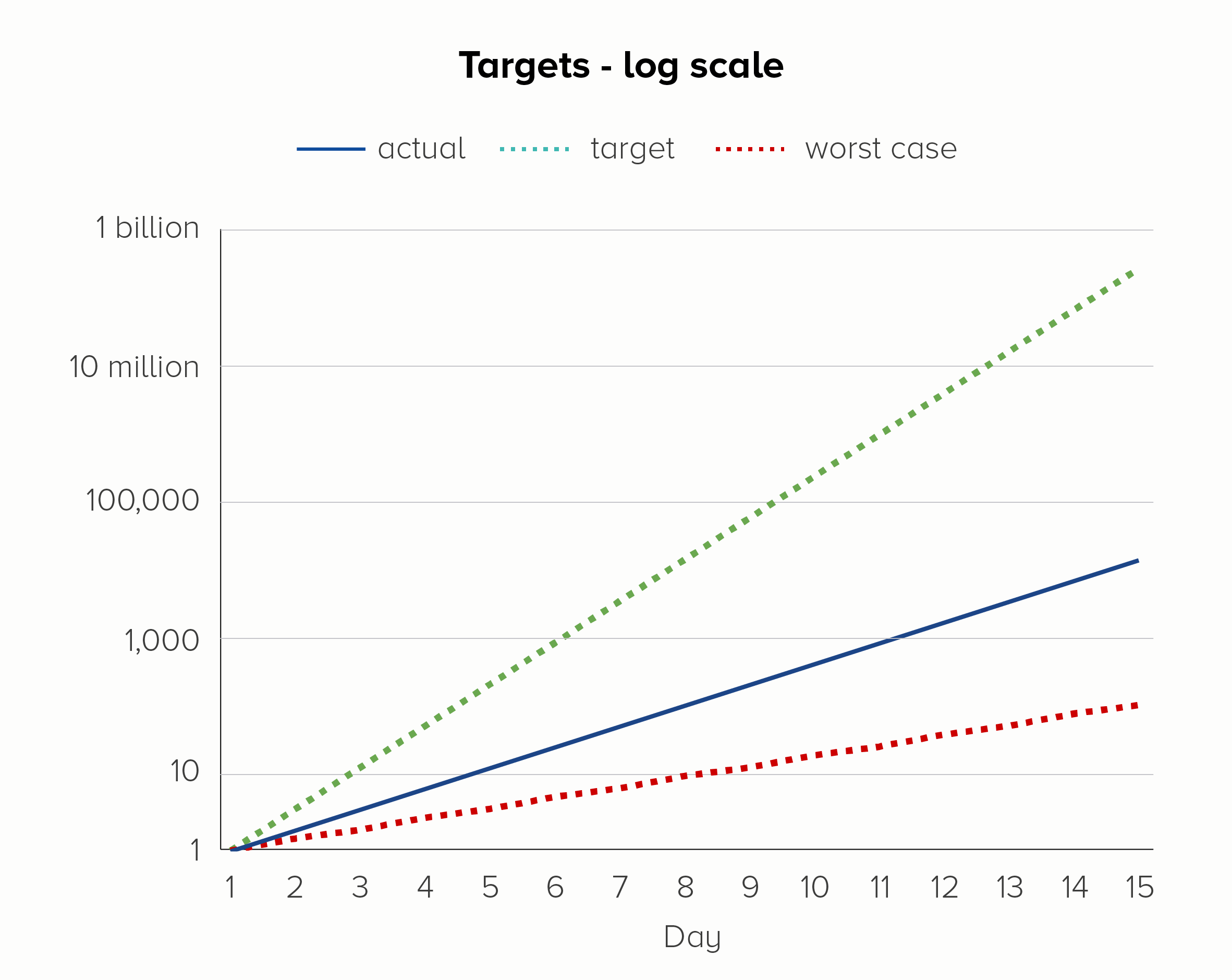
We can also add other helpful target lines and annotations. Say you decide to enter the lucrative amoeba farming business. To turn a decent profit, you need those unicellular scamps to reproduce twice a day, not once a day. On the other hand, if they start to reproduce less often - say, once every two days - then it’s game over for your transparent friends.

The first chart - on a linear scale - is hopeless at showing these upper and lower bounds. We only see the target line; the other two lines melt into the x-axis. Given that the ‘current’ line is going from 1 to 16,384 in 15 days, this is quite a significant trend to hide.

In the second chart, on a log scale, we see all three lines, even though the bottom line is going from 1 to 128 and the top line is going from 1 to 268 million. They all fit on the same chart, the trajectory of each is clear, and we do not jump to hysterical conclusions (we’re nowhere near our target!) simply because of the normal workings of exponential growth. 

The scale of the problem

So I’m a big fan of log scales, right?

In the privacy of my own home, yes. They are an extremely handy analytical tool. Like the cryptic notes in a diary entry or the shorthand in a journalist’s notebook, they can help you to work out what happened; they are great at teasing out the story.

But just as a journalist would never publish their unintelligible scribbles and call it a story, neither should you.

Or at least, a journalist might hand over their shorthand to another journalist who understands shorthand. And an analyst might present their log-scale chart to another analyst who regularly uses log scales. But this is not a common use case for most of us.

In my experience, most reports or presentations are for a mixed audience (experts, novices and everyone in between). Or sometimes just novices. Either way, these are not people who commonly encounter logarithms.

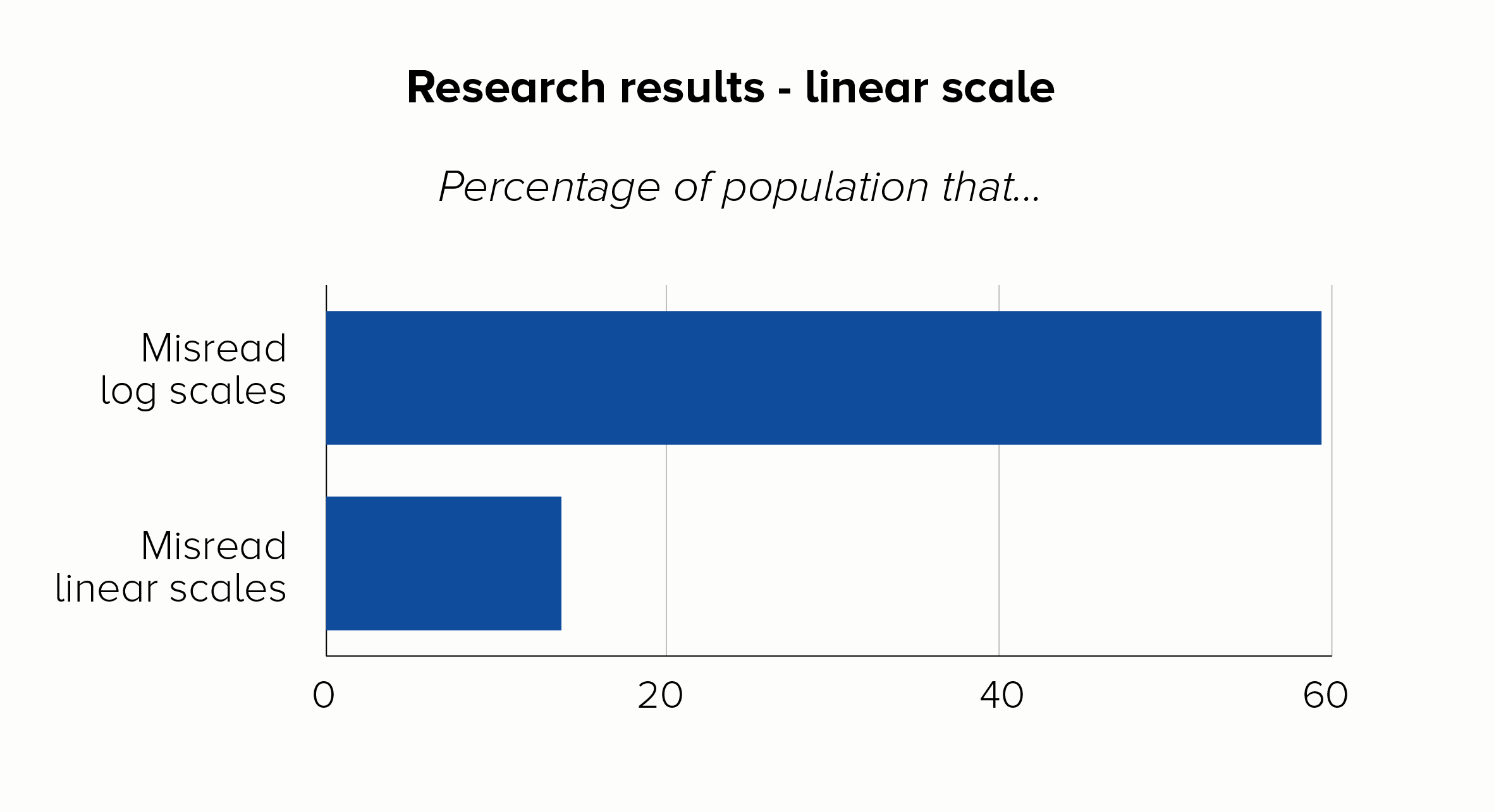
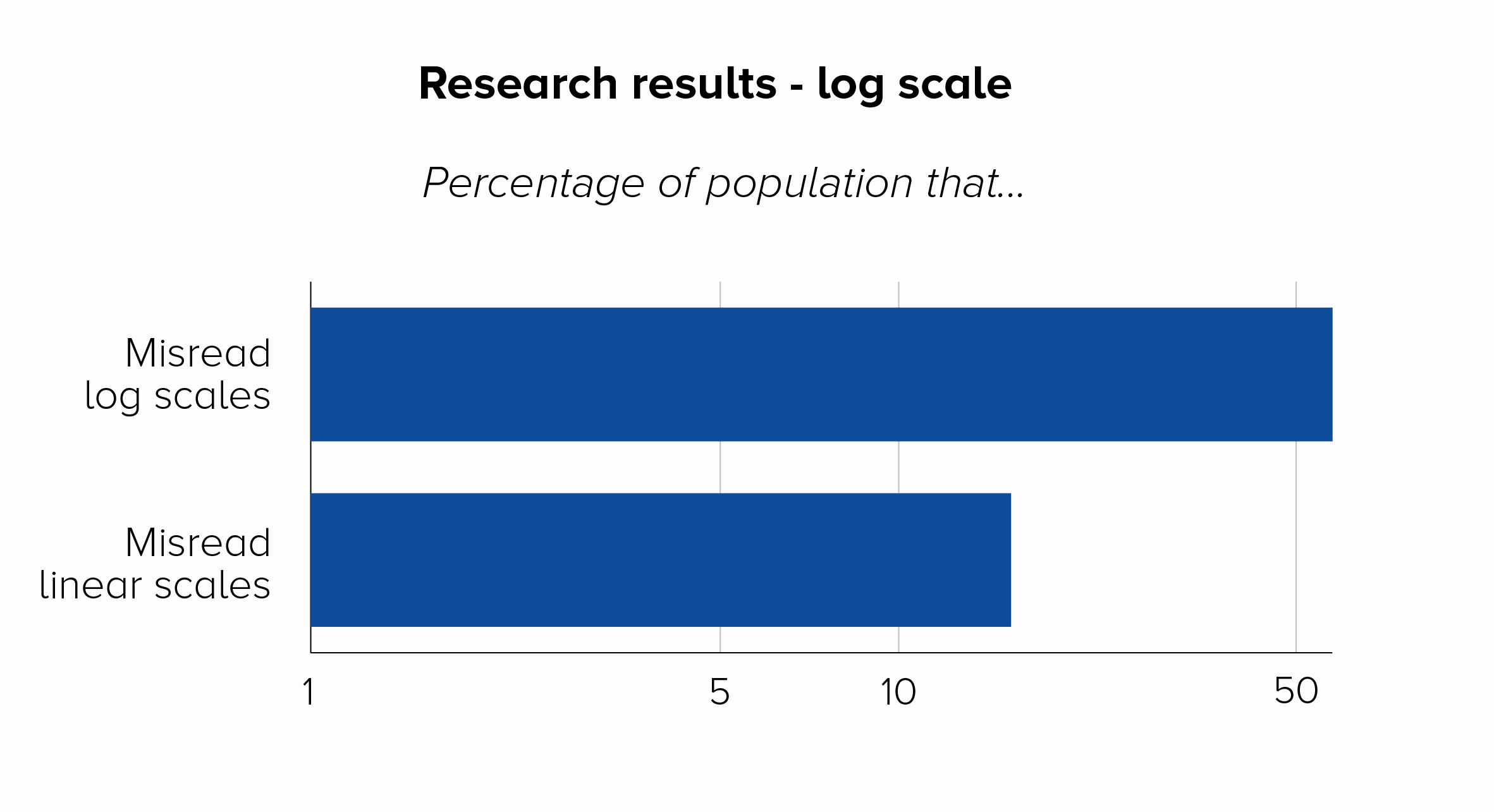
The title of a recent paper about Covid-19 data from the LSE says it all: ‘The public do not understand logarithmic graphs.’ After showing respondents a log-scale chart, around 60% of people got a basic question about the numbers wrong, compared to just 16% who got it wrong with a linear scale. 

The log-scale respondents were also a lot worse about making predictions about what would happen to the data in the future. I mean, they were way off target. Perhaps more seriously, they were just as confident in their wrongness as the linear scale group were about their more accurate predictions.

I mean, that’s the end of the discussion, isn't it? I can only assume that log scale fans respond to data like this by simply putting it on a log scale. 

There. Doesn’t look so bad now.

I’m joking, but the sad truth is that log scales do regularly get used to do exactly this - exaggerate good news or hide bad news. This is yet another mark against them: the public’s ignorance of what log scales mean is used to spread misinformation. There are so many examples of organisations doing this that I could fill this entire blogpost with them, but here is a classic from the early 2010s, brought to you by the British government.   

In 2013, HM Treasury released a chart showing how much it had spent on infrastructure projects.

Such munificence! All that money spent on helping our country to function. And look how evenly spread it is! No way would the government be helping out their friends in the energy sector and neglecting vital areas like maintaining flood defences or safely processing waste.

In this example, the government relied on the public either not looking at the y-axis or not understanding it. Ordinary voters wouldn’t realise that - as we saw with our amoeba charts - log scales make small numbers look bigger and big numbers look smaller. Fortunately, an opposition Treasury minister did know this: he accused the government of ‘mathematical cheating’ and alerted the UK Statistics Authority. A new version of the chart was published, this time using a linear scale.

The degree of distortion in the original chart is now plain to see. Apart from Energy and (less so) Transport, the government has spent nothing on anything.

Some of the Covid charts in the early days of the 2020 pandemic did the same thing, in fact the LSE research we mentioned earlier was a response to exactly this. In the UK, charts from publications like the New Scientist, the Financial Times and the Economist often used log scales. I suspect the core readership of these publications (they are broadly for expert/specialist readers) would be more likely to understand log scales - so I can see why the authors opted to use them. Unfortunately, in a social media age, these charts often travel way beyond their intended audience.

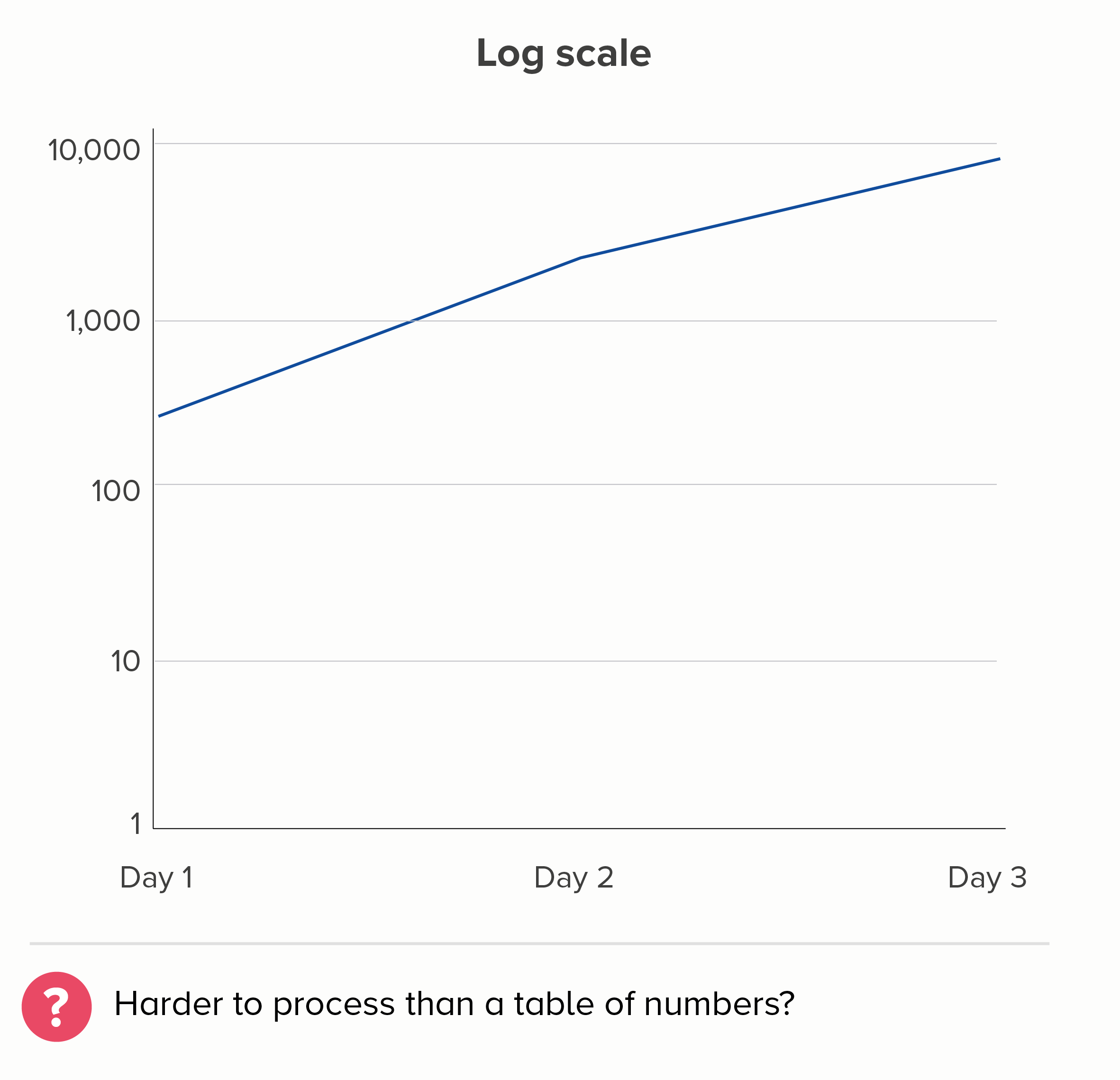
Let's look at why this might be a problem. Here's a chart of cumulative Covid deaths, adapted from an original produced by the New Scientist in October 2020.

What’s the first thing you think when you glance at this chart? I’ll tell you what I think - that’s it’s a story of a disease rapidly rising and quickly hitting a plateau. Disastrous for a few weeks, but soon brought under control.

Worse, it looks like a similarity story. The pandemic affected all countries in pretty much the same way, some had slightly more deaths, some slightly less, but it was a global crisis that nobody handled particularly well. South Korea and China aren’t that far away from the UK and Italy.

I’m sure I don’t need to tell you that none of this is true. The problem is, by using a scale which models exponential growth, this chart flatters the governments that chose to let the disease spread exponentially. In other words, the worst performers. 

This chart might use a more ‘scientific’ scale, but in no way does that mean it’s unbiased. 

And for those that say - yes, but look at the y-axis, that makes it clear that Australia had far fewer total deaths on day 170 than the UK, I would reply: oh, does it? Remember, most people don’t understand log scales. That y-axis just baffles them - and rightly so. I mean, how many total deaths had there been in Australia on day 170? It was somewhere between 250 and 2,500, but how many exactly? And the UK had how many deaths by day 210? It’s above 25,000 but by how much?

And try to predict how many deaths the UK might have by day 280. Go on, I dare you.

(There’s also the fact that this chart would ideally be showing cases per million so the countries can be fairly compared. But that’s a subject for another blogpost).

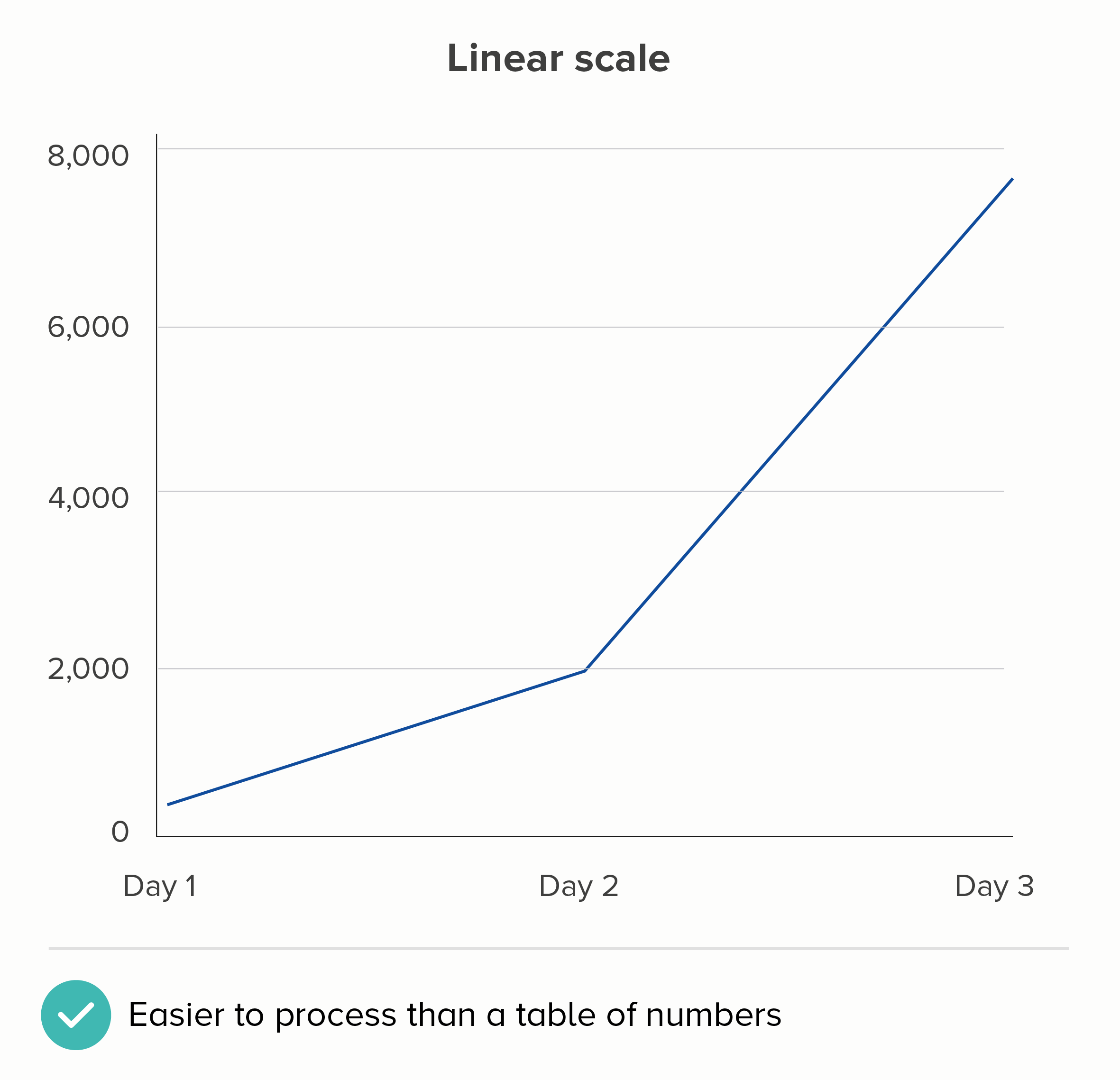
The deeper problem with charts like this is that this isn’t what we expect shapes on charts to do. We turn numbers into shapes because they are easier for us to process. Imagine we have a spreadsheet showing these three numbers:

  • 278

  • 1,946

  • 7,784

We don’t immediately understand that the second number is seven times bigger than the first, and the third is four times bigger than the second. But we are more likely to understand this if we encode these numbers as lines or shapes.

I realise the linear scale above isn’t perfect either. If this were showing the number of Covid cases, then the linear chart is more likely to make people think that the disease’s spread is accelerating when it isn’t. (Remember, 1,946 is SEVEN times 278, but 7,784 is only FOUR times 1,946).

But - but - on a linear scale, at least the fundamental relationship of number and shape is intact. We can estimate that the Day 1 number is roughly 300; on the log scale chart above, who the hell knows, it could be 350, it could be 800.

(The only number it can’t be on a log scale chart is zero because log scales can’t show zero - which is yet another reason why they confuse people).

The meaning of the story - the impact of Covid on people’s everyday lives - is also easier to see on a linear scale. Way more people have Covid on Day 3 than on Day 2. I need to take this seriously. I’m now much more likely to catch this disease. A 4x increase of a high number has a bigger impact than a 7x increase of a low number. It’s a story for the people at the sharp end of the pandemic rather than for the people coolly assessing whether its spread is exponential or not.

It’s just a bit more respectful too, isn’t it? Let’s look at that New Scientist chart again.

This is a chart about people who have suffered tragic and avoidable deaths. Does this chart tell the story of these people? In the UK, 7,113 people lost their lives to Covid between day 110 and day 190 of the pandemic. But the UK's line is totally flat over this time period. UK Prime Minister Boris Johnson reportedly said 'let the bodies pile high' - and so they did. But where has our log scale hidden all those bodies?

In her blog series about log scales, Lisa Charlotte Rost writes that linear scales ‘work best most of the time, especially when we present data about people.’ (emphasis mine). This sums it up, I think. Log scales are occasionally justified when you are charting something abstract - price rises, computer processing speed, amoebas in a petri dish - and particularly when you are talking to an expert audience. But people? Dead people? Every single one of them counts, and your chart needs to show that they count.

Leave log scales in the lab

Let’s look at some alternative approaches when you have stories of outsiders or exponential rises. Some of this covers similar ground as rule 26 - where we talked about broken y-axes in bar charts - so I’ll use different data here to minimise repetition.

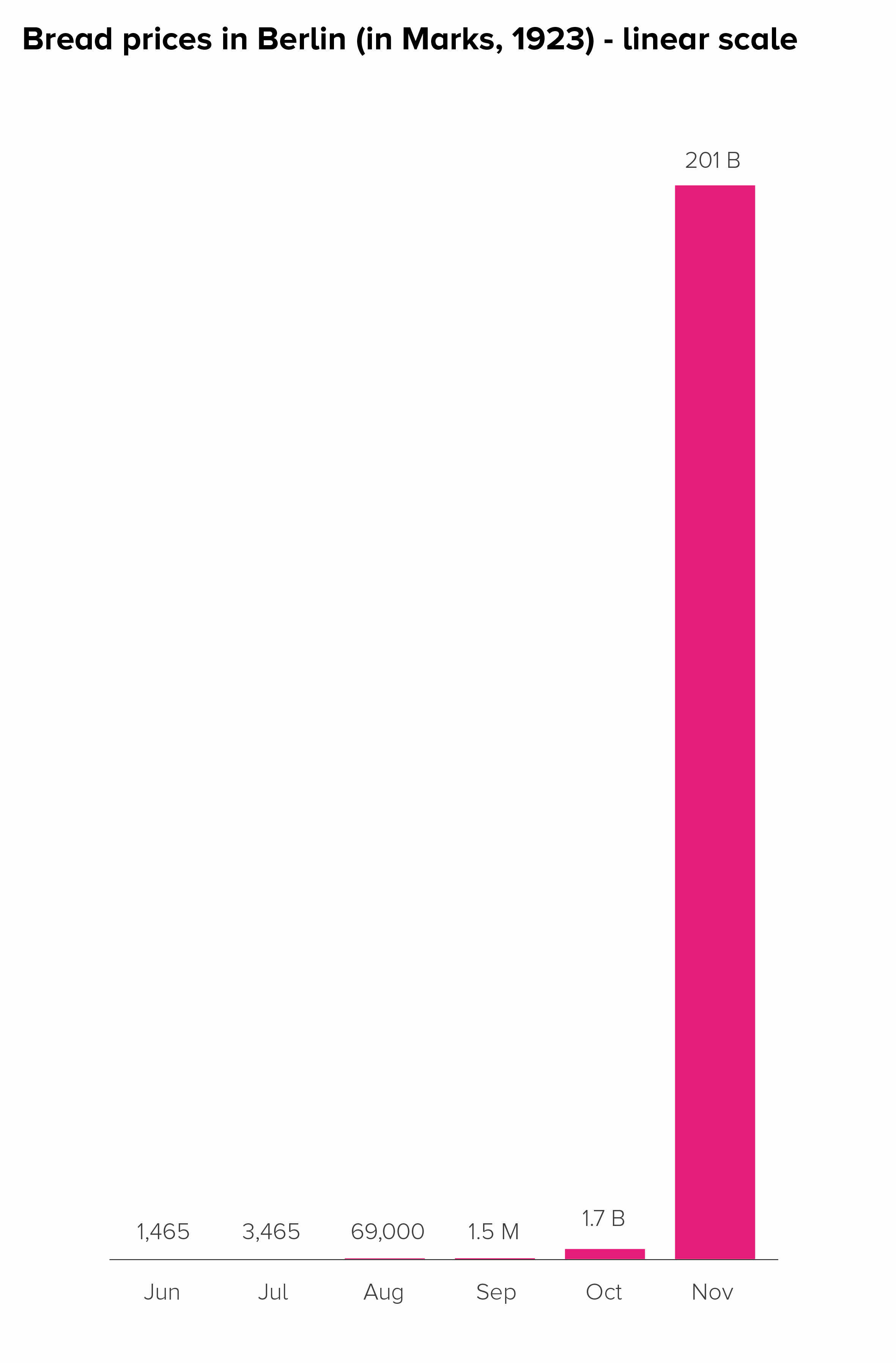
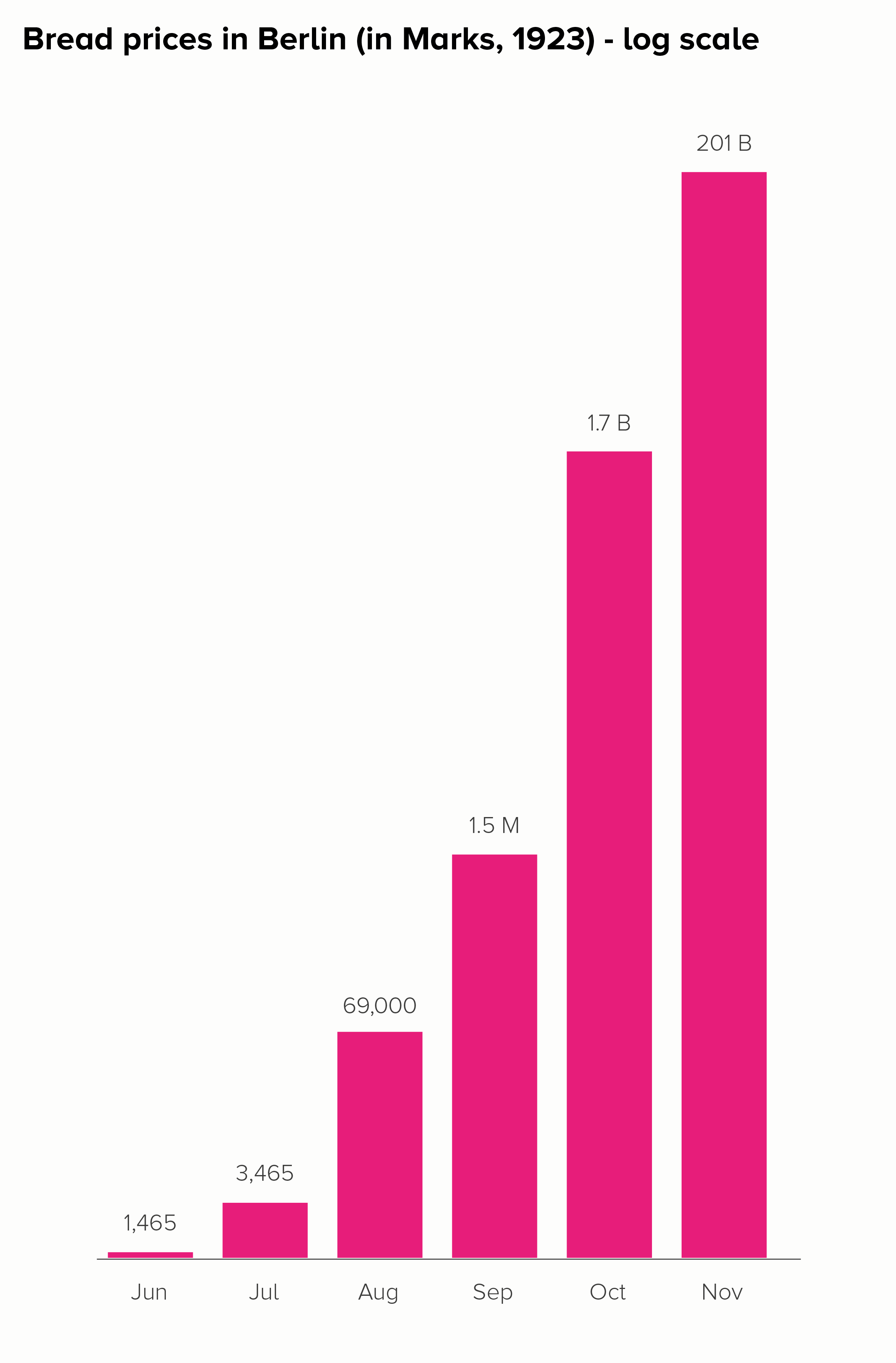
I’ll start with a chart that is often put in a log scale: the price of a loaf of bread in Germany during the hyperinflation crisis of the 1920s. Here is this data in a linear and log scale chart.

Neither of these charts work particularly well. In the linear scale version, the hugeness of that final datapoint (November - 201 billion marks) makes all the other bars shrink to almost nothing, even though the price of bread in October, for example, was a hefty 1.7 billion marks. 

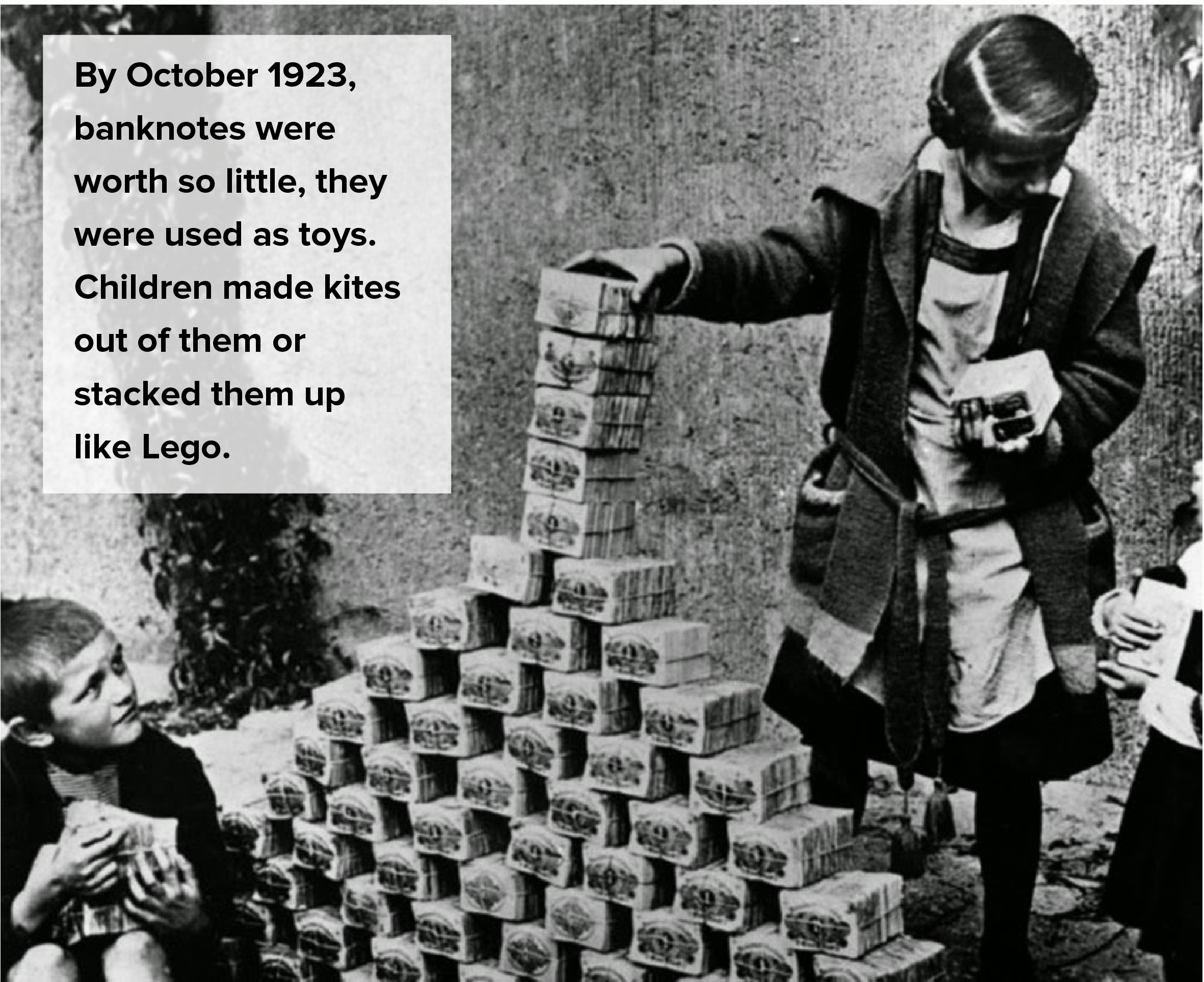
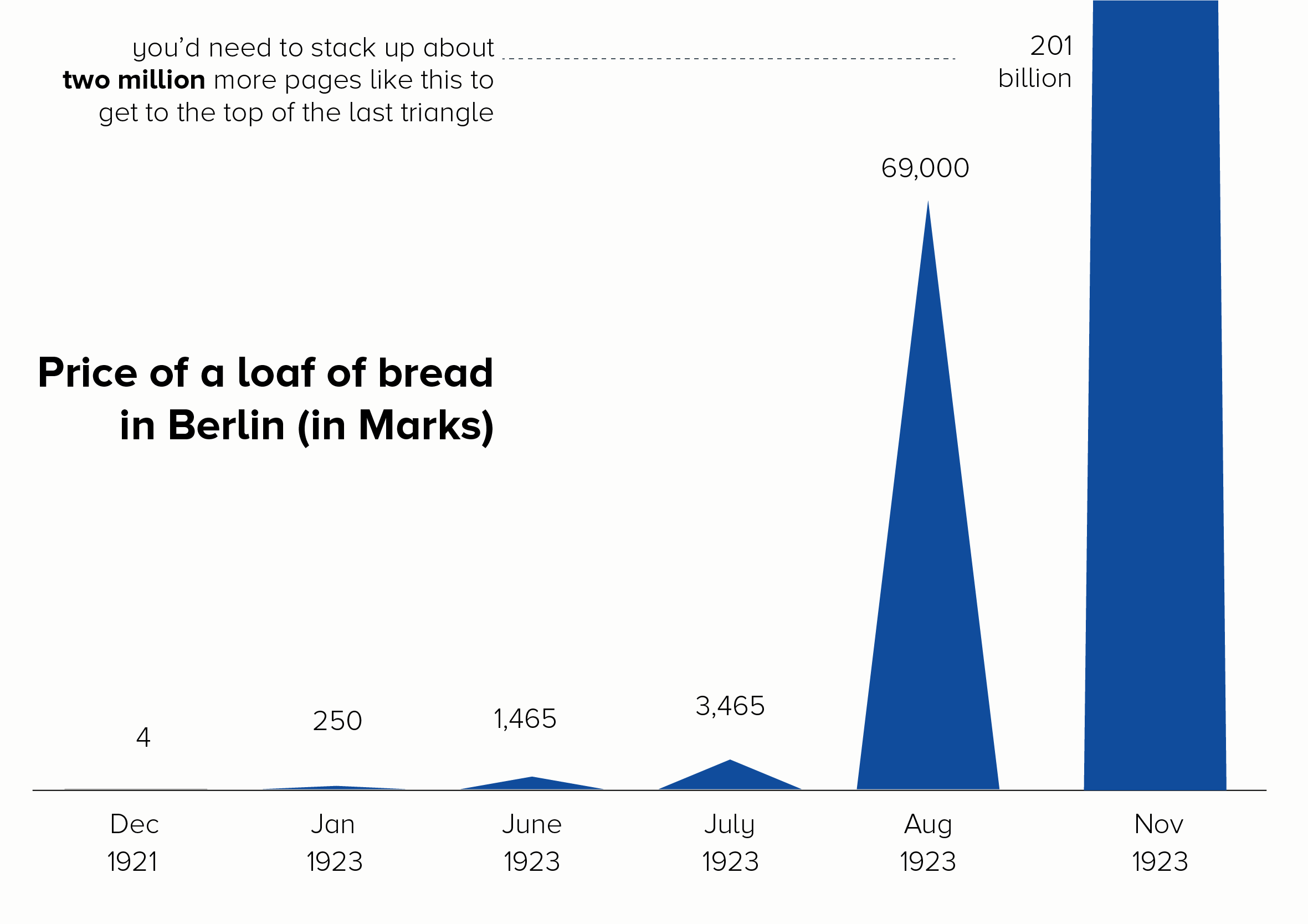
The log scale version is even worse. The 201 billion bar is only a little bit bigger than the 1.7 billion bar, when it should be 118 times larger. How is this helpful? Furthermore, the central story of unimaginably massive price hikes - which at least survives in some form with the linear version - utterly vanishes in the log-scale version. Yes, the bars get larger, but the rise is fairly steady and not particularly huge. Certainly you wouldn’t think that this was a country where, in a few short months, people went from handing over a few hundred Marks for a loaf of bread to needing a wheelbarrow full of banknotes to buy the same thing. The chart doesn’t do justice to a truly exceptional historical event.

Let’s look at some better ways of telling this story.

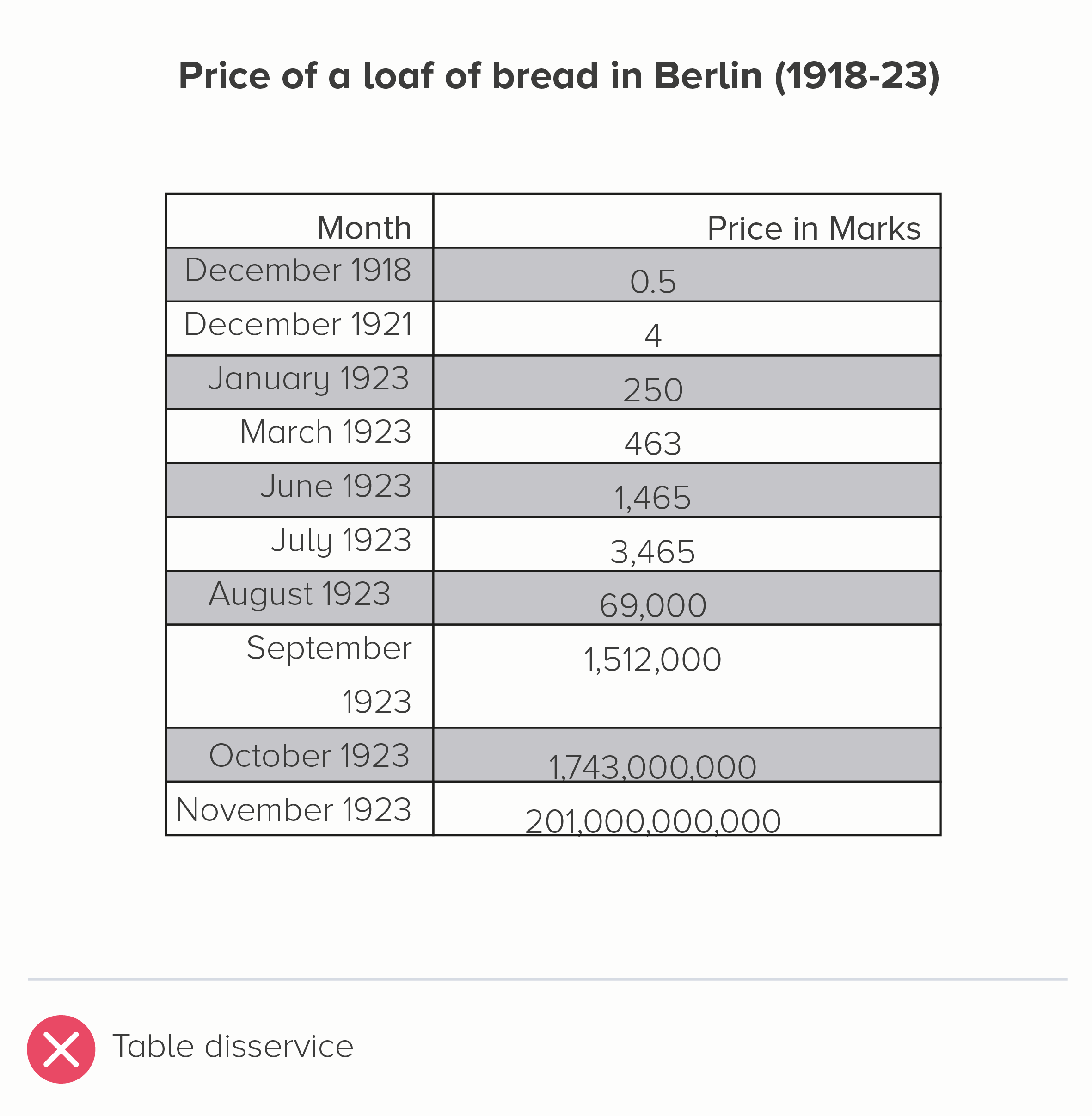
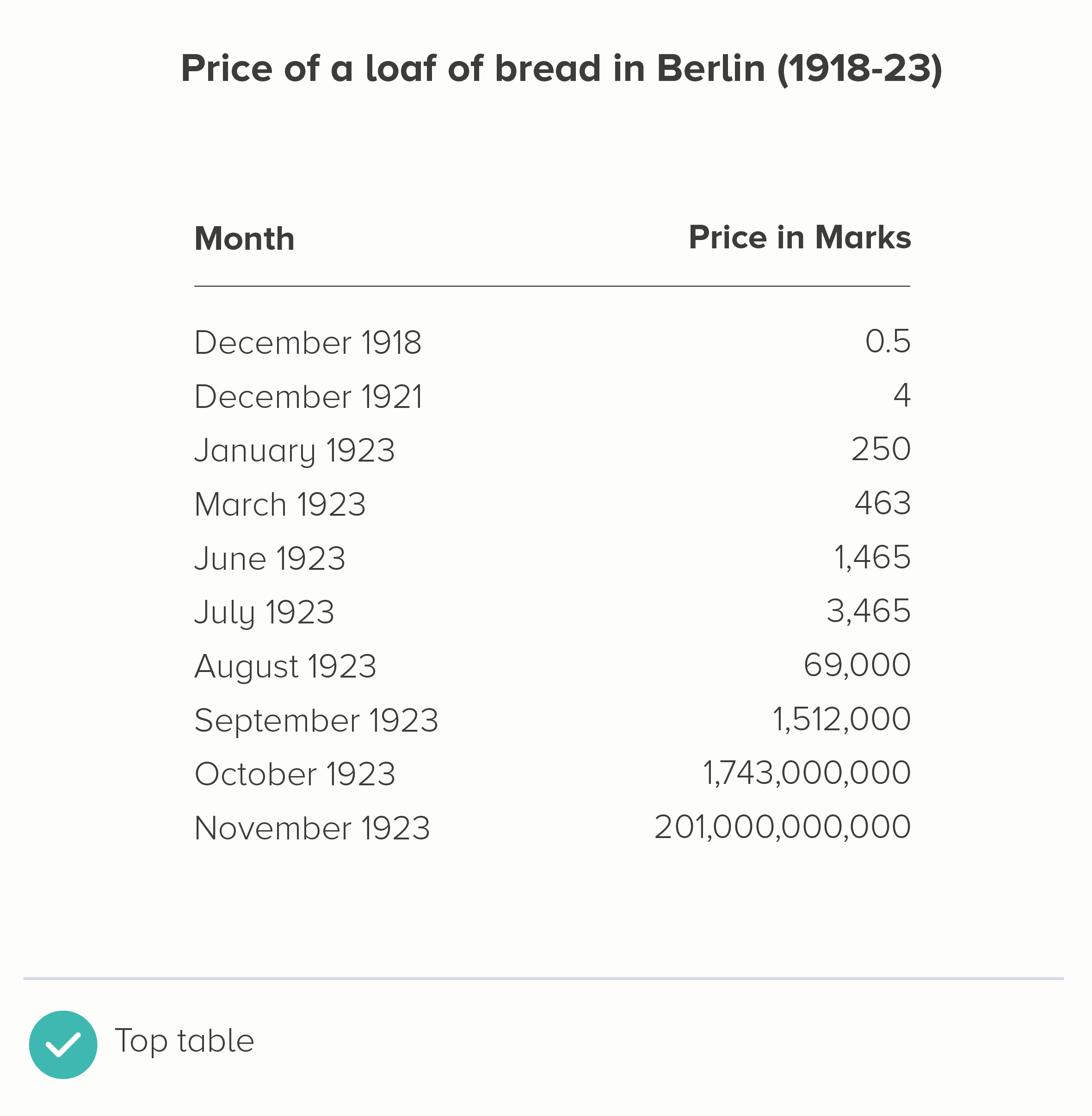
i) Use the original table

I mean, it needs to be clear and clean. Left-align the text, right-align the numbers. Minimal lines and borders. 

But, given this is about small numbers becoming unfeasibly large numbers, the second table below conveys that pretty clearly.

ii) Convert it into a different measure

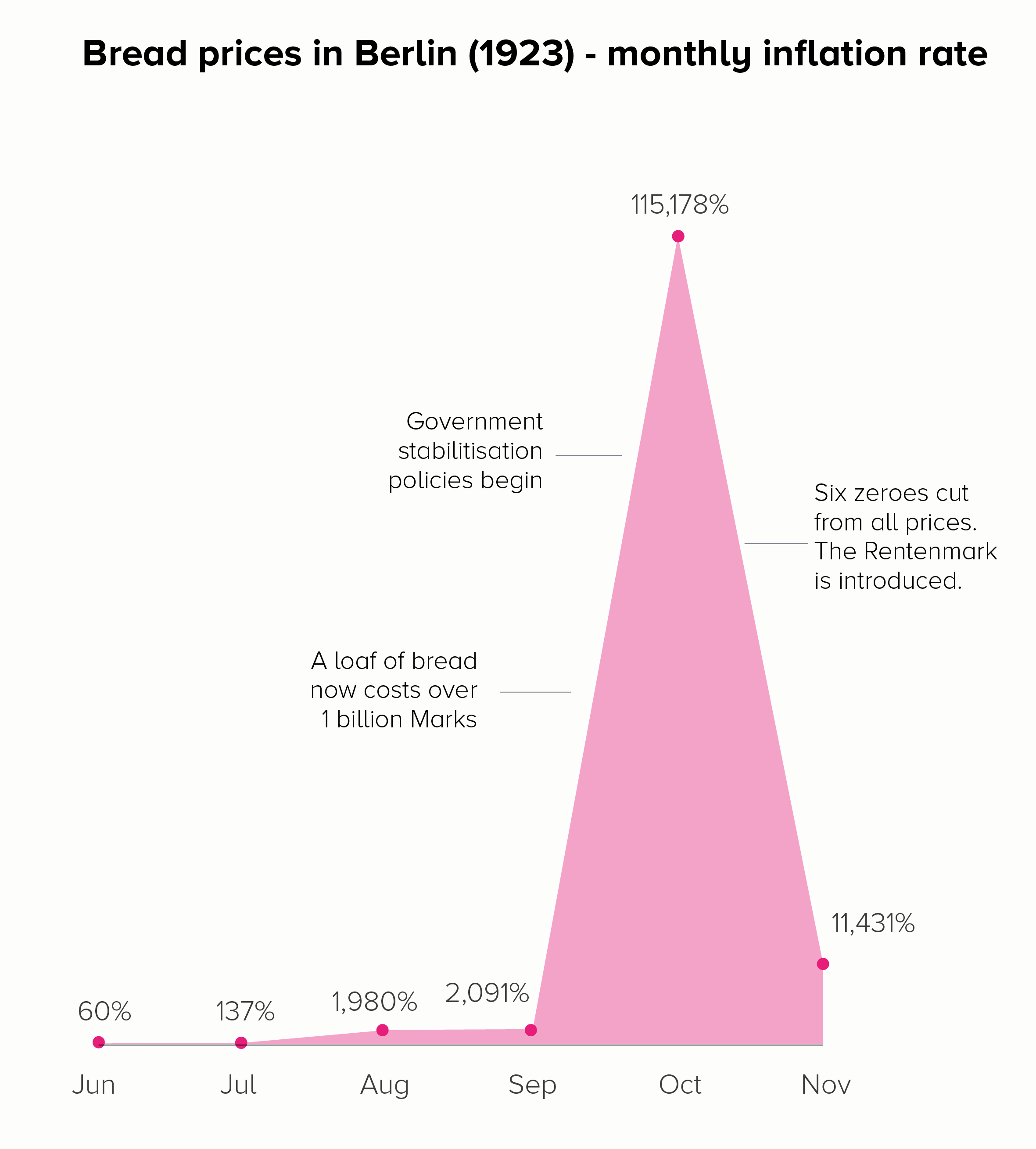
If you want to show how much something has changed, then charting the amount it has changed (percentage increase or decrease) can sometimes be more helpful than charting the raw numbers. For price rises, this would be the level of inflation.

In the first chart, we get a different insight into those astronomical price rises. When we charted prices (in both a linear and log scale), the focus was on that final month - November - when a loaf of bread cost the most. By switching to inflation, we see that October was the critical month, and that by November, the rate of inflation had dropped somewhat - as a result of the Weimar government acting to stabilise the currency.

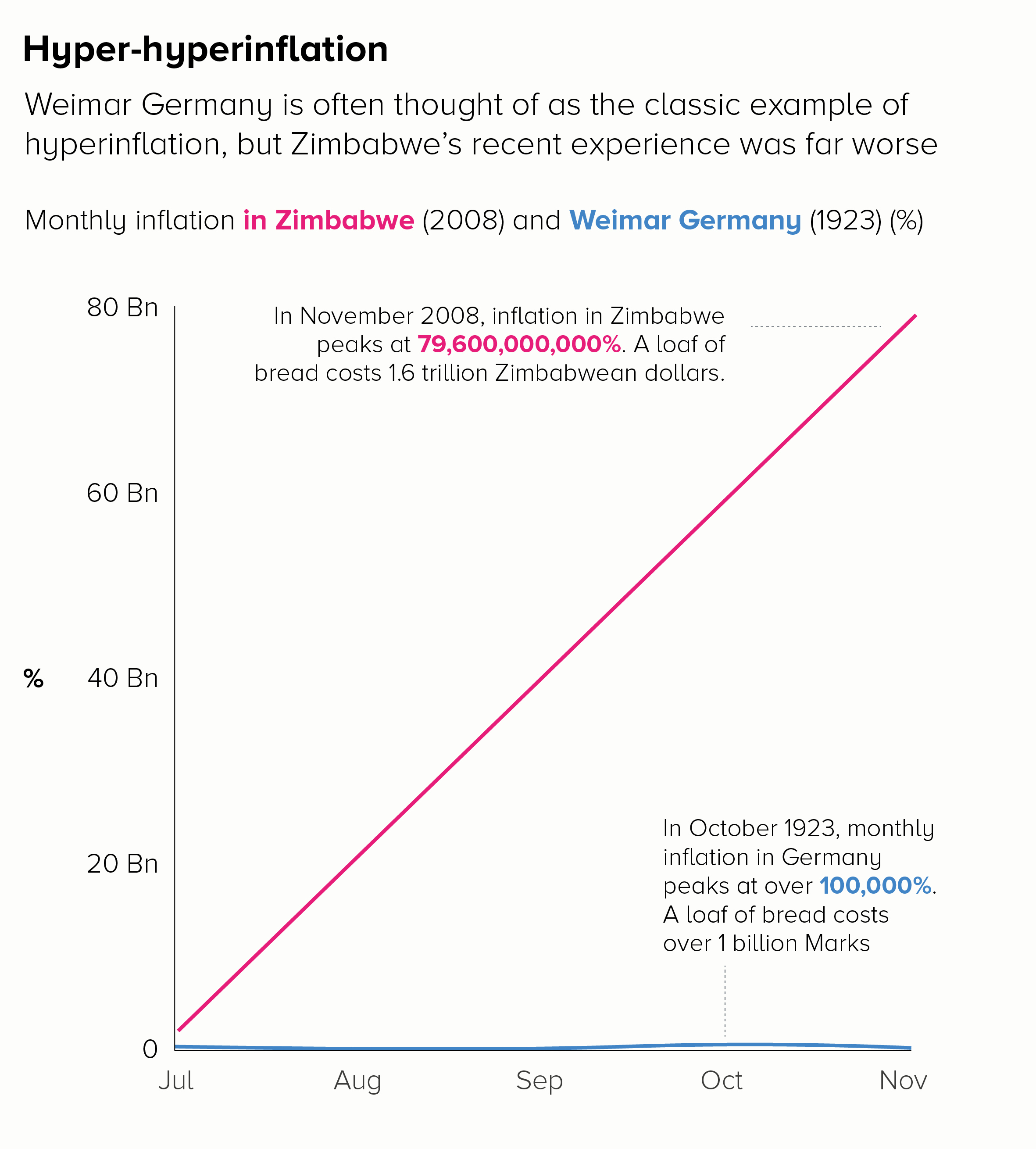
The second chart shows the benefit of introducing context or stepping people through a story of large rises. If we wanted to show the ‘off the charts’ price rises in Zimbabwe in 2008, we could start by charting the well-known German example and then overlay the Zimbabwe data to show how unprecedented it was.

Of course the issue with using inflation is that it doesn’t convey that human story of a loaf of bread costing a billion marks or two trillion Zimbabwean dollars. Inflation is a pretty abstract concept. So it could be worth keeping the ‘loaf of bread’ information on the chart as a call-out, as we have in the examples above. 

iii) Play with format

If you’ve got a big number that is literally ‘off the charts’, you can always show it going off the charts. This doesn’t work with all audiences, but a playful approach can sometimes be the best solution for data that doesn’t work on a standard scale. 

This is a particularly popular approach in animations and scrollytelling, as you are not constrained by a set frame size. Your first few datapoints can be visible on the first screen, but then you have a final huge number that requires the audience to keep scrolling (or for the camera to keep tracking). The chart seems to break out of its boundaries.

My favourite example of this in an animation is The Fallen by Neil Halloran: https://www.youtube.com/watch?v=DwKPFT-RioU&ab_channel=NeilHalloran 

The effect is best shown between 4 minutes and 7 minutes when Halloran tries to convey quite how many soldiers were killed in the Battle of Stalingrad. You keep expecting the bar to stop growing, but it doesn’t. 

For its use in infographics, check out ‘The Depth of the Problem’ by the Washington Post or ‘Gross Miscalculation’ by Melanie Patrick. Also the recent Covid front pages from the New York Times that I mentioned in rule 26

iv) Experiment with different charts

Bars and lines are not always effective at telling stories of huge outliers. Fortunately, there are a lot of other chart types out there.

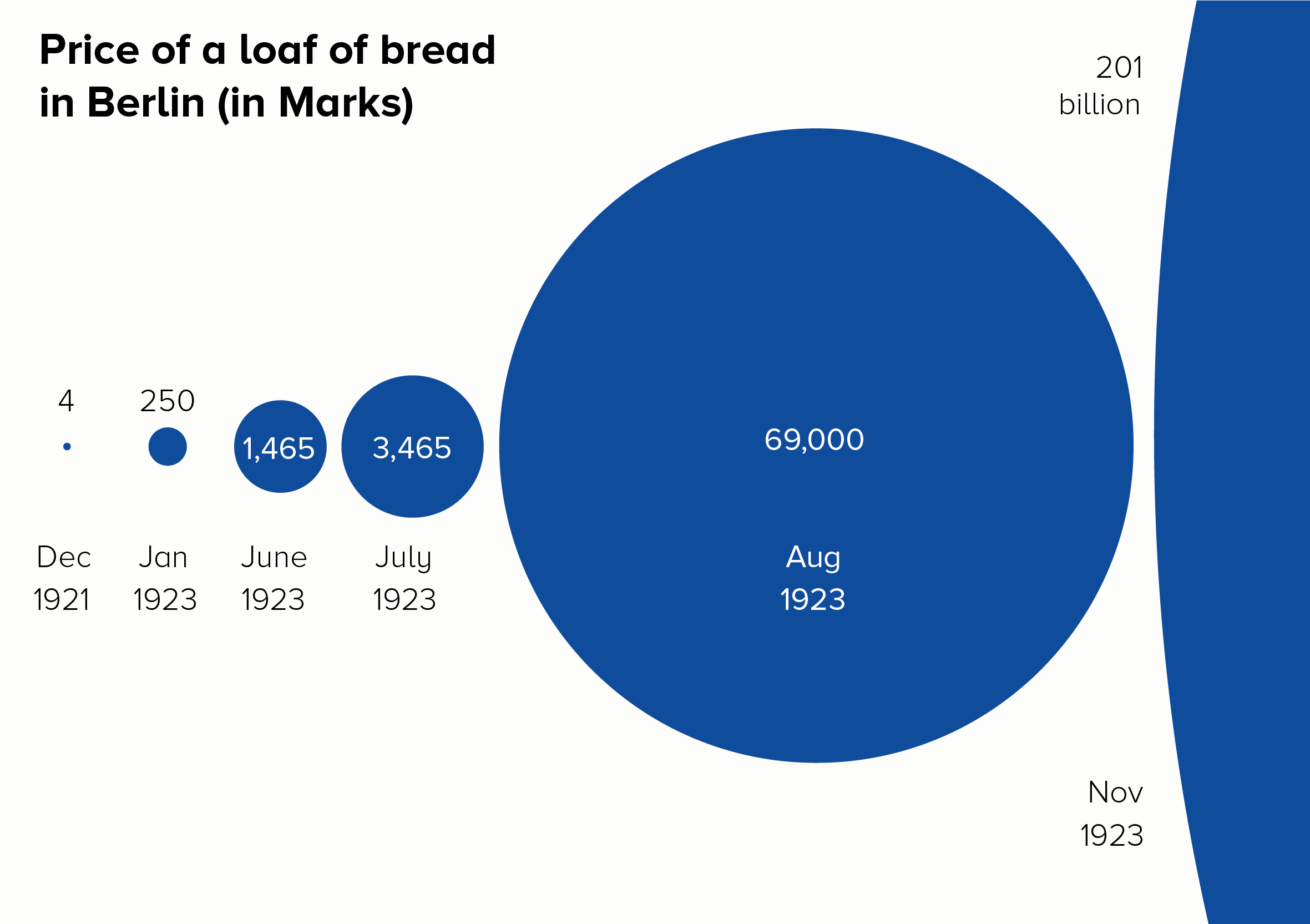
Bubbles are particularly good as you can show the edge of the circle and allow your audience to imagine the rest. Triangles can have the same effect, as they suggest mountains (mountains of cash, in this instance).

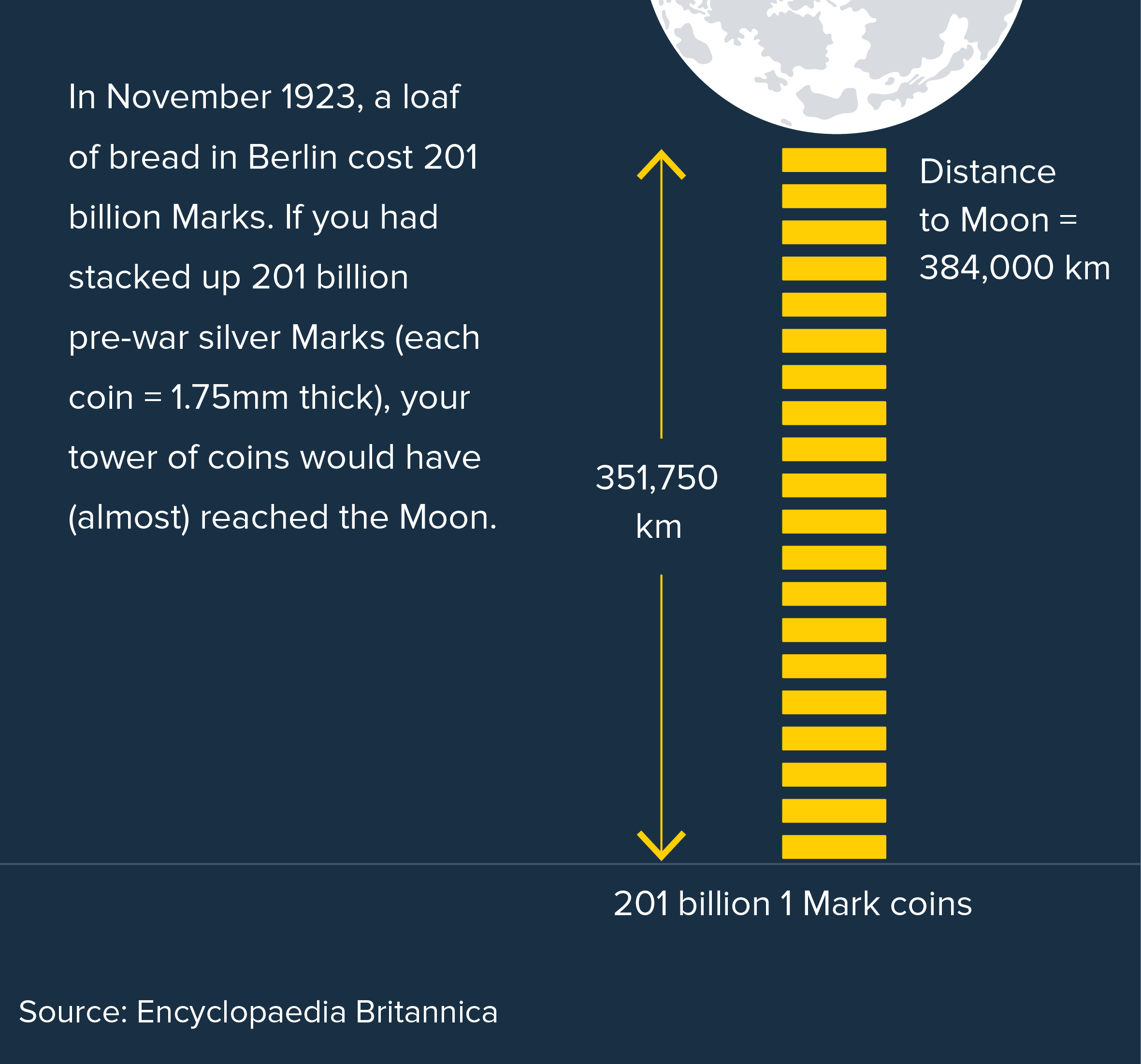
v) Use analogies

If a number is hard to picture, then help your audience picture it. 

Image credit: Adam Frost/ Jim Kynvin

vi) No chart at all

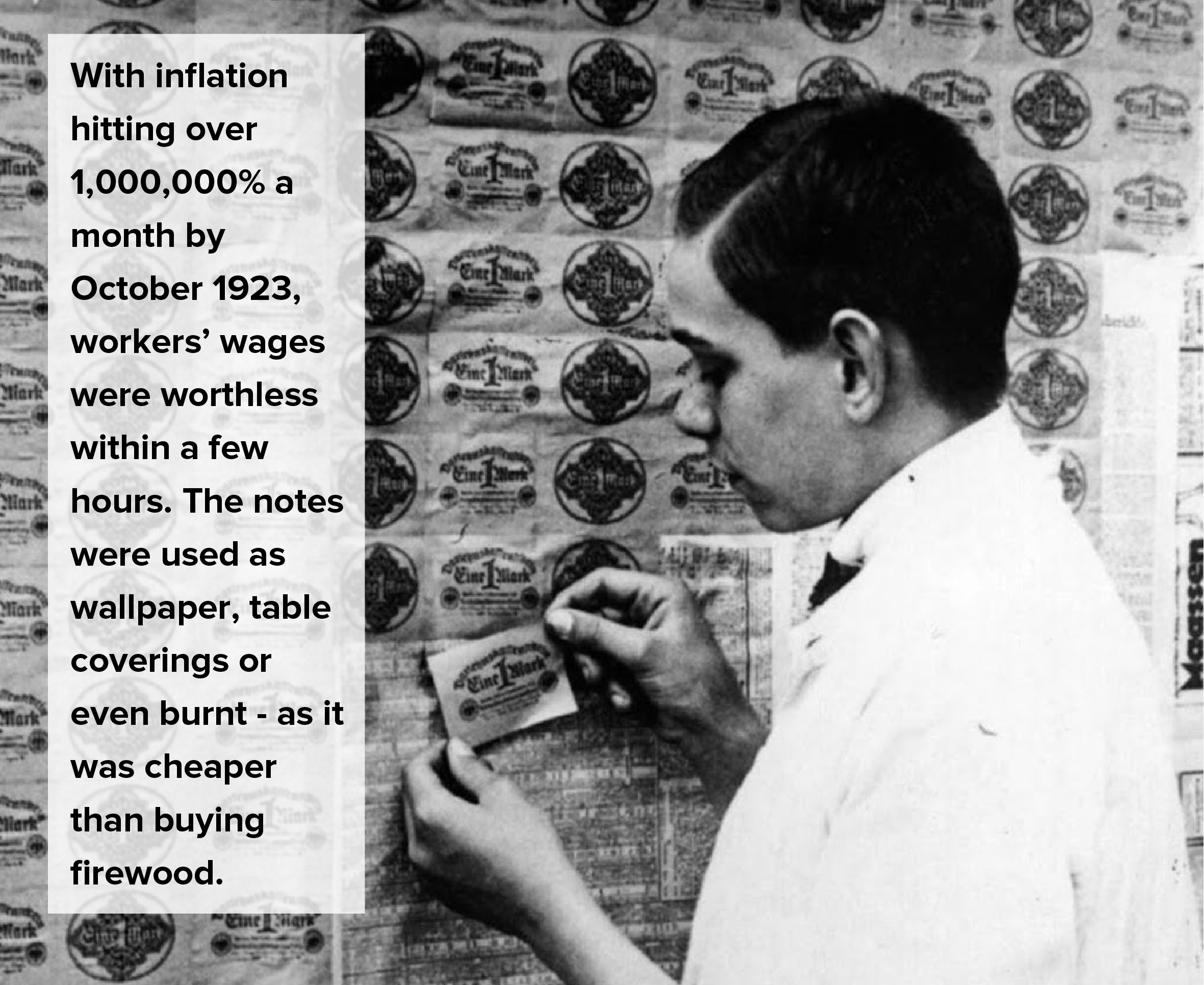
Using photographs and illustrations can also be effective. They help to convey the human stories behind the numbers. In the case of hyperinflation, after all, it wasn’t that the value of bread had soared and nobody could afford it anymore. It was that the value of the German Mark had dropped to such a degree that how much money you had became meaningless. Conveying a concept like this is perhaps easier to do with words, numbers and photography, rather than with a chart. 

Image credit: Bundesarchiv

viii) *Sigh* A log scale

Last but not least, if all else fails, then very very occasionally, in the hands of a brilliant communicator, a chart with a log scale can be made to work. Not with the German hyperinflation data. But here are a couple of examples using different data that do work.

First, 200 years in 4 minutes by Hans Rosling from the TV series ‘The Joy of Stats’.

This is a walkthrough of rising global health and wealth over the last 200 years. Rosling puts income per person (the x-axis) on a log scale. If he didn’t, his story would die - most of the countries would slowly rise to the top left, rather than soaring to the top right. Not ideal. But I think the log scale is justified here - Rosling is talking about income, which doesn’t rise in a linear way (a $1 pay rise doesn’t mean the same thing in Sierra Leone as it does in Switzerland). More importantly, Rosling clearly explains what his chart means every step of the way, in case anyone is confused by the log scale. Finally, if you click through to his Gapminder tool, you can switch to a linear scale if you prefer it.

The second example would be Poppy Field by Valentina D'Efilippo, which I’ve mentioned in a previous post.

This chart commemorates deaths in twentieth-century conflicts. The size of the poppy represents number of deaths. The x-axis is a timeline. The y-axis is the duration of the conflict - on a base-2 log scale. As with the Hans Rosling example, D’Efilippo uses a log scale because a linear scale would kill her story. There is a huge outlier (Israel v Palestine, lasting 60 years and counting) that would make all the other poppy stalks look tiny and tangled. The poppy heads would overlap, and her field metaphor would be lost.

So I think a log scale is justified here too. D’Efilippo is talking about the duration of a war, which does strange things to time: large wars can be shorter but more catastrophic, smaller or local conflicts can drag on for decades. Her treatment is artistic, rather than 100% accurate, so we are not reading this chart to get exact numbers: those poppy stalks are not straight like bars; they snake across the page, to reflect the slippery nature of warfare, and to give us a beautiful sense of a breeze moving across her field of poppies. The y-axis scale is subtle too, barely noticeable, and it’s certainly not a precondition for understanding the chart, particularly as the duration data is also present on the x-axis. 

Conclusion

Let’s go back to our rule then, the Edward Tufte formulation: ‘Use log scales for many kinds of variables.This is utter rubbish, and should be broken whenever possible. Log scales are suitable for a tiny sub-group of data stories (exponential rises and large outliers) and, even then, there are usually alternative charts or helpful analogies that will convey the information more effectively. 

Research has shown that log scales are widely misunderstood, but common sense should also tell you as much. Look at a chart on a log scale, and it seems to undermine the entire point of turning numbers into shapes. In a standard chart, if one shape is ten times bigger than another, it represents a number that is ten times bigger than another. A log scale obliterates this relationship. 

But you can never say never. It’s still worth knowing what log scales are and how they work because, as an analytical tool at least, they can help you find and organise stories. And as the final examples from Hans Rosling and Valentina D’Efilippo show, in the right hands and with the right data, they can sometimes reveal hidden stories and keep the bigger picture in view.

Verdict: Break this rule almost always

Sources: Log scales research https://blogs.lse.ac.uk/covid19/2020/05/19/the-public-doesnt-understand-logarithmic-graphs-often-used-to-portray-covid-19/. Others linked in the article text.

Rule 28: Use a clustered column to show multiple series

In this blog series, we look at 99 common data viz rules and why it’s usually OK to break them.

by Adam Frost

Clustered bar charts are horrendously common in corporate PowerPoints. I’m not sure why, because I’ve never found a clustered bar that wouldn’t be more effective if it was a different chart. Or just a data table.

The chart name itself is a warning sign. Why are you clustering things? Yes, when you analyse data, you often cluster datapoints because you have so many of them, and you're trying to identify patterns. But when you are communicating what you've found, the job is doing the opposite: separating out, deleting, directing the eye. Clustering is usually cluttering: cognitive and visual busy-ness.

Let's look at a clustered bar and compare how other charts might fare with the same data. I'll use something neutral, the kind of thing you might find in a corporate deck: global employment data from the ILO.

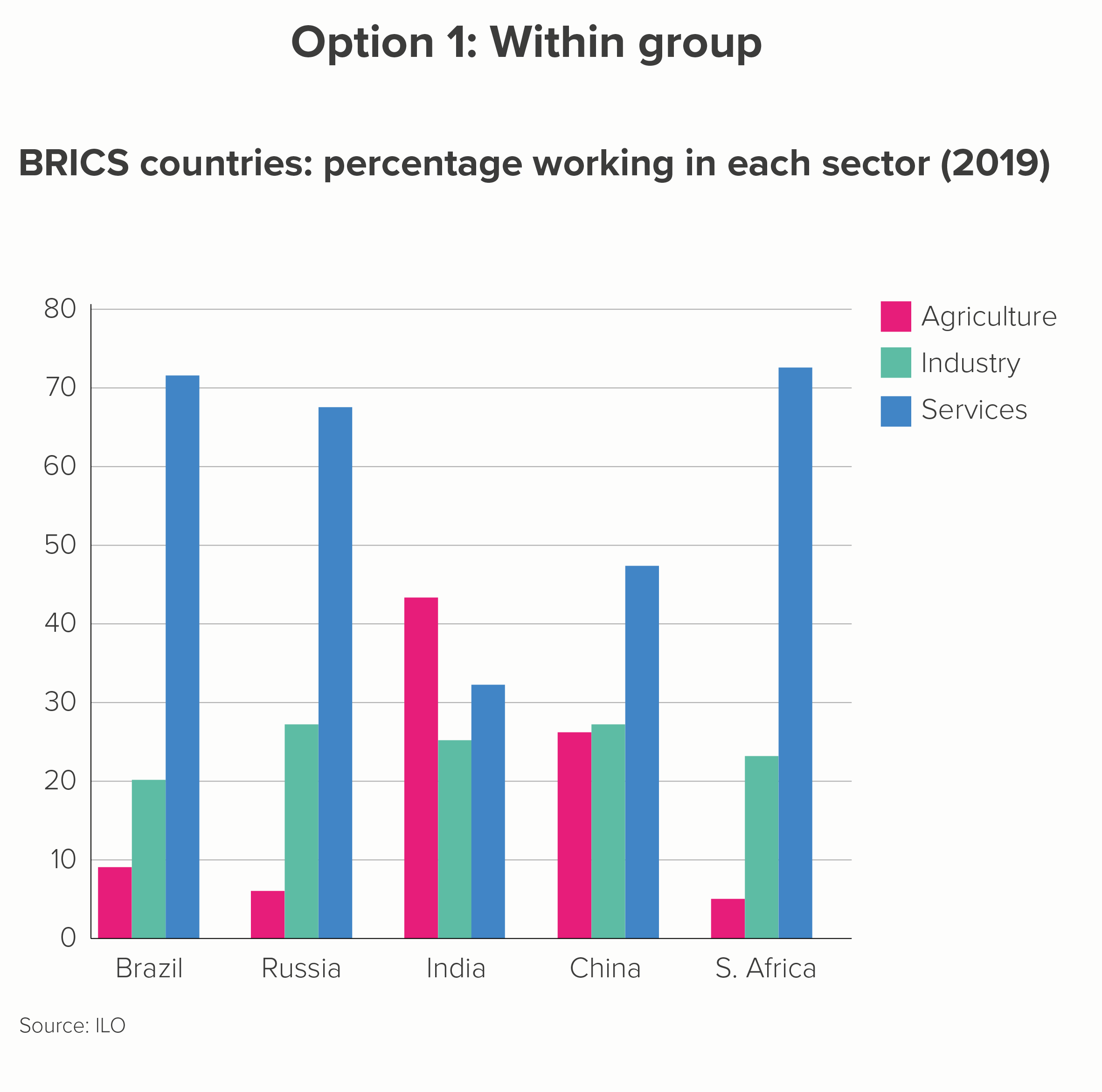
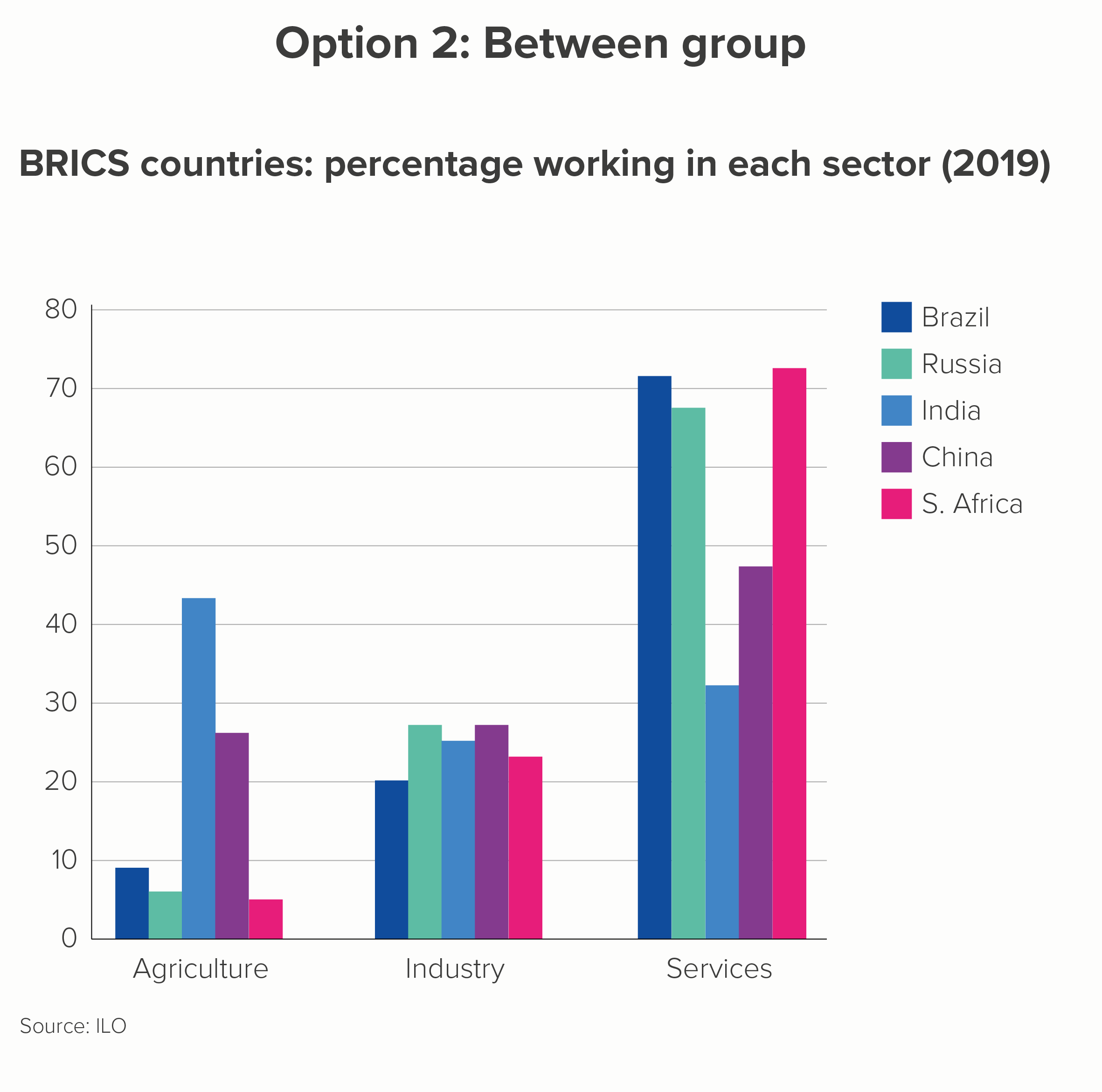
A clustered bar might be used to emphasise differences within each country (what percentage work in each sector? A 'within group' comparison) or differences between each country (which country has the most people in the services industry? A 'between group' comparison). Here are your two options.

The first thing to say is how poor both these charts are at telling an interesting story. The first is better, but only slightly.

I have done my best. I have, wherever possible, used text, colour and layout to tease out any potential stories. (Rules 16-27 on bar charts that we outlined above should help you if you’re forced to use clustered bars). So you can sort of see that Brazil, Russia and South Africa have a strong service sector (in chart 1) and that the five countries all have a similar percentage of the workforce working in industry (in chart 2). 

But neither of these charts are properly fixable. The universal problems are:

  • you always have to use a key, which slows down understanding. Back and forth we go, between bar and key

  • you rarely have space for data labels - the bars are too narrow - so you have to rely on axis labels and gridlines to estimate values. Back and forth we go, between bar and gridline and y-axis

  • There are just too many bars, in no particular order. You can’t rank clustered bars in the same way as you can rank bars showing a single variable. So the clusters might be alphabetical (option 2) or some other ordering system (‘BRICS’, option 1). Either way, back and forth we go, between bar and x-axis. 

The more specific problems are:

Option 1: Within group

  • When you foreground ‘within group’, the 'between group' comparison is difficult. Let's look at ‘percentage working in industry’ in that first chart. Try to work out the differences between Russia, India and China. Do Russia and China have exactly the same percentage working in industry or is one slightly ahead? Even if you managed to work it out, was it easy, quick, fun?

Option 2: Between group

  • When you foreground ‘between group’, the ‘within group’ comparison is difficult. Look at chart 2 above. Does China have more people working in agriculture or industry?

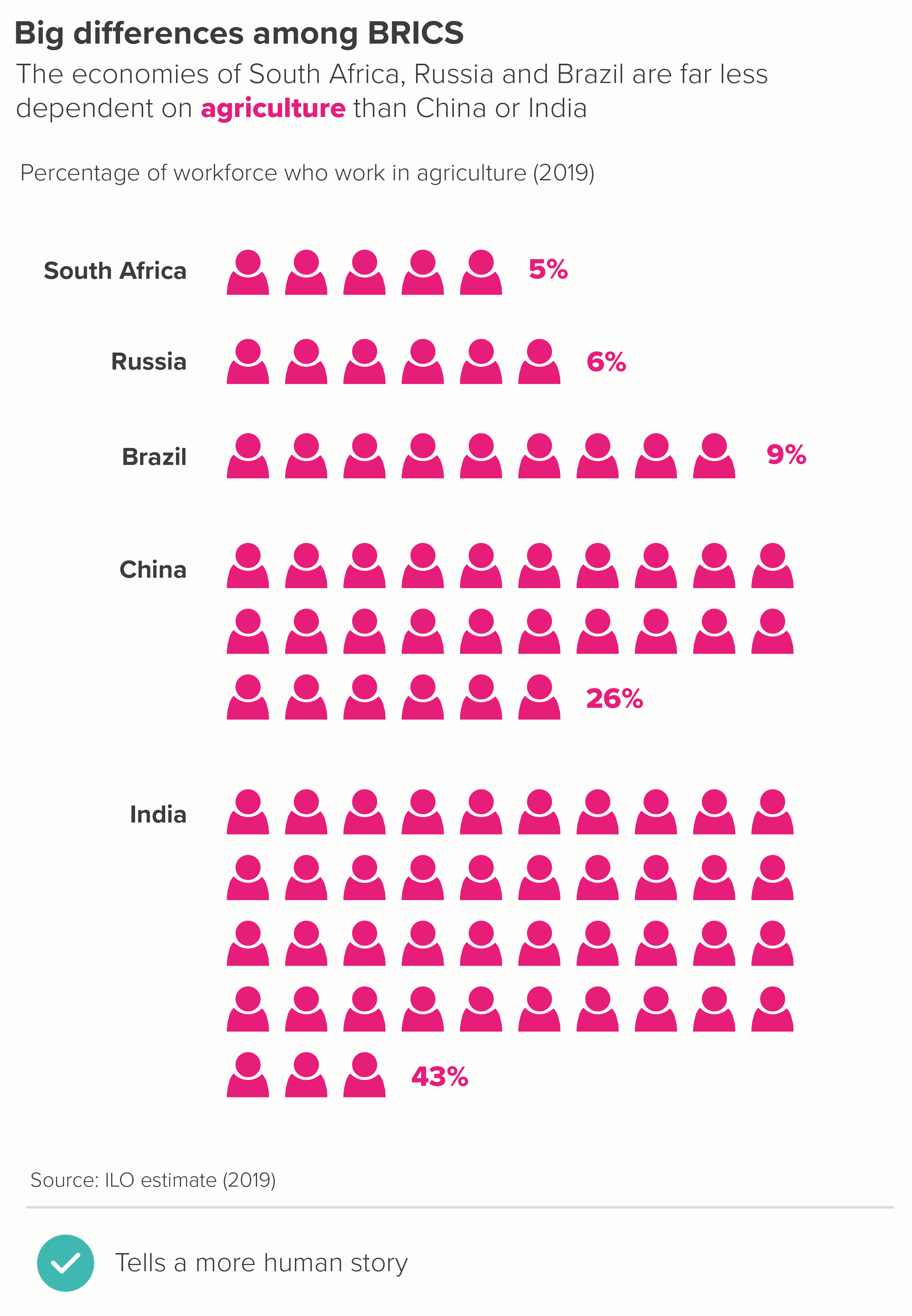
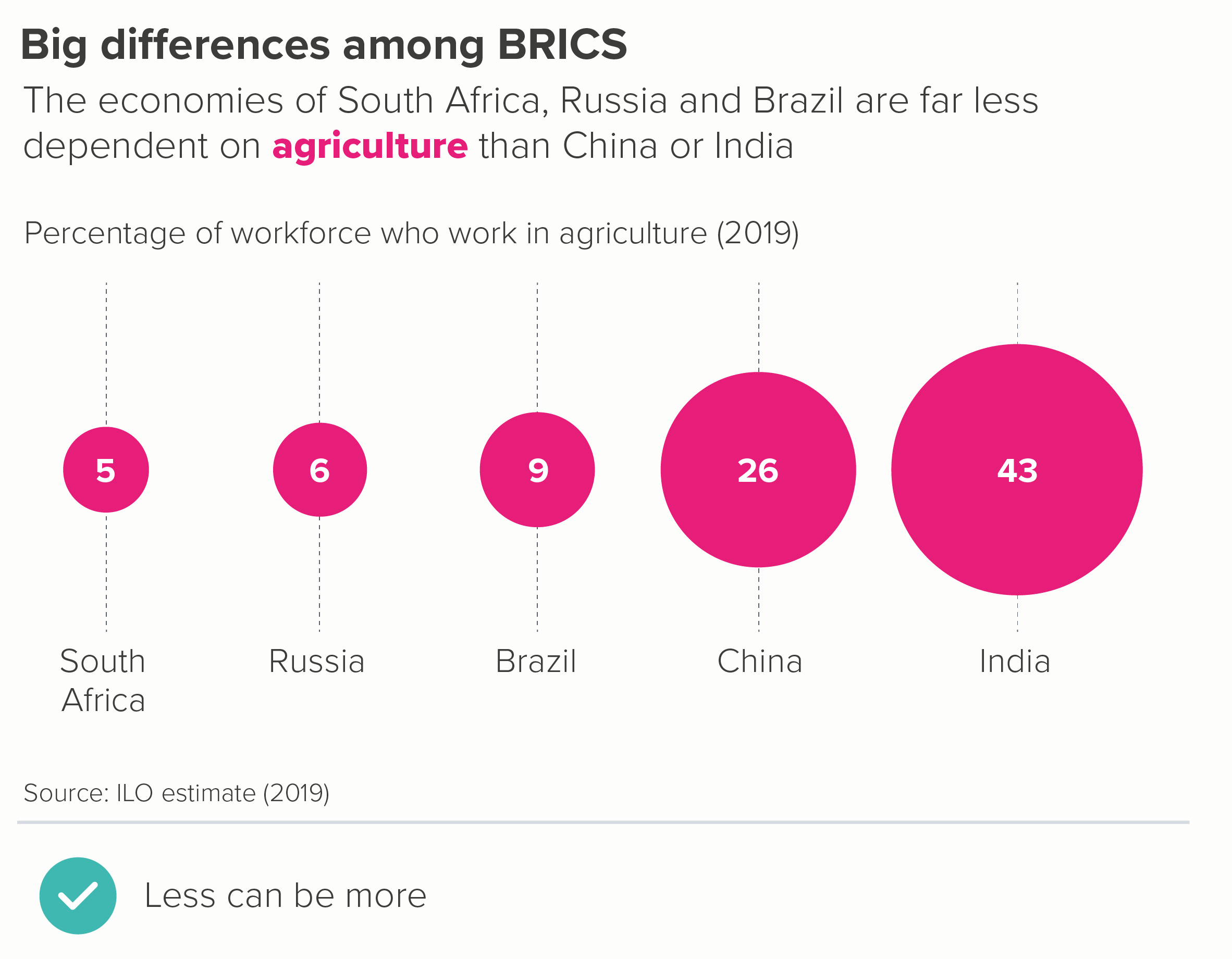
So let’s start again. First of all, is there anything interesting in this dataset? For me, it’s the fact that these five ‘BRICS’ countries are routinely grouped together, as if they were similar, whereas in fact they aren’t - at least if we look at how their population earns a living. We have to fight to see this story in the clustered column. 

Instead let’s start by going back to basics - and work up from there.

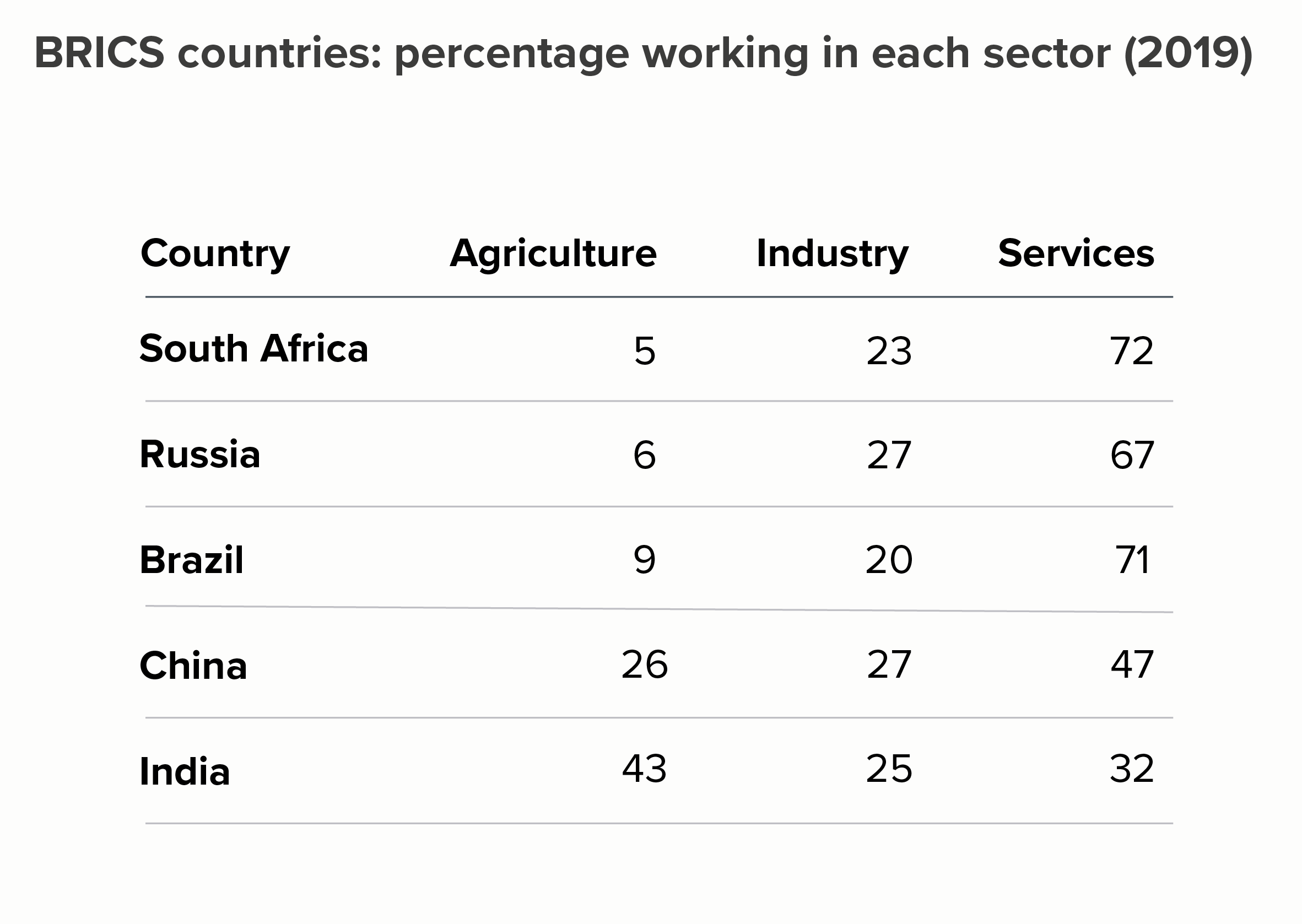
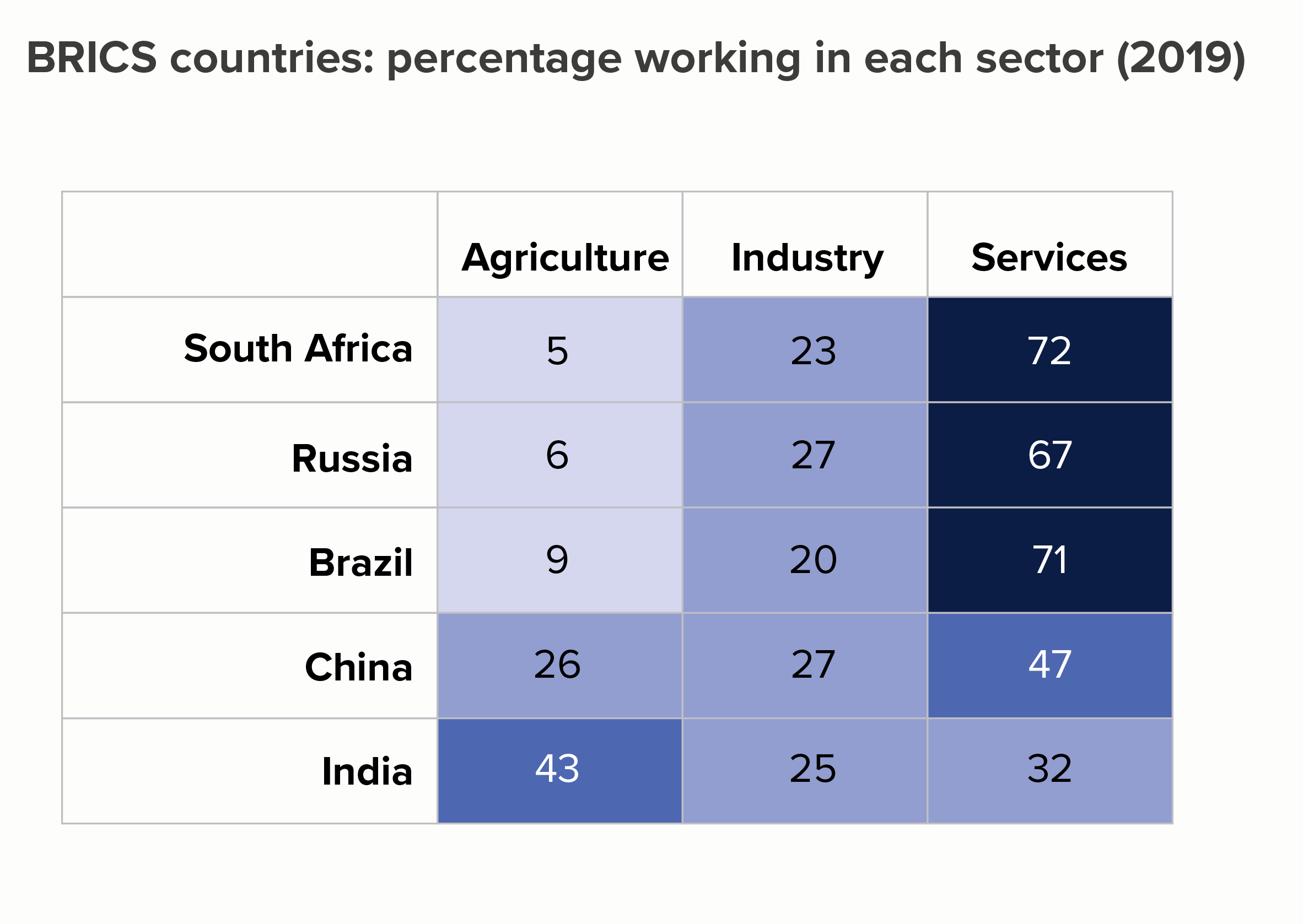
So: a table, then a heat table. I’ll rank smallest to largest by the first column (agriculture) to see if that makes the story of difference more evident.

OK, the story still isn’t exactly leaping out but it’s already clearer than in the clustered bars. On the heat table in particular, the first three rows clearly share a kinship. And the fact that the values in the industry column share a similar colour is also clear.

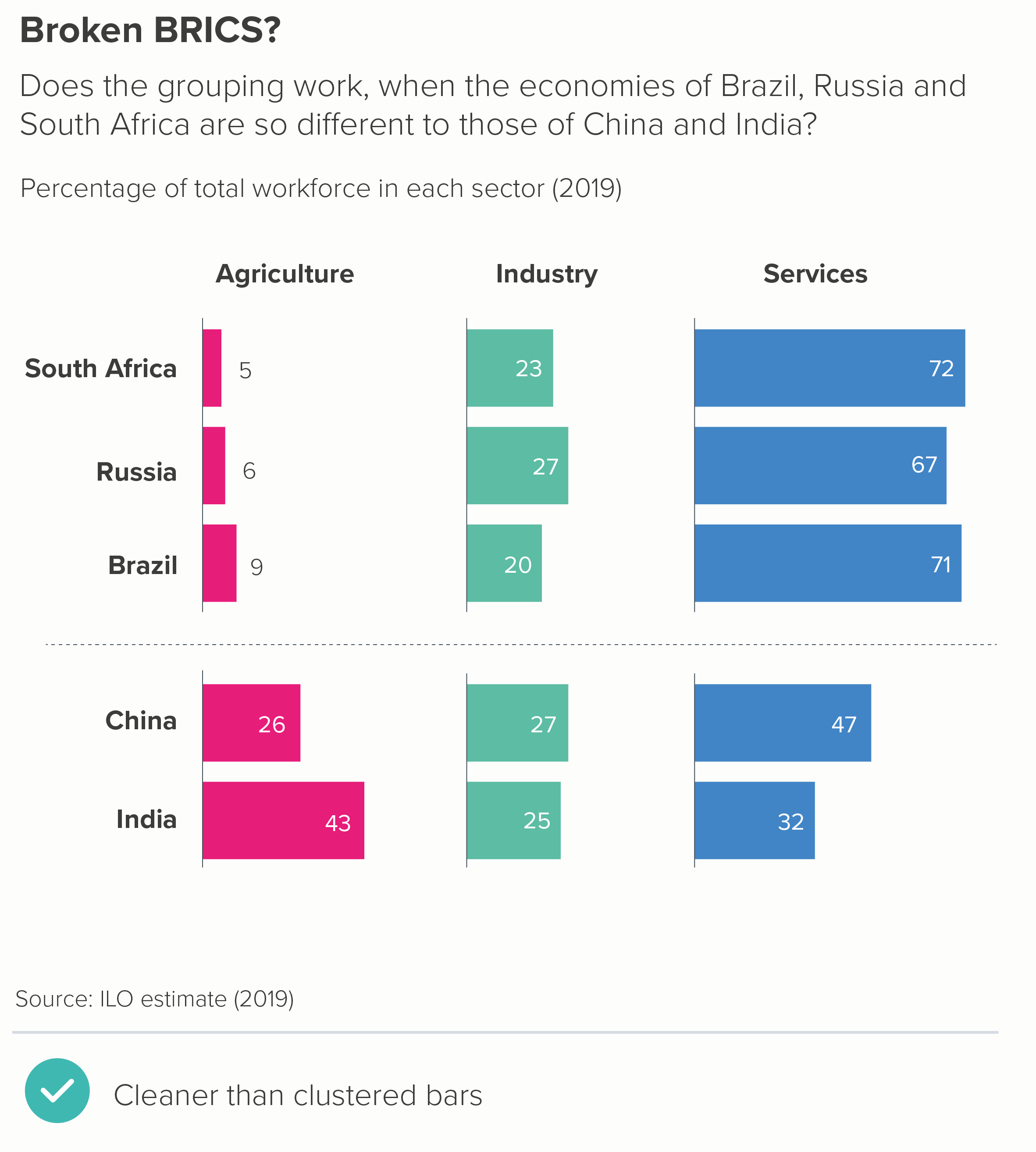
Let’s stick with the table format but see if we can further enhance the visuals. Perhaps turn those numbers into bars? That might help us see those differences - and we can lose the key too. Or we could try a dot chart - we’d need to bring the key back, but these charts are perfect for stories where there are big variations in value. 

As with the heat table, the story is clearer than in the clustered bars, but now we have visuals to help it lodge in our memories too. 

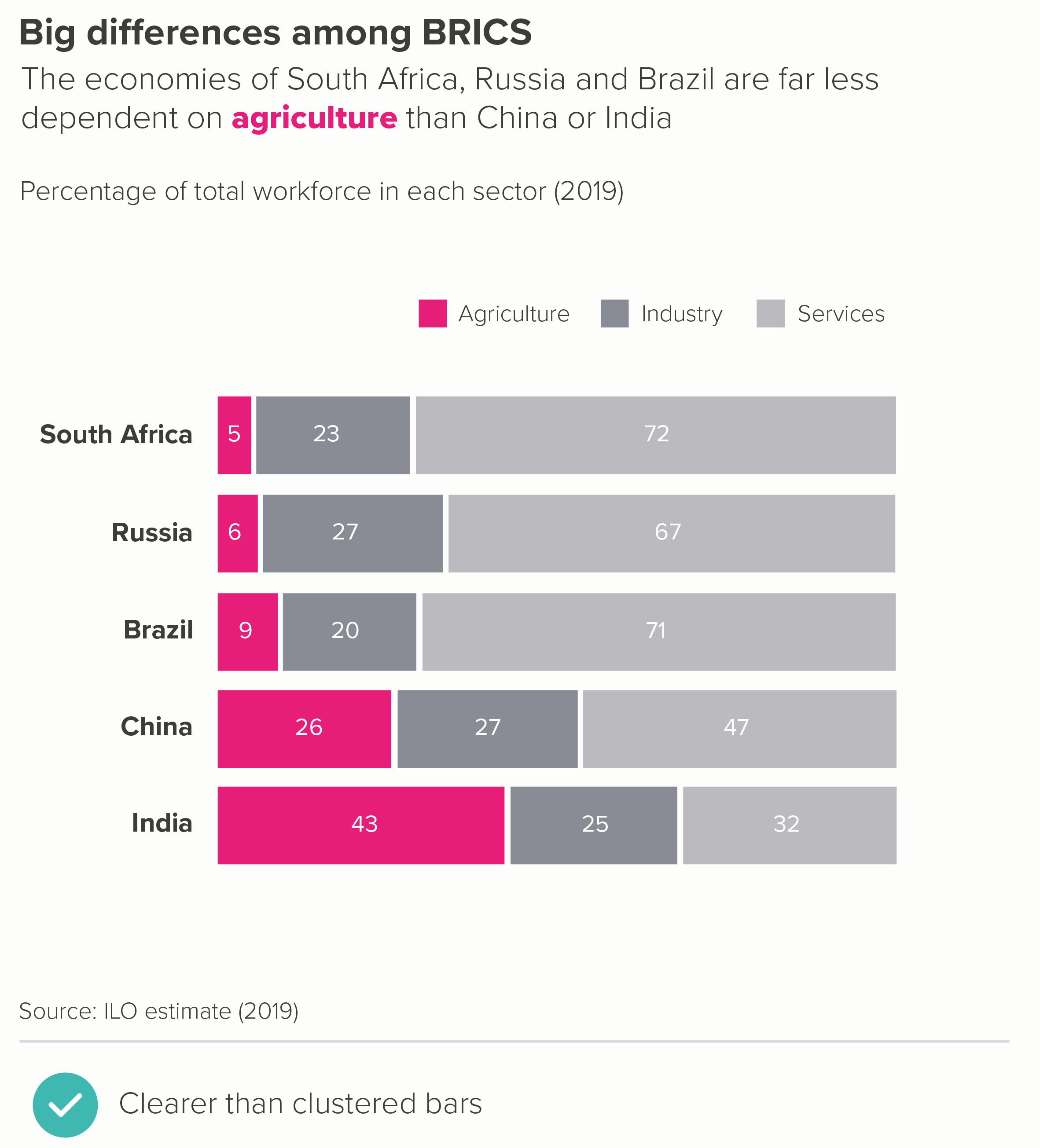
Alternatively, we could switch to waffle charts or stacked bars - although we’d probably want to emphasise just one of the sectors to stop the chart getting too visually busy. (For both of these chart types, it’s the first, base-aligned, value that you should be highlighting).

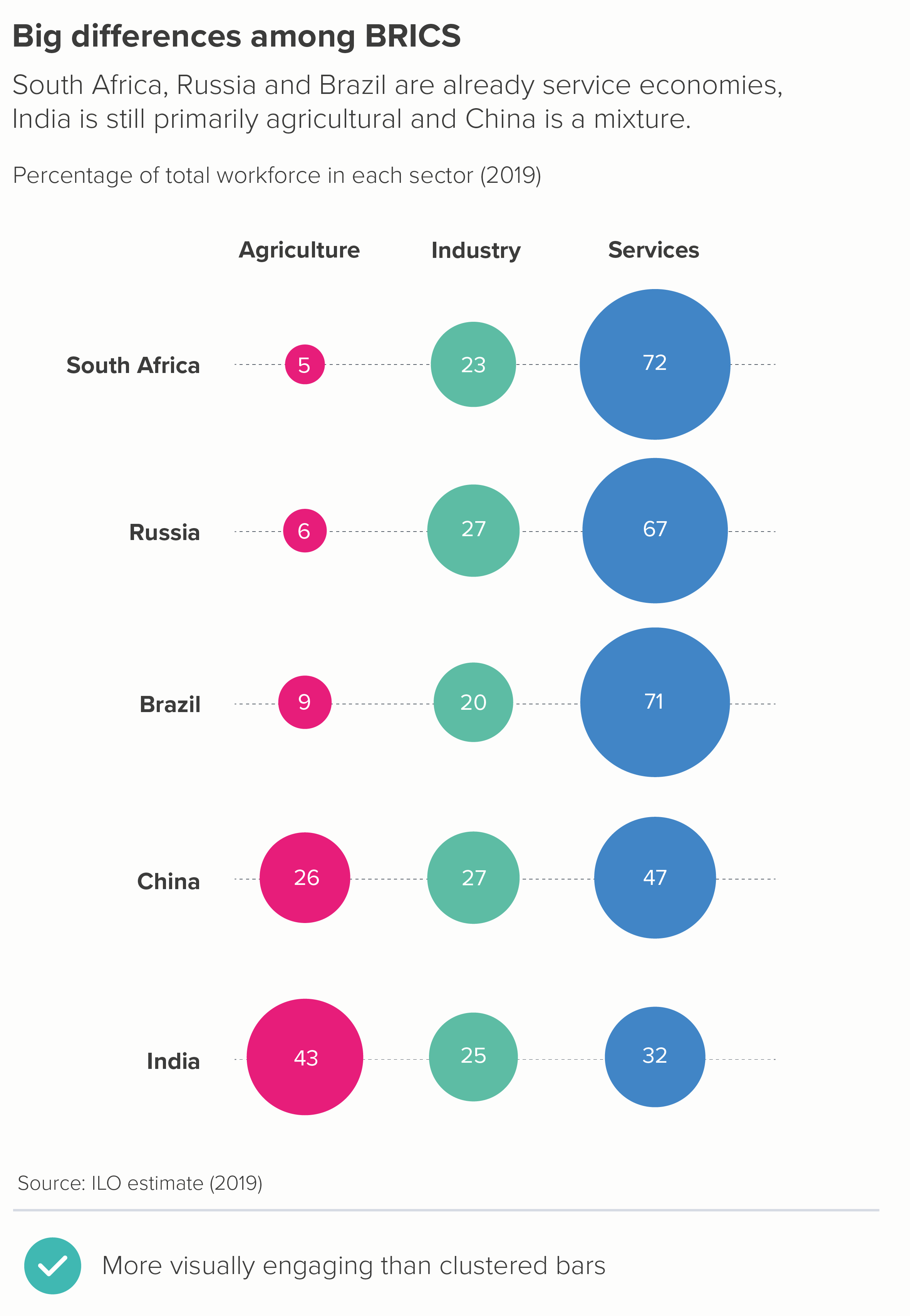
There are also options like bubble tables - where the numbers are perhaps only a little easier to compare than with a clustered bar, but at least they have visual impact. Isotype charts can also work, although you would probably just want to focus on one of those sectors (e.g. agriculture) and delete the others. 5 x 100 icons would just be confusing at this scale.

In fact, it’s worth remembering that deleting almost always makes your story clearer, and it would also be true here, with all of the chart types mentioned above. For example, here are the bubble and waffle charts with just agriculture shown.

So - is that the rule: never use a clustered bar chart? If you can, delete the less interesting bars and give more space to the main datapoint(s)? Pretty much. 

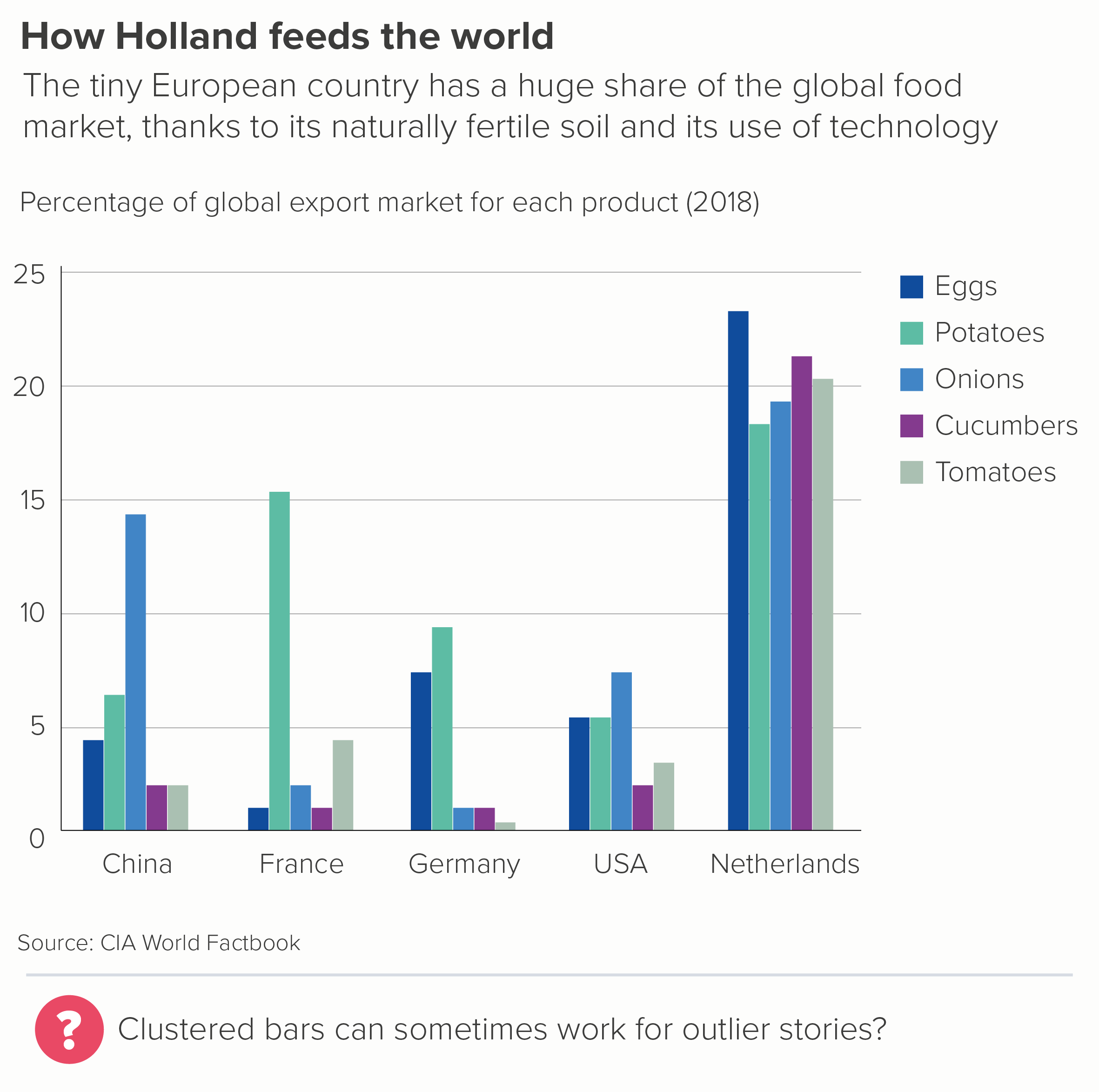
One possible exception is when you have a large outlier, outperforming in all areas. In those cases, a clustered bar can give the audience that initial jolt, that sense of an unexpected ending.

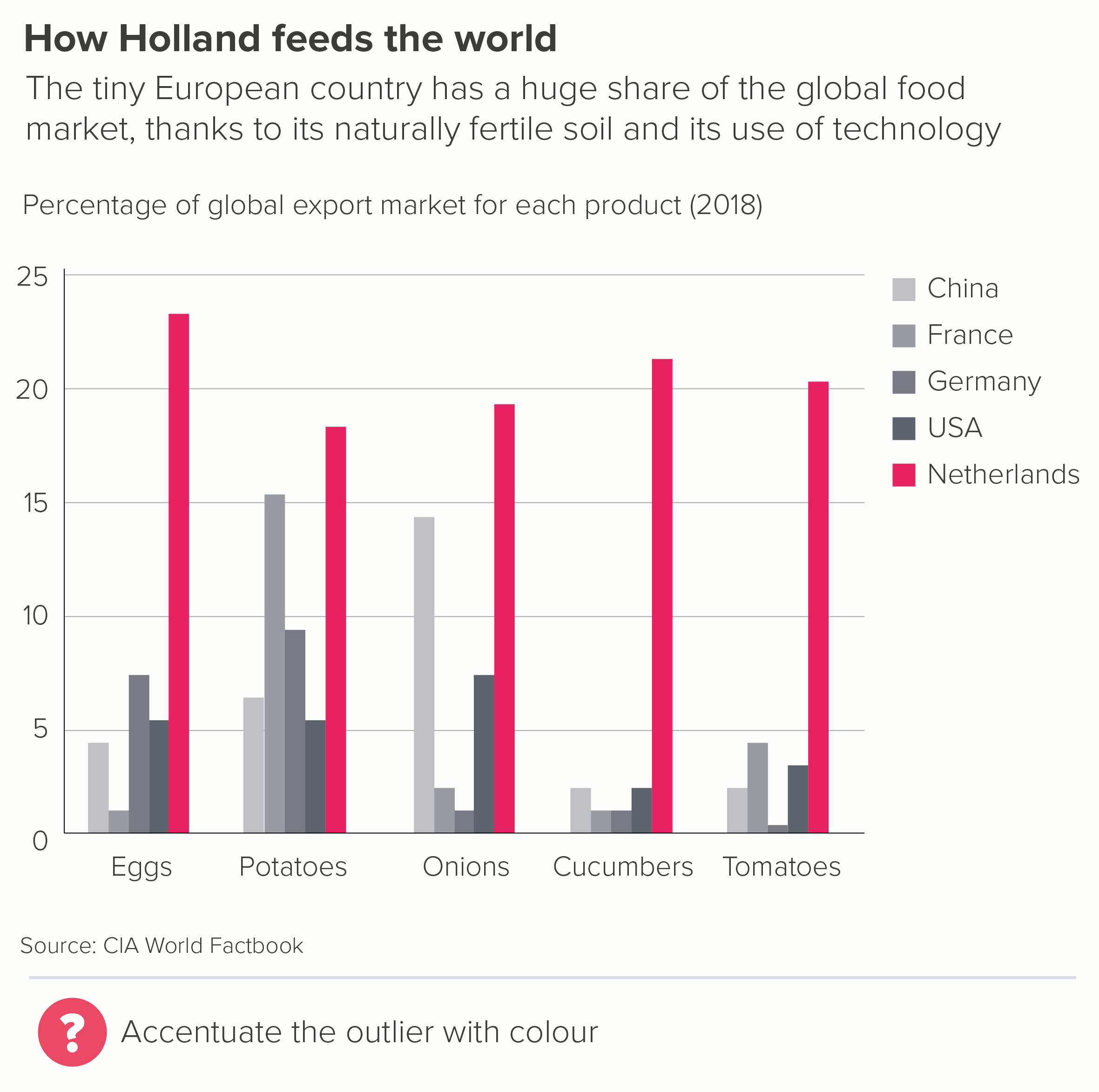
The Netherlands is a tiny country, geographically speaking. If it were a US state, it would be the 42nd largest, just ahead of Maryland and Hawaii. But it is clearly way ahead on exports for a whole range of fruit and vegetables.

But even with these stories, once you’ve got the audience’s attention, and convinced them to explore the detail, they are likely to get frustrated. It is hard to compare any of those bars above to others outside of their immediate cluster. 

So even here, I’d try putting the data in a different chart, to see if it delivers on both the overall story and the necessary nuance. In most cases, it will. In the two examples below, we have been able to lose our key, include more data, and build a stronger story.

You might be able to think of even better alternatives. But I suspect that you will rarely conclude that the correct answer is to cluster the bars.

One final note: occasionally you see clustered bars used to tell change over time stories. I’d strongly advise against this. Clustering is bad enough when you are using bars properly - to tell a story of difference or ranking - but it is completely counterintuitive when you are telling a story of change - this datapoint has travelled from here to here. I’d always switch to a slopechart or a line chart or a similar visual trope that allows your eye to easily travel from start point to end point without interruption.

VERDICT: Break this rule whenever you can.

Sources: CIA World Factbook, ILO

More data viz advice and best practice examples in our book- Communicating with Data Visualisation: A Practical Guide

Rules 16-27: Bar charts - a visual summary

In this blog series, we look at 99 common data viz rules and why it’s usually OK to break them.
by Adam Frost

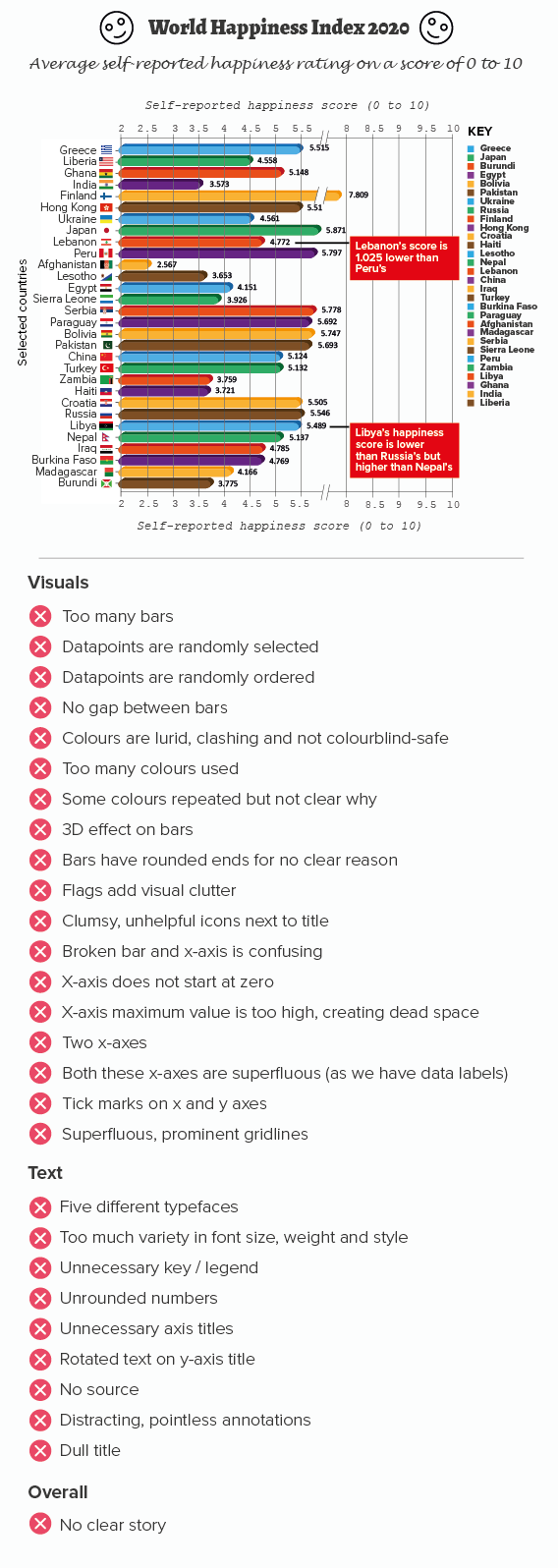
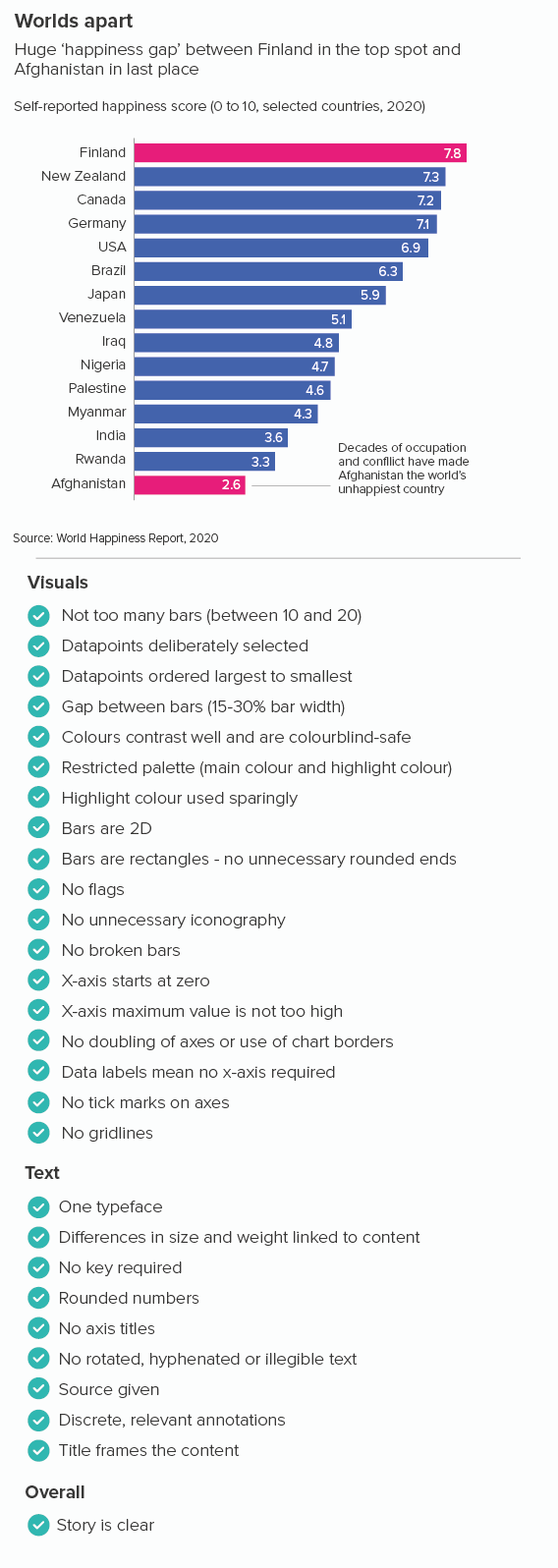
In the preceding 12 blogposts, I’ve looked at which of the bar chart rules are essential (‘Always start a bar chart at zero’, ‘No 3D bars’), which are useful (‘No multi-coloured bars’, ‘Not too many bars’) and which are downright useless (‘Bar charts need a key’). But, as with pie charts, we saw that things are rarely that simple, and even the most sensible sounding rule (‘Don’t break your axis’) has important exceptions.

So even though I’ve summarised the key dos and don’ts in the video above, remember that the key to good visual storytelling is knowing when the rules should be ignored for the sake of your narrative.

I’ve also included static images below which outline the main principles.

I’ve included a recap of the key bar chart rules below. If you read the individual blogposts, you will see that the degree to which you follow or break these rules always depends on your role, your story and your audience.

Rule 16: If in doubt, use a bar chart

Rule 17: Not too many bars

Rule 18: Don’t use multi-coloured bars

Rule 19: Arrange your bars largest to smallest

Rule 20: Keep a sensible gap between the bars

Rule 21: Bar charts need a key

Rule 22: No rounded, pointed or decorated bars

Rule 23: No 3D bars

Rule 24: Label your bars and axes

Rule 25: Always start your bar charts at zero

Rule 26: Don’t use broken axes and bars

Rule 27: No unnecessary lines on bar charts

More data viz advice and best practice examples in our book- Communicating with Data Visualisation: A Practical Guide